
Business
Best Video Doorbell Without Subscription Storage Guide

Why Your No-Subscription Doorbell Clips Disappear and How to Save Them
You check your doorbell history after a porch theft or a neighbor dispute and find the footage gone. That is one of the more frustrating parts of no-fee home security. The clip did not fail to record. It was overwritten, and the loop cycle did exactly what it was designed to do.
Understanding that distinction changes how you shop for the best video doorbell without a subscription. This article covers how loop recording actually works, how to calculate how many days of footage your storage holds, what environmental factors accelerate overwriting, and what you can do to lock clips before they disappear.
Table of Contents
- How loop recording works on a no-fee doorbell
- Storage math and how many days your footage actually lasts
- The variables that eat your storage faster than expected
- How to save clips before loop recording overwrites them
- Hardware that reduces storage pressure before it starts
- Conclusion
How loop recording works on a no-fee doorbell
A video doorbell without a monthly subscription stores recordings directly on the device, either on a microSD card inserted into the unit or on built-in flash memory soldered to the circuit board. Neither type has infinite capacity. Once the storage fills, the camera does not stop recording. It deletes the oldest clip to make room for the newest one. That behavior is called loop recording, and it is a deliberate design choice, not a defect.
The logic is practical. A camera that stops recording when full would become useless at exactly the moment it fills up, which is often shortly after you bought it. Loop recording keeps the timeline current. The trade-off is that footage older than a certain window gets deleted automatically, and the app does not warn you before a specific clip is erased.
Storage setup determines that window. A no-monthly-fee video doorbell with 8 GB of built-in storage on a quiet residential street might hold three to five days of clips. The same camera installed on a busy apartment building entrance could overwrite every 12 to 18 hours. Storage size is only part of the equation.
Storage math and how many days your footage actually lasts
The calculation for any no-subscription doorbell is straightforward once you know the three variables.
Daily storage (MB) = (clips per day × average clip length in seconds × video bitrate in Mbps) ÷ 8
Days of footage = total storage capacity in MB ÷ daily storage in MB
Bitrate is measured in megabits per second (Mbps), but storage is counted in megabytes (MB). Dividing by 8 converts the daily total from megabits to megabytes.
For a 2K doorbell capturing roughly 20 clips a day, each running about 30 seconds, at a bitrate of 2 Mbps, each clip is approximately 7.5 MB. Twenty clips mean about 150 MB per day. On a 16 GB card, that works out to roughly 100 days of footage under those conditions.
The math breaks down fast when conditions change. The same camera on a block where foot traffic triggers 80 clips a day instead of 20 burns through the same 16 GB in about 25 days. Resolution compounds the problem. A 2K stream can run at three to four times the data rate of a 1080p stream at the same clip length, so the storage window shrinks by a similar ratio when you move from 1080p to 2K.
Storage medium also matters. Built-in flash storage, also called eMMC, is faster and more stable than a microSD card in an external slot. Dedicated flash chips are bonded directly to the circuit board, which eliminates the physical connection point where microSD cards can develop read errors or corruption over time. For daily-use cameras that write and rewrite constantly, eMMC typically handles the write cycle volume better than a consumer-grade SD card running continuous loop recording.

These are estimates using 2 Mbps as a reference bitrate. Your actual numbers will vary based on the camera’s compression settings and how aggressively it trims silence from clips.
The variables that eat your storage faster than expected
The storage math above assumes a stable environment. Real installations rarely stay that way.
Trigger volume is the biggest variable. A camera positioned to face a sidewalk in a dense urban neighborhood, an apartment hallway, or a driveway near a busy intersection can accumulate 200 or more trigger events on an active afternoon. Each of those is a clip. Most of it is not the footage you need. They are still consuming write cycles and shortening your window.
Detection zone configuration makes a direct difference. A zone set to cover the entire field of view will fire on passing cars, blowing leaves, light changes from passing headlights, and anyone within 30 feet of the lens. Narrowing the zone to the immediate porch area cuts trigger volume significantly without reducing the coverage that matters for actual incidents.
Physical storage is sensitive to temperature. MicroSD cards in exposed exterior enclosures face thermal cycling year-round, expanding and contracting as temperatures swing from sub-zero winter nights to summer afternoons above 90°F. That cycling stresses both the card and the contact pins over months of use. Internal storage bonded to the circuit board handles those swings with fewer mechanical failure points.
Moisture is a slower problem. An SD card slot exposed to condensation, rain intrusion, or humidity drift can develop oxidized contacts or corrupted sectors without any obvious error message in the app. The camera appears to be recording normally until you try to retrieve a clip and find the file unreadable. Sealed internal storage does not have that particular failure mode.
How to save clips before loop recording overwrites them
Loop recording cannot be stopped without giving up continuous coverage. Managing overwrite risk comes down to daily habits and a few app settings rather than disabling the feature.
Your most reliable save is a same-day download. Open the event timeline in your doorbell app, tap the clip, and export it as an MP4 to your phone’s local storage. Once the file lives on your phone, the camera’s loop cycle no longer controls whether you can access that recording.
Some models also let you lock a clip inside the app so the overwrite logic skips it. Use a lock as a temporary hold, not a long-term archive. Many cameras limit how many clips you can lock, and some clear locked files when storage pressure spikes. When in doubt, download.
Build a short routine around that. Each evening, scan the event log and pull anything time-sensitive. That usually takes two to three minutes. A dedicated album or folder on your phone makes it easier to share footage with a neighbor or attach files to a police or insurance report. For extra safety, copy key clips to a home NAS or a cloud drive you already pay for. You get redundancy without a doorbell subscription fee.
Local storage on the doorbell also helps with evidence quality. A direct download from the device is the original capture, not a file squeezed through a cloud re-encoding step. Clearer stills matter when you are documenting what happened at the door.
Hardware that reduces storage pressure before it starts
Manual downloads help, but only up to a point. When trigger volume climbs past 80 events a day, keeping up manually is not realistic. Hardware that cuts false triggers or moves storage indoors solves the problem before the event log fills up.
AI detection running on the camera processor filters non-human motion before a clip is saved. A basic motion sensor treats a passing car and a person at the door the same way. On a high-traffic installation, AI filtering can cut the daily clip count from 80 or more down to 10 to 20 human-presence events, extending the storage window by a factor of four or more without changing the card or built-in capacity.
An indoor hub removes storage from the outdoor unit entirely, sending footage to a base station inside your home with room for terabytes of local storage instead of a card sitting in the doorbell housing.
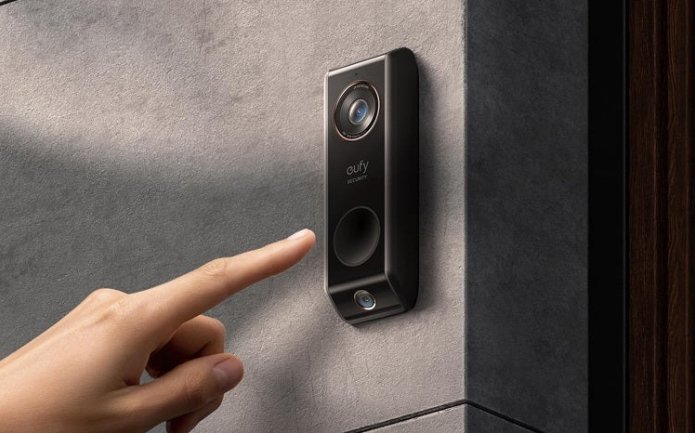
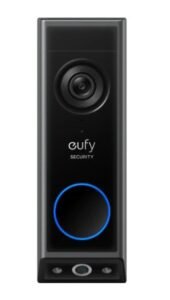
The eufy Video Doorbell E340 addresses the storage problem from both angles. The dual-camera design, one front-facing and one downward at the door, covers the full scene in a single recording rather than requiring two separate installations with doubled clip volume. Its AI detection filters motion to human presence and package activity specifically, which reduces trigger count on high-traffic installations. It pairs with the eufy HomeBase for expanded local storage when the built-in capacity is not enough.
Conclusion
Loop recording is not a glitch. A fixed-capacity doorbell stays current by overwriting old clips on schedule. Your footage window depends on storage size, daily clip volume, and false triggers.
Save important clips the same day. Download to your phone instead of relying on App Lock. On busy entrances, tighten detection zones and use AI filtering before upgrading the card. The best video doorbell without a subscription fits your door’s storage needs, not just the highest resolution. Once you know your trigger volume, browse the eufy video doorbells collection and compare storage type first, then features.

When Does a Tree Need Professional Attention?

Havrenn & Co. Brings the Rich Texture of Suede Back Into Focus

What the Diagnostic Process for Recurrent Pregnancy Loss Involves and Why It Matters to Work with a Specialist

IFRS vs Ind AS 20: Key Differences Every Indian Accountant Should Know

Why Semi-Detached Homes Are Performing Differently Across the Bexley Property Market

Easy Ways to Practice Self Care

6 Ways to Keep Your Car Running When Moneys Tight

Madeira in Autumn: A Slower, Warmer Way to Experience the Island

What You Actually Hand Over When You Book a Trip Online

Exploring the Online Beauty Marketplace
Madeira in Autumn: A Slower, Warmer Way to Experience the Island
Why Semi-Detached Homes Are Performing Differently Across the Bexley Property Market
Easy Ways to Practice Self Care
IFRS vs Ind AS 20: Key Differences Every Indian Accountant Should Know
What the Diagnostic Process for Recurrent Pregnancy Loss Involves and Why It Matters to Work with a Specialist
Havrenn & Co. Brings the Rich Texture of Suede Back Into Focus
6 Ways to Keep Your Car Running When Moneys Tight
When Does a Tree Need Professional Attention?
When Does a Tree Need Professional Attention?
Havrenn & Co. Brings the Rich Texture of Suede Back Into Focus
What the Diagnostic Process for Recurrent Pregnancy Loss Involves and Why It Matters to Work with a Specialist
IFRS vs Ind AS 20: Key Differences Every Indian Accountant Should Know
Why Semi-Detached Homes Are Performing Differently Across the Bexley Property Market
Easy Ways to Practice Self Care
6 Ways to Keep Your Car Running When Moneys Tight
Madeira in Autumn: A Slower, Warmer Way to Experience the Island
What You Actually Hand Over When You Book a Trip Online
Exploring the Online Beauty Marketplace
-

 Biography7 months ago
The Emotional Journey of Joanne Schieble Simpson, Steve Jobs’ Biological Mother
-

 News7 months ago
Jamal Adeen Thomas – Everything You Should Know About Clarence Thomas’ Son
-
 Blog4 months ago
What Is Sotwe? Everything You Need to Know Before Using It
-

 Biography7 months ago
Meet Theo Ressler: Everything You Know About Jami Gertz’s son