Have you ever wondered how some Java desktop programs can talk directly to large business systems? Many people know about websites and web apps, but not everyone knows that some companies still use powerful desktop applications. These applications often need a safe and reliable way to connect with company servers and business tools.
This is where the application client container comes in. It is an important part of Java EE, which is now called Jakarta EE. It helps standalone Java applications use many of the same features that server applications use. This includes security, resource access, and communication with business services.
The application client container may not be as popular as web apps today, but it still plays an important role in many companies. Banks, hospitals, government offices, and large businesses continue to use systems that depend on it. These organizations often need strong security and stable connections between desktop applications and servers.
In this guide, we will explain everything in very simple words. You will learn what an application client container is, why it matters, how it works, and where it is still used in 2026. By the end, you will have a clear understanding of this important Java technology.
What Is an Application Client Container?
An application client container, often called ACC, is a runtime environment that runs standalone Java client applications. These applications run on a user’s computer instead of inside a web browser. The container provides services that help the application work with enterprise systems.
Think of it as a helper that sits between a Java desktop application and a business server. Instead of making developers build everything by hand, the container provides many useful features automatically. This makes development easier and helps applications stay secure.
The application client container is part of the Jakarta EE platform. It allows a desktop application to access remote services, business logic, messaging systems, and other resources. This helps client applications work smoothly with enterprise servers.
Without the application client container, developers would need to manage many tasks themselves. They would have to handle security, resource lookup, remote communication, and configuration manually. The container removes much of this work and makes applications easier to manage.
Many people compare the ACC to other Java containers. The difference is that the application client container runs on the client machine. It gives desktop applications enterprise-level features while allowing them to remain independent programs.
Why Application Client Container Matters
The application client container matters because it gives desktop Java applications many advanced features. A normal Java application can run by itself, but an ACC-managed application gets extra support from the enterprise platform.
One important benefit is security. Businesses often need strong protection for their systems and data. The application client container supports secure login, user roles, and protected communication between the client and server. This makes it a good choice for sensitive environments.
Another benefit is easier access to enterprise resources. Applications can connect to remote business services without complicated setup. The container helps locate resources and manages many technical tasks behind the scenes.
The ACC also helps developers save time. Features such as dependency injection and managed services reduce the amount of code developers need to write. This can make projects easier to build and maintain.
Even though modern cloud applications are common today, many organizations still rely on existing enterprise systems. For these businesses, the application client container remains a useful and trusted solution.
How Application Client Container Fits in Java
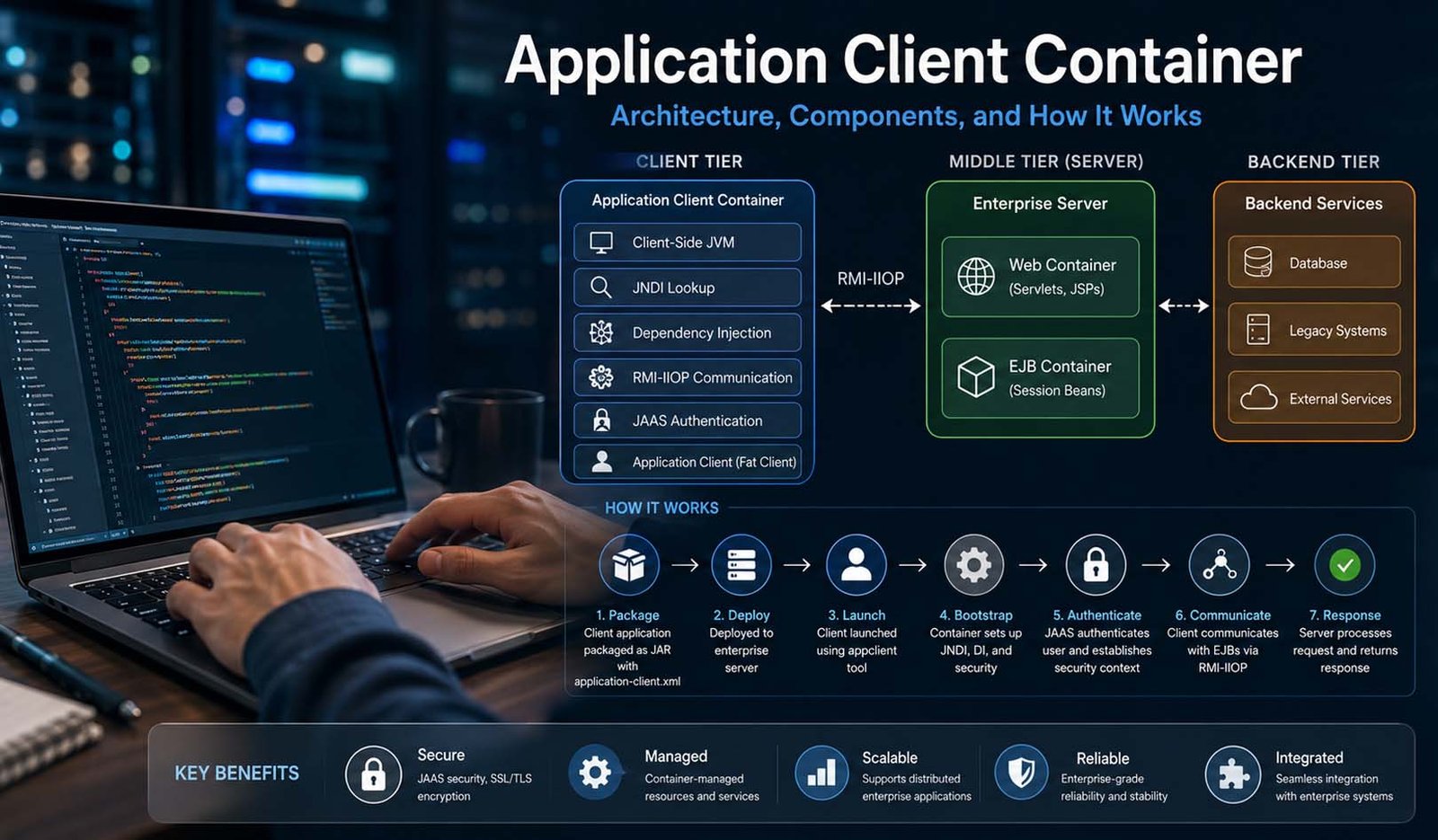
To understand the application client container, it helps to look at the bigger picture. Java EE and Jakarta EE use a structure that separates different parts of an application into layers. This keeps systems organized and easier to manage.
The first layer is called the client tier. This is where users interact with applications. The application client container belongs to this layer. It runs standalone Java applications that users open on their computers.
The second layer is called the middle tier. This is where the business work happens. It includes the Web Container and the EJB Container. These containers process requests, apply business rules, and handle many server-side tasks.
The third layer is the backend tier. This layer contains databases, older systems, and external services. It stores information and provides data when applications need it.
The application client container works with all of these layers. It helps client applications communicate with the middle tier and access data from the backend tier. This connection is one reason why ACC remains valuable in enterprise environments.
Thin Client and Fat Client
When talking about enterprise applications, you will often hear the terms thin client and fat client. These terms describe where most of the work takes place in an application.
A thin client usually runs inside a web browser. Most of the processing happens on the server. The browser mainly displays information and sends requests. Many websites and web applications follow this model today.
A fat client works differently. It runs as a complete application on the user’s computer. The application has its own user interface and can perform more work locally. Java desktop applications often fall into this category.
The application client container is designed for fat clients. These applications run inside their own Java Virtual Machine, also called a JVM. Because they run locally, they can provide rich features while still connecting to enterprise services.
For example, a company reporting tool may run directly on an employee’s computer. The tool can display reports, process data, and communicate with remote business services. The application client container helps make this possible.
Main Parts of Application Client Container
The application client container includes several important parts that work together. Each part has a specific job and helps the client application communicate with enterprise systems.
One important part is the client-side JVM. This is the Java Virtual Machine installed on the user’s computer. It runs the application, loads classes, manages memory, and provides the environment needed for execution.
Another important part is the application-client.xml file. This file contains configuration details for the client application. It can include information about resources, security settings, environment values, and the application’s main entry point.
The container also supports JNDI lookup. JNDI helps applications find resources such as Enterprise JavaBeans, messaging services, and data sources. Instead of hardcoding resource locations, applications can find them through the naming service.
Dependency Injection is another useful feature. Using annotations such as @EJB, @Resource, and @Inject, developers can access resources more easily. This reduces extra code and helps keep applications cleaner and easier to maintain.
The final major parts include RMI-IIOP and JAAS. RMI-IIOP handles communication with remote enterprise services, while JAAS manages user authentication and security. Together, these features help create secure and reliable enterprise applications.
How Application Client Container Works
Now that we understand the main parts, the next step is learning how the application client container actually works. The process begins when a developer creates and packages a client application.
The application is usually packaged into a JAR file. This package often includes the application-client.xml file and other resources the application needs. In many enterprise systems, the client package is also included inside a larger EAR file.
After packaging, the application is deployed to an enterprise server such as GlassFish or another Jakarta EE server. The server recognizes the application client module and prepares the resources needed for communication and management.
When the user launches the application, the application client container starts the client-side environment. It prepares the JVM, loads configuration settings, and gets the application ready to communicate with enterprise services.
In the next part of this guide, we will continue with the complete runtime process, explore JNDI lookup, security features, EJB communication, container comparisons, real-world uses, Docker support, and why the application client container still matters in modern enterprise systems.
JNDI Lookup in Application Client Container
When the application client container starts, it does not only open the Java app. It also prepares the app so it can find the right business tools on the server. One of the main ways it does this is through JNDI lookup.
JNDI means Java Naming and Directory Interface. In very simple words, it works like a contact list for Java resources. Instead of writing the full location of every resource in the code, the app can ask JNDI to find it by name.
For example, a desktop app may need to call an EJB, use a JMS queue, or connect with a data source. JNDI helps the app find these things in a clean way. This makes the app easier to move, update, and manage.
The application client container creates the right JNDI setting before the app starts working. This means the client app can talk to enterprise resources without doing all the setup by itself.
In newer Java EE and Jakarta EE apps, developers can also use Dependency Injection. This means the container can give the needed resource to the app automatically. So, instead of writing long lookup code, a developer can use simple tags like @EJB, @Resource, or @Inject.
Security in Application Client Container
Security is one of the biggest reasons why the application client container is still useful. Many business apps deal with private data. This can include bank records, health data, company reports, and government files.
The ACC uses JAAS, which means Java Authentication and Authorization Service. In easy words, JAAS helps check who the user is. It can ask for a username and password before the app connects to the server.
After login, the user’s identity can travel with the request to the server. This is important because the server needs to know who is asking for data. It can then decide what the user is allowed to see or do.
The application client container can also support SSL or TLS. This helps protect the data while it moves between the client app and the server. It is like sending the data through a safer path.
Security roles can also be set in the app settings. This helps make sure users only get access to the resources they really need. For example, a normal worker may see reports, while a manager may approve changes.
Application Client Container and EJB
The application client container is closely linked with Enterprise JavaBeans, also called EJBs. EJBs usually live on the server. They hold business logic, such as rules for payments, reports, orders, or records.
A client app inside the ACC can call these EJBs from the user’s machine. This is useful because the desktop app can stay light, while the main business work stays safe on the server.
The ACC often uses RMI-IIOP for this remote talk. RMI means Remote Method Invocation. IIOP helps this communication work in enterprise systems. In simple words, it lets the client call a method on the server as if it were nearby.
This is helpful for large business systems. A company may have a desktop tool for staff, but all important work still happens on the main server. The application client container helps both sides work together.
This setup also helps keep business logic in one place. If the company changes a rule, it can update the server side instead of changing every desktop app one by one.
Application Client Container vs Other Containers
Jakarta EE has different containers for different jobs. The web container runs web parts like servlets and JSP pages. It works on the server and handles browser requests.
The EJB container also works on the server. It manages Enterprise JavaBeans. These beans handle business logic, security, and other server-side tasks.
The application client container is different because it runs on the client machine. It manages standalone Java client apps. These apps are not browser pages. They are normal Java programs that run in their own JVM.
There was also something called an applet container in older Java days. Applets ran inside web browsers. But applets are now outdated and are no longer used in modern browsers.
So, the simple idea is this: the web container is for web apps, the EJB container is for server business code, and the application client container is for managed Java desktop apps.
Real Uses of Application Client Container
The application client container is not used everywhere today, but it still has strong use cases. It is most common in older enterprise systems and private company tools.
For example, a bank may use a Java desktop app for internal staff. The app may need to connect with secure server systems. The ACC can help with login, remote calls, and protected access.
Hospitals may also use this type of setup for internal tools. These systems need safe access to records and must follow strict rules. A managed client can be useful when security and control matter a lot.
Another example is a point-of-sale system. A store terminal may talk to a central inventory system. The desktop app can send sales data and receive stock updates from the server.
Reporting tools are another good example. A company may use a desktop app to get data from remote session beans and show reports to workers. The application client container helps this happen in a cleaner way.
Application Client Container in Modern Apps
In 2026, many new apps use REST APIs, microservices, cloud tools, and web apps. These are easier for many teams and fit well with modern systems. Because of this, the application client container is not the first choice for most new projects.
Still, this does not mean ACC is useless. Many large companies have older systems that still work well. Rebuilding these systems from zero can be risky, costly, and slow.
The application client container is still useful where direct EJB access is needed. It is also useful when a company already uses RMI-IIOP, JNDI, JAAS, and Jakarta EE servers.
Docker has also made ACC more flexible in some cases. A team can package an ACC-based app with its needed tools and libraries. This can make the app easier to run in the same way across different systems.
This is not always used for normal desktop users. But it can be useful for batch jobs, background work, testing, and controlled business tasks. It shows that older Java tools can still fit into newer workflows.
Best Tips for Using Application Client Container
The first good tip is to use Dependency Injection when possible. It keeps the code cleaner. It also lets the container manage resources instead of forcing developers to write long lookup code.
The second tip is to keep settings outside the main code. The application-client.xml file can store resource names, security roles, and environment values. This makes changes easier later.
The third tip is to test the client with the right app client tool. For example, GlassFish has the appclient tool. A common command looks like this: appclient -client MyAppClient.jar.
The fourth tip is to handle security properly. Use JAAS login, protect remote calls, and pass the right user identity to the server. This helps keep business data safe.
The fifth tip is to package the app carefully. The client JAR should include the needed files, classes, and references. If something is missing, the app may fail when it starts or when it calls the server.
Final Thoughts
The application client container may sound like a small part of Java, but it has a clear and useful job. It helps standalone Java client apps work with enterprise servers in a safe and managed way.
It gives desktop Java apps features that normal Java apps do not get by default. These include JNDI lookup, JAAS security, Dependency Injection, and remote EJB access through RMI-IIOP.
Today, many new apps use REST APIs and cloud systems. But many large companies still use Java EE and Jakarta EE systems that depend on stable client-server tools.
So, the application client container still matters. It is not for every project, but it is very helpful when a business needs secure Java desktop apps that can connect directly with enterprise services.
(FAQs)
What is an application client container?
An application client container is a runtime that runs standalone Java client apps. It helps these apps connect with enterprise servers and use services like JNDI, security, remote EJB calls, and Dependency Injection.
Is application client container still used in 2026?
Yes, it is still used in some enterprise systems. It is common in older Java EE or Jakarta EE systems, especially in banking, healthcare, government, and large company tools.
Is application client container used for web apps?
No, it is not mainly for web apps. Web apps run in a web container. The application client container is mainly for standalone Java client apps that run on the user’s machine.
What is the difference between ACC and EJB container?
The ACC runs Java client apps on the client machine. The EJB container runs business components on the server. Both can work together when the client app calls remote EJBs.
Does application client container need GlassFish?
No, GlassFish is only one example. Other Jakarta EE servers may also support app client features. GlassFish is often mentioned because it has the well-known appclient tool.
Can application client container work without application-client.xml?
Yes, in many cases it can work with annotations like @EJB, @Resource, and @Inject. But application-client.xml is still helpful for complex apps that need clear settings.
How is ACC different from a normal Java app?
A normal Java app must handle many things by itself. An ACC-managed app gets container help for security, JNDI lookup, remote communication, and resource access.
Don’t miss these:
Glamping Economy: Why Luxury Camping Is Growing So Fast Around the World
Clipfly AI Guide: Create, Edit, and Improve Videos in Minutes





 Biography7 months ago
 News6 months ago
 Blog3 months ago
 Biography7 months ago