Have you ever seen a warning light appear on your car dashboard and wondered what it means? Many people face this problem every day. A small light can make you worry about expensive repairs, long waits at a repair shop, and visits to the dealership. The good news is that car owners now have more tools than ever to understand what is happening inside their vehicles.
This is where FORScan comes in. FORScan is a popular vehicle diagnostic tool made mainly for Ford, Mazda, Lincoln, and many Mercury vehicles. It helps owners check vehicle problems, read fault codes, watch live data, and even change some settings without leaving home. Because modern vehicles use many computers and sensors, having access to this information can be very helpful.
Many people compare FORScan to dealership tools because it can do much more than a basic OBD-II scanner. Instead of only showing simple engine codes, it can connect with many vehicle systems. This gives owners a better look at what is happening inside their cars, trucks, and SUVs.
In this guide, we will explain everything. You will learn what FORScan is, how it works, which vehicles it supports, its main features, and why so many vehicle owners use it. By the end, you will have a clear idea of whether FORScan is the right tool for you.
What Is FORScan?
FORScan is special software that helps people check and understand vehicle problems. It was created mainly for Ford, Mazda, Lincoln, and related vehicles. The software talks directly to the computers inside the vehicle and shows useful information that many basic scan tools cannot see.
Think of your vehicle as a large network of small computers. These computers control things like the engine, transmission, lights, brakes, and many other parts. When something goes wrong, these computers often save information about the problem. FORScan helps you read that information.
Many people first hear about FORScan when they want to avoid expensive diagnostic fees. Instead of visiting a dealership every time a warning light appears, they can connect the software and check the issue themselves. This can save both time and money.
Another reason people like FORScan is its wide range of features. It can read fault codes, clear codes, watch live sensor data, reset service lights, and perform many other useful tasks. This makes it much more powerful than many simple code readers sold in stores.
FORScan is available on different platforms. There is a Windows version that offers the most features. There are also mobile versions for Android and iOS. FORScan Lite is popular among users who want quick checks while away from a computer.
How FORScan Works
The way FORScan works is actually very simple. Every modern vehicle has an OBD-II port. This small port is usually found under the dashboard. It allows tools to connect to the vehicle’s computer systems and read information.
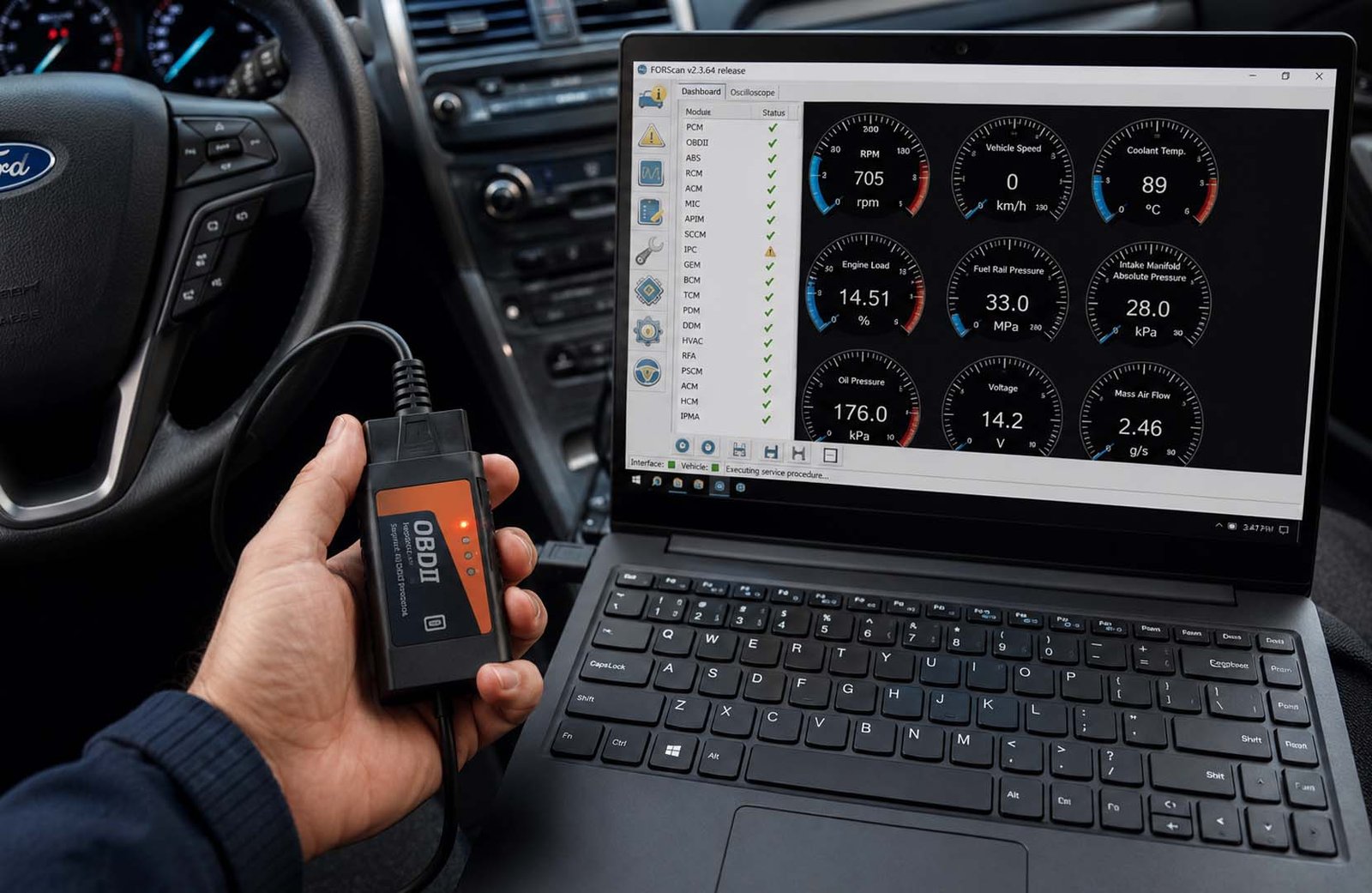
To use FORScan, you first need a compatible OBD-II adapter. The adapter acts like a bridge between your vehicle and the software. Once connected, FORScan can communicate with different modules inside the vehicle and gather important data.
When the connection is active, the software scans the vehicle. It checks different systems and looks for stored fault codes. These codes help identify problems that may be affecting vehicle performance. Instead of guessing what is wrong, owners can see useful details right on the screen.
FORScan can also show live information while the vehicle is running. This means users can watch engine speed, fuel data, temperatures, and sensor readings in real time. Seeing live data often makes it easier to find the cause of a problem.
One of the best parts is that the process is usually fast. Within a few minutes, many owners can collect information that would otherwise require a visit to a repair shop or dealership.
What Cars Work With FORScan?
One of the biggest reasons for FORScan’s popularity is its strong support for Ford family vehicles. The software was built mainly for Ford, Lincoln, Mazda, and many Mercury models. Because of this focus, it often provides deeper access than many general scan tools.
Ford owners are among the most active FORScan users. Many people use it on popular vehicles such as the Ford F-150, Ford Explorer, Ford Escape, Ford Ranger, Ford Edge, and many other models. The software can often access systems that ordinary scanners cannot reach.
Mazda owners also use FORScan for vehicle checks and maintenance. The software can help diagnose problems, read fault codes, and monitor vehicle performance. Many Mazda drivers appreciate the extra information that becomes available through the software.
Lincoln owners benefit in a similar way. Since Lincoln vehicles share many systems with Ford vehicles, FORScan can often provide detailed information about vehicle modules and settings.
It is important to remember that support may vary depending on the model year and vehicle type. Some newer vehicles include extra security features that may limit access to certain systems. For this reason, checking compatibility before making changes is always a smart idea.
FORScan Lite vs Full FORScan
Many beginners wonder which version of FORScan they should use. The answer depends on what they want to do. Both versions are useful, but they are designed for different needs.
FORScan Lite is the mobile version. It is made for people who want quick and simple vehicle checks. If you need to read fault codes, clear codes, or view basic information while away from home, the Lite version can be very helpful.
The full Windows version offers many more features. This version is often used by vehicle owners who want advanced functions. It allows deeper access to modules and supports many programming and customization tasks.
For example, someone who only wants to check a warning light may be happy with FORScan Lite. On the other hand, a person who wants to reset certain systems, perform advanced tests, or change vehicle settings will usually prefer the full version.
Many experienced users start with the basic features and then move to the full version later. This approach helps them learn the software step by step while becoming more comfortable with its tools.
Main FORScan Features
The reason so many people talk about FORScan is because of its long list of useful features. The software offers much more than simply reading a warning light. It gives users access to information that can help them understand their vehicles better.
One important feature is fault code reading. When a vehicle detects a problem, it often stores a code. FORScan can read these codes from many different systems. This helps users understand where the problem may be coming from.
Another powerful feature is live data monitoring. Users can watch information from sensors while the vehicle is running. This includes engine data, fuel information, temperatures, transmission values, and much more. Seeing data in real time can make diagnosis much easier.
FORScan can also clear fault codes after repairs are completed. In many cases, users can reset service reminders and warning lights. This can be very convenient after routine maintenance work.
The software also supports special service functions and access to vehicle modules. These features are part of what makes FORScan so popular among people who enjoy working on their own vehicles.
Reading Car Fault Codes
Modern vehicles are very smart. When a problem happens, the vehicle often saves a fault code. These codes act like clues that help explain what may be wrong. Without a tool like FORScan, these clues are often hidden from the driver.
FORScan can read Diagnostic Trouble Codes, often called DTCs. These codes may come from the engine, transmission, body systems, brakes, airbags, and other vehicle systems. This wide access gives users a much clearer picture of vehicle health.
A basic scanner may only show simple engine codes. FORScan often goes much deeper. It can access additional systems and provide more useful information. This extra detail can save time when trying to find the cause of a problem.
For example, a warning light might appear because of a sensor issue. Instead of replacing parts without knowing the cause, a user can read the stored code and begin troubleshooting in a more informed way.
This ability to read detailed fault codes is one of the biggest reasons many Ford, Mazda, and Lincoln owners choose FORScan over simpler scan tools.
Live Data in FORScan
Reading fault codes is helpful, but sometimes a problem only appears while the vehicle is running. This is where live data becomes extremely useful. Live data allows users to watch information from vehicle sensors in real time.
FORScan can display many different types of information. Users can watch engine speed, fuel system activity, temperatures, battery voltage, transmission data, and many other values while the vehicle operates.
Imagine a vehicle that feels rough while driving. A stored fault code may not tell the whole story. Live data allows users to watch what the sensors are doing at that exact moment. This often makes finding the real cause much easier.
Many professional technicians rely on live data every day. One reason FORScan is so popular is because it brings this type of information to regular vehicle owners at home.
Live monitoring also helps users keep an eye on vehicle performance over time. Small changes can sometimes be noticed before they become larger and more expensive problems.
FORScan Extended License
As users become more comfortable with FORScan, many start learning about the Extended License. This special license unlocks advanced features that are not available in the basic version.
The standard version is enough for reading and clearing codes. It works well for basic diagnostics and regular vehicle checks. Many beginners start here while learning how the software works.
The Extended License adds more powerful tools. These tools can include module programming, advanced service functions, vehicle configuration changes, and other special features that many owners find valuable.
Because these features affect important vehicle systems, users should always be careful. Making changes without understanding the settings can create problems. Taking time to learn before making adjustments is always the safest approach.
The Extended License is one of the reasons many people compare FORScan with dealership-level tools. It gives owners access to functions that are normally unavailable with ordinary scan tools.
FORScan Programming and Changes
One feature that makes FORScan stand out is its ability to change certain vehicle settings. This is often called programming or customization. Many Ford owners use these options to adjust features and personalize their vehicles.
For example, some Ford F-150 owners use FORScan to enable or disable certain functions that are controlled by vehicle modules. These changes may improve convenience or match personal preferences.
The software can also help with service-related tasks. In some supported vehicles, users can reset service reminders, perform maintenance procedures, and complete other useful actions that normally require special tools.
Some vehicles may even support key or key fob programming through FORScan. This feature depends on the model and the tools being used. It is one of the many reasons people consider FORScan such a powerful tool.
At the same time, users should always be careful when making changes. Before adjusting settings, it is wise to save original values and understand exactly what each change does.
FORScan vs Basic OBD-II Scanner
A basic OBD-II scanner is useful, but it is often very limited. Most simple scanners only read engine codes. They may tell you that a problem exists, but they may not show much detail about where the problem is coming from.
FORScan gives much deeper access, especially for Ford, Mazda, Lincoln, and Mercury vehicles. It can check many systems, not just the engine. This may include the transmission, body control module, ABS, airbags, and other important parts of the vehicle.
This is why many owners see FORScan as more than a simple scan tool. It can help users understand the full health of their car. It can also show live data, clear codes, reset service lights, and support some service tasks.
For example, a normal scanner may only say there is an engine fault. FORScan may show extra details from other modules. This helps you avoid guessing and makes the repair process easier.
Still, a basic scanner is fine for small checks. But if you own a Ford, Mazda, or Lincoln and want more control, FORScan is usually a much better choice.
FORScan vs Dealership
Many people ask if FORScan can replace a dealership visit. The answer is simple. It can help with many home checks, but it cannot replace the dealership in every case. It is powerful, but it still has limits.
Dealerships use official factory tools. These tools can access all vehicle systems, install official software updates, and read service bulletins. These updates and reports are often needed for warranty work or deep repairs.
FORScan is great for reading fault codes, watching live data, checking modules, and changing some settings. It can save a lot of money because you do not need to pay a diagnostic fee every time a light appears.
A dealership visit can cost around $100 to $200 for normal diagnostics. Some complex checks may cost $300 to $500 or more. With FORScan, the main cost is the adapter and the license if you need advanced features.
So, FORScan is best for simple to medium checks at home. The dealership is best for warranty work, serious problems, safety issues, and official updates.
Cost of Using FORScan
One big reason people like FORScan is the cost. The basic software is free to download. This makes it easy for beginners to try it without spending too much money at the start.
You will still need a good OBD-II adapter. A common adapter may cost around $50 to $100. It is better to buy a trusted adapter because a weak or cheap adapter can cause connection issues.
The FORScan Extended License may cost extra. Some users pay around $10 to $50, depending on the type of license and seller. This license is needed for advanced tools like programming and deeper settings.
Compared with dealership fees, this can be a smart deal. If you use FORScan many times, the tool may pay for itself quickly. This is helpful for people who maintain their own cars.
But cost should not be the only thing you think about. You also need patience, care, and basic learning. A tool is only helpful when it is used the right way.
Good Things About FORScan
FORScan can save money. Instead of paying the dealership just to find out what is wrong, you can check many problems at home. This is very useful when the issue is small or easy to understand.
It also saves time. You do not need to book an appointment, wait in line, or leave your car at a shop for a basic scan. You can connect the tool and check codes in your own garage.
Another good thing is control. FORScan lets owners learn more about their own vehicles. You can see live data, check modules, and understand how your car is working.
It is also helpful for older vehicles. If your car is out of warranty, FORScan can be a great tool for regular checks and simple service work. Many DIY owners use it for this reason.
Fleet owners may also find it useful. If someone manages many Ford or Mazda vehicles, this tool can help track problems, check codes, and reduce repeated diagnostic costs.
Limits and Risks of FORScan
FORScan is useful, but it must be used with care. Some newer vehicles have security systems that limit access to certain modules. This means FORScan may not work the same on every model.
Another limit is that FORScan does not provide official factory updates. Dealerships can install special software updates and firmware patches from the manufacturer. These are not always available through home tools.
Programming can also be risky. If you change the wrong setting, you may cause problems in the vehicle. In some cases, wrong programming can even make a module stop working.
This is why users should always save original settings before making changes. It is also smart to read guides, watch simple tutorials, and understand each setting before touching it.
FORScan is not dangerous by itself. The risk comes from using advanced features without enough care. If you only read codes and watch live data, the risk is much lower.
When to Visit a Dealership
You should visit a dealership if your vehicle is still under warranty. This helps protect your warranty rights. If a repair is covered, the dealership can fix it using official tools and records.
You should also go to the dealership for serious or complex problems. If the issue involves safety systems, airbags, brakes, or deep electrical faults, trained technicians may be the safer choice.
A dealership is also better when your car needs official software updates. These updates may fix known problems, improve systems, or follow factory repair steps.
Dealerships also have access to Technical Service Bulletins, often called TSBs. These bulletins explain known issues and official repair methods for certain models.
So, FORScan is great for home checks and learning. But the dealership is still important when the job is too big, too risky, or tied to warranty service.
Easy Tips for Beginners
Start with simple tasks first. Read fault codes, clear old codes after repairs, and watch live data. Do not jump into programming on your first day.
Use a good adapter. A trusted OBD-II adapter gives a better connection. A poor adapter may disconnect during important work, and that can cause trouble.
Always save your original settings before making changes. This is very important. If something goes wrong, your saved values can help you return the vehicle back to normal.
Keep your battery charged during programming. Low battery power can interrupt the process. This can create errors, especially when changing module settings.
Most of all, go slowly. FORScan is a strong tool, but it rewards careful users. Read first, learn first, and change settings only when you fully understand them.
Final Thoughts
FORScan is one of the most helpful tools for Ford, Mazda, Lincoln, and Mercury owners. It gives you a clear way to understand your vehicle without running to the dealership for every small warning light.
It can read codes, clear faults, show live data, reset service lights, and unlock advanced features with the right license. For many DIY users, this makes car care easier, cheaper, and less stressful.
But FORScan should be used with care. It is not a toy. Simple checks are easy, but programming and module changes need patience and proper learning.
The best way to use FORScan is to start small. Learn how to read codes first. Then slowly explore deeper tools when you feel ready.
In the end, FORScan is worth it for many owners who want to understand their cars better. It can save money and time, but a dealership is still the safer choice for warranty work, serious faults, and official updates
(FAQs)
What is FORScan used for?
FORScan is used to check vehicle problems, read fault codes, watch live data, clear codes, reset service lights, and change some settings on supported vehicles.
Does FORScan work on all cars?
No, FORScan mainly works with Ford, Mazda, Lincoln, and many Mercury vehicles. It is not made for every car brand.
Is FORScan free?
The basic FORScan software is free. But you may need to buy an OBD-II adapter. You may also need an Extended License for advanced features.
Can FORScan program key fobs?
FORScan can program key fobs on some supported vehicles. It depends on the model, year, adapter, and license. Always check before trying it.
Is FORScan better than a normal OBD-II scanner?
For Ford, Mazda, and Lincoln vehicles, FORScan is often better because it can access more systems and show deeper details than many basic scanners.
Can FORScan damage my car?
Reading codes is usually safe. But changing settings or programming modules can cause problems if done the wrong way. Always save original settings and follow trusted steps.
Do I still need a dealership if I have FORScan?
Yes, sometimes. You may still need a dealership for warranty work, official updates, complex problems, and safety-related repairs.
Don’t miss these:
How routing 111000025 Helps You Send and Receive Money Easily
NippyDrive Explained: What It Is and Why So Many People Are Talking About It





 Biography7 months ago
 News6 months ago
 Blog3 months ago
 Biography7 months ago