
Tech
Lenso AI Explained: How This Smart Face Search Tool Really Works

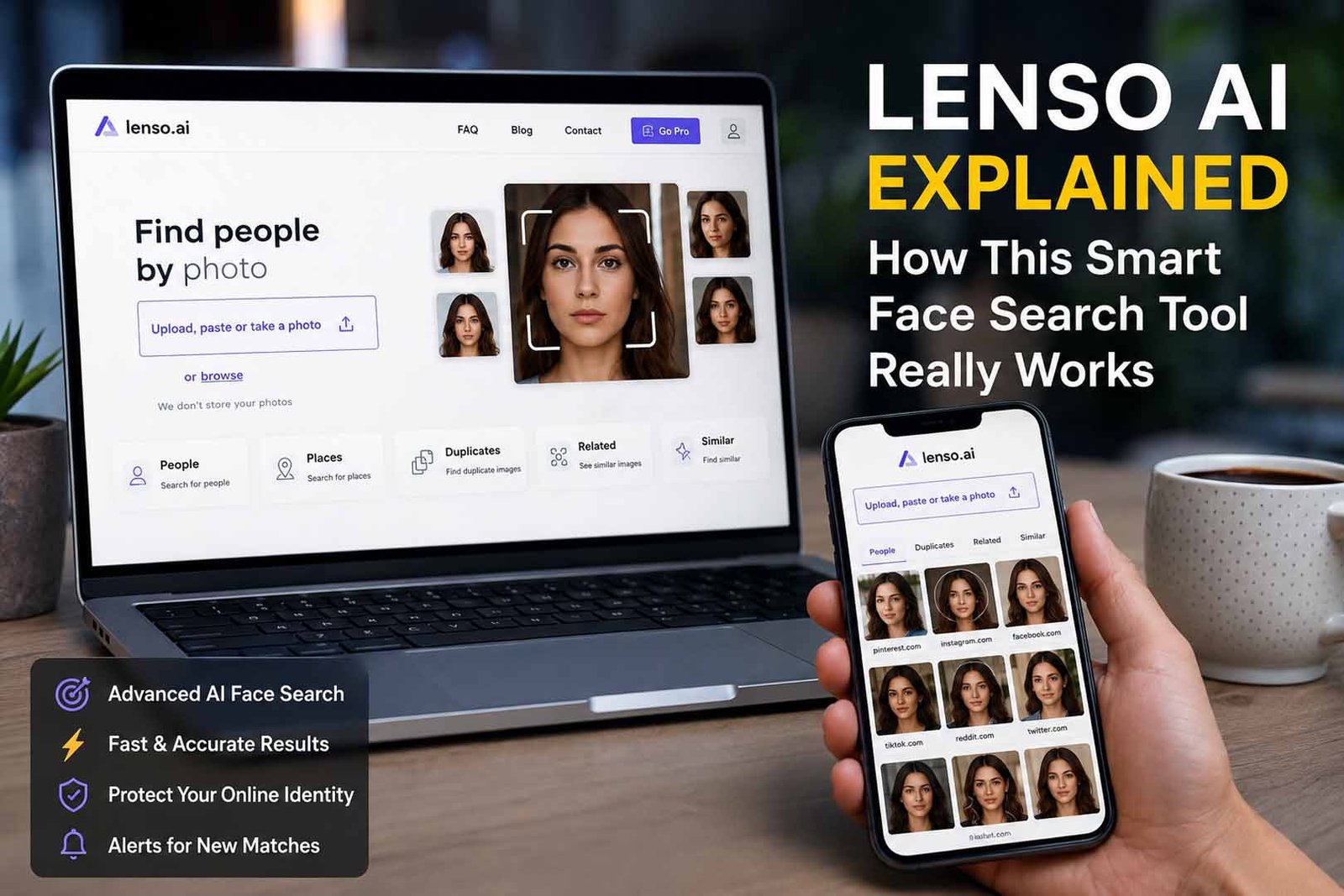
Have you ever looked at a photo and wondered where else that picture appears online? Maybe you wanted to find an old friend, check if someone is using your photo, or learn more about a person from a single image. A few years ago, doing this was very hard for most people.
Today, things are different. Smart AI tools can help people search the internet in new ways. One tool that has gained a lot of attention is lenso ai. It uses face search technology to help users find matching images online in a fast and simple way.
Many people have heard about reverse image search tools like Google Images and TinEye. These tools can be useful, but they often focus on the whole image. Lenso ai takes a different path. It looks closely at facial details and tries to find matching faces instead of only matching pictures.
Because of this, many users now use lenso ai for face search, image tracking, online safety, and checking where photos appear on the web. The tool has become a popular choice for people who want more than a normal image search.
In this article, we will look at what lenso ai is, how it works, what features it offers, and why many people are interested in it. We will also explain everything in very easy words so anyone can understand how this smart tool works.
What Is Lenso AI?
Lenso ai is an AI-powered face search tool. In simple words, it helps users search for matching faces online by using a photo. Instead of typing a name, users upload an image and let the system look for similar faces across the internet.
The main goal of lenso ai is to help people find images connected to a face. This can be useful when someone wants to see where a photo appears online or when they want to find other images of the same person.
Unlike many older search tools, lenso ai focuses on facial details. It studies things like the shape of the face, the eyes, the nose, and other visible features. This helps the system search more carefully and produce better face-related results.
Another reason people like lenso ai is its simple design. You do not need special skills or technical knowledge. Most users can upload a photo, start a search, and view results within a short time.
As AI technology continues to improve in 2026, tools like lenso ai are becoming more useful for everyday users. People now want faster and smarter ways to search online, and face search tools are becoming part of that change.
How Lenso AI Face Search Works
Many people ask a simple question: how does lenso ai know whether two photos show the same person? The answer starts with facial recognition technology. The system studies the face inside the uploaded image before searching for matches.
The first step is face detection. When you upload a photo, the tool looks for a face in the image. It separates the face from the rest of the picture so it can focus on the most important part.
After that, the system studies facial details. It may look at the space between the eyes, the shape of the nose, the jaw area, and other visible parts of the face. These details help the tool build a face profile for the search.
The next step is matching. Lenso ai compares those facial details with images that it can find online. The goal is to locate faces that look very similar to the one in the uploaded photo.
Finally, the tool shows the results. The closest matches are usually shown first. This helps users quickly review images and see which results appear to match the searched face.
Why Lenso AI Is Different
Many people think face search and reverse image search are exactly the same thing. They are related, but they are not identical. This is one of the biggest reasons why lenso ai has attracted attention from users around the world.
Traditional reverse image search tools often study the entire image. They may look at colors, shapes, objects, backgrounds, and other parts of the picture. This works well when someone wants to find the same image or a similar image online.
However, face search focuses mainly on the person in the photo. Instead of studying the full image, lenso ai pays special attention to facial details. This can help when users want to find the same person in different photos.
For example, a person may have different hairstyles, different clothes, or different backgrounds in each photo. A normal image search may struggle with this. Face search technology is designed to focus more on the face itself.
This difference is one of the main reasons many users choose lenso ai when they want to search for people rather than search for pictures in general.
Main Features of Lenso AI
One of the biggest strengths of lenso ai is its face search feature. Users can upload a photo and quickly search for matching faces online. This simple process makes the tool easy to use for both new and experienced users.
Another useful feature is speed. Nobody wants to wait a long time for search results. Lenso ai is designed to provide results within seconds, which helps users save time and get information quickly.
The platform also offers a clean and simple layout. Some online tools can feel confusing because they have too many buttons and options. Lenso ai keeps things simple, making it easier for people to understand what to do next.
Accuracy is another feature often mentioned by users. The system tries to find matches even when photos have different lighting, different face angles, or small changes in appearance. This helps improve the overall search experience.
Lenso ai also includes a People category in supported regions. This section is designed to show matching faces found during the search process, making it easier to focus on face-related results.
How to Use Lenso AI
Getting started with lenso ai is usually very simple. Most users can begin a search within a few minutes. The process is designed to be easy even for someone who has never used a face search tool before.
The first step is visiting the platform and choosing the photo you want to search. Users can upload an image from their device, and in some cases, they can also paste an image from their clipboard.
Once the image is uploaded, the system begins studying the face. The search process starts automatically, and the tool begins looking for possible matches across available online sources.
After the search is finished, users can open the People category if that option is available in their region. This area shows face-related matches that may be connected to the uploaded image.
Another useful option is the alert feature. Users can create alerts and receive email notifications when new matching images are found online. This can help people keep track of their images without running the same search again and again.
What Lenso AI Can Be Used For
One common use of lenso ai is finding old contacts. Imagine finding an old school photo and wanting to reconnect with a classmate years later. Face search tools may help users discover images that provide useful clues.
Another popular use is online reputation management. Many people want to know where their photos appear online. Lenso ai can help users monitor their digital presence and understand how their images are being used.
People also use face search tools to look for unauthorized image use. Sometimes photos are copied and shared without permission. Finding those images can help users understand where their content appears on the internet.
Photographers, models, and content creators may also find face search useful. Their images often appear on different websites, and image tracking can help them discover where their work is being used.
There are also people who simply want more control over their online identity. As photos continue to spread across websites and social media platforms, tools like lenso ai offer a way to stay informed and aware of where images appear online.
Lenso AI for Online Safety
Online safety is one of the biggest reasons people use lenso ai. Today, photos can move across the internet very fast. A picture may be copied, shared, or used on another website without the owner knowing about it.
This can be a big problem for people who care about their online image. Someone may use a photo to make a fake profile. Someone may also use a face photo in a way that feels wrong or unsafe.
Lenso ai can help users search for where their face appears online. This can make it easier to find photo misuse, fake accounts, or copied images. It gives users a simple way to check their digital footprint.
The alert feature can also be helpful. If a new matching image appears online, users can get an email alert. This means they do not need to search again and again by hand.
Still, users should use face search with care. It should be used for safety, privacy, and fair reasons. It should not be used to bother people or invade someone’s private life.
Lenso AI for Creators and Brands
Lenso ai can also be useful for creators. Photographers, models, artists, bloggers, and content creators often share photos online. Sometimes their photos are copied and used on other sites without permission.
A creator can upload an image and check if the same or similar photo appears somewhere else. This can help them find stolen images, copied work, or pages that use their content without credit.
Brands can also use lenso ai for image tracking. For example, a business may want to know where its product photos, campaign images, or brand visuals are being used online. This can help protect its online identity.
The Duplicates category can be helpful for this. It can show copies of an image. The Related and Similar Images categories can also help users find images that look close to the original photo.
This makes lenso ai more than just a face search tool. It can also work as an image search tool for people, places, copies, and similar pictures.
Lenso AI vs Google Image Search
Google Image Search is a popular tool. Many people use it to find similar pictures online. It can be helpful when you want to search for products, places, objects, or images that look close to the one you upload.
But Google Image Search is not mainly made for face search. It often looks at the whole image. This means it may focus on the background, clothes, colors, objects, or the full photo layout.
Lenso ai is different because it gives more focus to face search. In the People category, it looks for face matches. This can be more useful when the goal is to find the same person in different photos.
For example, imagine you upload a photo of a person standing near a beach. A normal image search may show other beach photos. But lenso ai may focus more on the person’s face and show matching face results.
This does not mean one tool is always better than the other. Google Image Search is useful for general image search. Lenso ai is better when you want face search, duplicates, image tracking, and people-focused results.
Benefits of Using Lenso AI
One big benefit of lenso ai is that it is easy to use. Users do not need to understand coding, AI, or facial search systems. They can upload a photo, choose a category, and review the results.
Another benefit is speed. Search results can appear quickly, which makes the tool useful for people who want fast answers. This is helpful when someone wants to check many images without wasting much time.
Lenso ai also offers different search categories. Users can search for People, Places, Duplicates, Related Images, and Similar Images. This makes the tool more useful for different search needs.
The alert feature is also a strong benefit. It can help users track new results without repeating the same search every day. This is good for privacy, safety, and image protection.
The tool can also help users check image sources. When a result appears, users may be able to open the source page and see where the image was found. This makes the search more useful and clear.
Things to Know Before Using Lenso AI
Lenso ai is helpful, but users should know a few things before using it. First, face search may not be available in every region. Some users may not see the People category depending on where they live.
Second, results depend on what images are available online. If a photo is not indexed or visible on the web, the tool may not find it. No image search tool can find every picture on the internet.
Third, not every match will be perfect. AI can make strong guesses, but users should still check results carefully. A similar face does not always mean it is the same person.
Fourth, some sources or deeper results may need unlocking. A user may be able to search for free, but some result details may not be fully open without extra access.
Most importantly, lenso ai should be used in a fair and careful way. It is best for checking your own photos, protecting your work, tracking image use, and staying safe online.
How to Get Better Results on Lenso AI
To get better results, users should upload a clear photo. A face should be easy to see. A blurry, dark, or far-away photo may not give the best match.
It is also better to use a photo where the face is not hidden. Sunglasses, masks, hats, or heavy shadows may make the search harder. A clean face photo can help the system understand the image better.
Users can also try more than one photo. If one image does not give good results, another photo may work better. A front-facing photo may give different results than a side photo.
Lenso ai also allows users to explore different result groups. They can check People, Duplicates, Related, Similar Images, and Places when needed. This helps users get a wider view of the image search.
Filters and sorting can also help. Users may sort results by newest, oldest, best match, or other options. This can make it easier to find the most useful results quickly.
Final Thoughts
Lenso ai is a smart and simple tool for people who want to search by image. It can help users find faces, copied photos, similar images, places, and related results online.
The biggest reason people like lenso ai is its face search feature. It does not only look at the full photo. It can focus on facial details and help users find matching faces more clearly.
It can also help with online safety. Users can check where their photos appear, find possible fake profiles, track image misuse, and protect their digital footprint.
Creators and brands can also use it to protect their work. They can find duplicate images, check sources, and see where their visuals are being used online.
In the end, lenso ai is worth knowing about in 2026. It is simple, fast, and useful for many image search needs. Like any AI tool, it should be used wisely, but it can be a very helpful choice for face search and online image tracking.
(FAQs)
What is lenso ai used for?
Lenso ai is used for reverse image search and face search. It can help users find people, duplicate images, similar photos, places, and related images online.
Is lenso ai a face search tool?
Yes, lenso ai offers face search through its People category. This feature helps users find matching faces online when it is available in their region.
Is lenso ai free to use?
Lenso ai allows users to run searches, but some results or source details may need unlocking. So, users should check the platform for the latest access options.
Can lenso ai find stolen photos?
Yes, lenso ai can help users find copied or duplicate images online. This can be useful for photographers, models, creators, and people who want to protect their photos.
Is lenso ai better than Google Image Search?
Lenso ai is better for face search and image tracking in some cases. Google Image Search is still useful for general image search, products, places, and common web images.
Can lenso ai send alerts?
Yes, lenso ai has an alert feature. Users can set alerts and get email updates when new matching images are found online.
Is lenso ai safe to use?
Lenso ai can be useful for safe and fair image searching. Users should use it carefully, respect privacy, and avoid using face search for harmful or unfair reasons.
Don’t miss these:
What Is Chi-Square Test? Explanation for Everyone
Gramhir.pro Explained: What It Is and How It Creates AI Images

The Rise of Natural Lubricants in Modern Self-Care

Mabinogi Lazy Patch Explained: What It Is and Why Players Talk About It

The Most Important Statistics Concepts Every Data Scientist Should Know

Lenso AI Explained: How This Smart Face Search Tool Really Works

Entrepreneurial Skills: The Key Skills Every Future Business Leader Needs

Gramhir.pro Explained: What It Is and How It Creates AI Images

Perchance AI Review: Why So Many Creators Are Talking About It

Best AI to Human Text Converter Tools for Better Writing in 2026

How Simpcitu Helps You Stay Organized, Focused, and Productive

Clipfly AI Guide: Create, Edit, and Improve Videos in Minutes

Dale Russell Gudegast Biography: All You Should Know About Eric Braeden’s Wife

What Happened to Maureen Wilson? All About Robert Plant’s Ex-Wife

Who Is Melanie Lynn Clapp? The Full Story of Johnny Knoxville’s Ex-Wife

Jeremiah Peniata Fatu: Everything to Know About Jimmy Uso’s Brother

María Elvira Murillo The Full Life of Félix Gallardo’s Ex-Wife

Elaine Okamura: The Full Story of Wayne Newton’s First Wife

Meet Teresa Barrick: Fashion Designer, Mother, and Steven Tyler’s Former Wife

Who Is Zachariah Wood? Meet Elijah Wood’s Older Brother and Game Producer

Everything to Know About Radina Aneva and Her Life With Jeffrey Jordan

The Full Life of Lena Gieseke: Tim Burton’s Ex-Wife and Talented Artist
The Rise of Natural Lubricants in Modern Self-Care
Mabinogi Lazy Patch Explained: What It Is and Why Players Talk About It
The Most Important Statistics Concepts Every Data Scientist Should Know
Lenso AI Explained: How This Smart Face Search Tool Really Works
Entrepreneurial Skills: The Key Skills Every Future Business Leader Needs
Gramhir.pro Explained: What It Is and How It Creates AI Images
Perchance AI Review: Why So Many Creators Are Talking About It
Best AI to Human Text Converter Tools for Better Writing in 2026
How Simpcitu Helps You Stay Organized, Focused, and Productive
Clipfly AI Guide: Create, Edit, and Improve Videos in Minutes
-

 Biography3 months ago
The Emotional Journey of Joanne Schieble Simpson, Steve Jobs’ Biological Mother
-

 News2 months ago
Jamal Adeen Thomas – Everything You Should Know About Clarence Thomas’ Son
-

 Biography3 months ago
Meet Theo Ressler: Everything You Know About Jami Gertz’s son
-

 Celebrity4 months ago
Who Is William Douglas Sewell? Meet Rufus Sewell’s Musician Son