Making videos used to take a lot of time, money, and effort. Many people needed cameras, editing software, recording equipment, and sometimes even a full team to create a single video. For small businesses, creators, and beginners, this was often difficult and expensive.
Things are very different today. AI tools have changed how people create content. Now, someone can make a professional-looking video in just a few minutes. This is one reason why AI video tools have become so popular around the world.
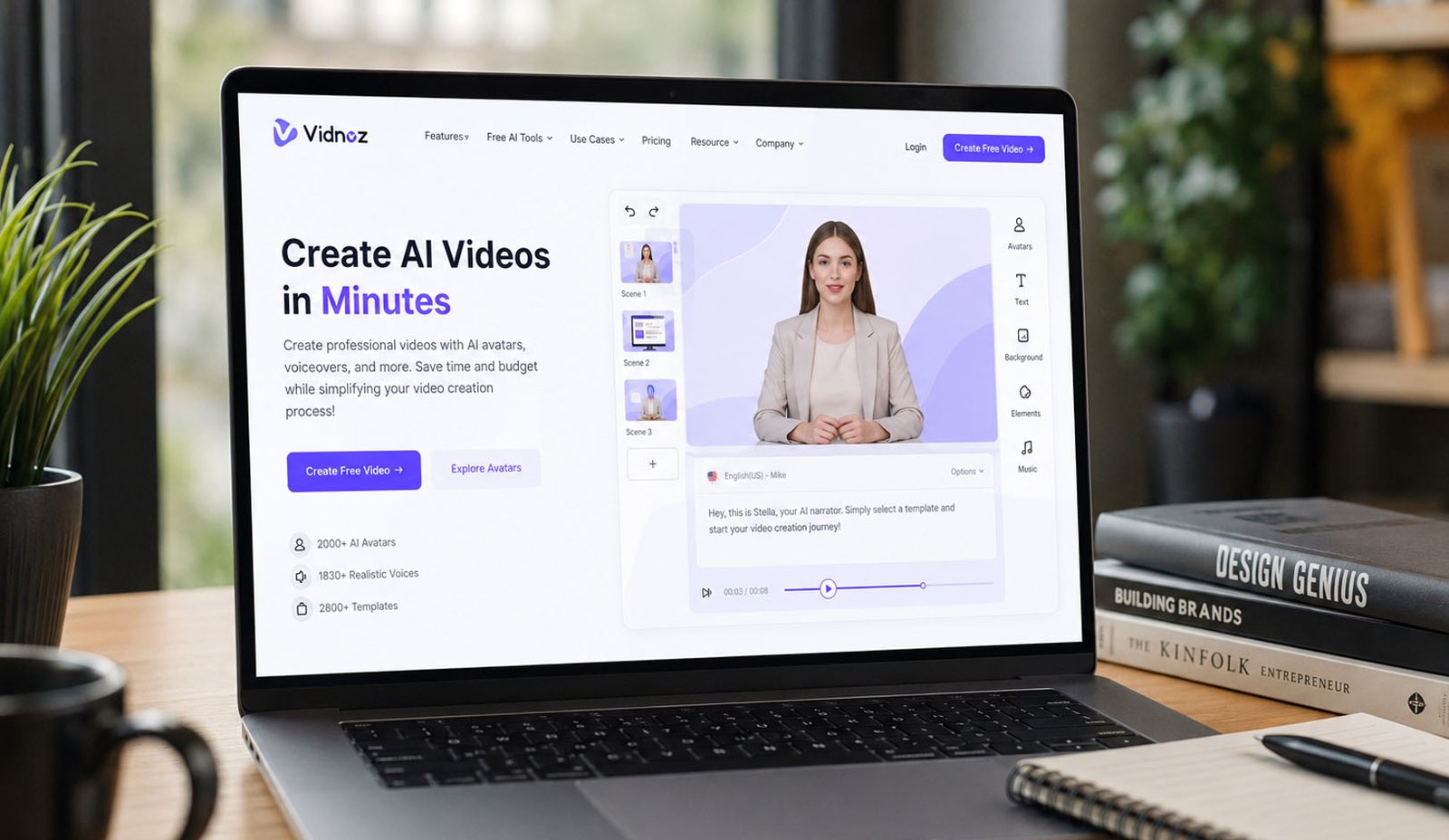
One name that is getting a lot of attention is Vidnoz AI. This platform helps people create videos with AI avatars, AI voices, ready-made templates, and smart video tools. Even people with no editing experience can create videos quickly.
Many marketers, business owners, teachers, and content creators now use Vidnoz AI to save time and create more content. Instead of spending hours recording videos, they can let AI handle much of the work.
In this article, we will take a close look at Vidnoz AI. We will explain its features, benefits, tools, uses, pricing, and much more. By the end, you will have a clear idea of why so many people are using this AI video platform in 2026.
What Is Vidnoz AI?
Vidnoz AI is an online AI video generator that helps users create videos without needing advanced video editing skills. It works directly in a web browser, so there is no need to install large software programs on your computer.
The platform uses artificial intelligence to help create videos faster and more easily. Users can choose AI presenters, select voices, add text, and create complete videos in just a few steps. This makes the process much simpler than traditional video production.
One of the biggest reasons people like Vidnoz AI is that it removes many common video creation problems. You do not need expensive cameras, studio lights, microphones, or professional actors. The platform provides many of these things through AI.
Businesses often use Vidnoz AI for product videos, training materials, sales presentations, and customer support content. At the same time, creators use it for social media videos, YouTube content, and educational projects.
Because it is simple and beginner-friendly, many people can start using Vidnoz AI within minutes. Even users who have never edited a video before can learn the platform quickly.
How Vidnoz AI Works
The main goal of Vidnoz AI is to make video creation easy. Instead of starting with a blank screen, users can choose from ready-made templates and AI tools that guide them through the process.
When you log into the platform, you can select a video template or choose another creation option. From there, you can add your text, select an AI avatar, choose a voice, and make simple changes to the design.
The AI then helps build the video automatically. It can match voices with avatars, create speech from text, and prepare scenes for your project. This saves a huge amount of time compared to manual editing.
Users can also customize many parts of the video. For example, they can change backgrounds, colors, text, images, captions, and visual effects. This helps make the final video match a brand or personal style.
Once everything looks good, users simply click the generate button. Vidnoz AI processes the video and prepares it for preview and download. The process is fast and designed to be easy for both beginners and experienced users.
Vidnoz AI Features
One reason why Vidnoz AI has become popular is the large number of tools available in one place. Instead of using several different programs, users can create and edit videos inside a single platform.
The platform combines AI avatars, AI voices, templates, text-to-video tools, talking photos, subtitles, and image creation features. This makes it useful for many different types of video projects.
For businesses, these tools can reduce production costs and speed up content creation. A marketing team can create multiple videos in the time it once took to create only one.
For creators, the platform offers a simple way to publish content regularly. Whether someone is making educational videos, product reviews, or social media clips, the available tools can help save time.
Another helpful thing is that many features are designed for beginners. Users do not need years of editing experience. Most tools work through simple menus and easy settings.
AI Avatars in Vidnoz AI
One of the most talked-about parts of Vidnoz AI is its large collection of AI avatars. The platform offers more than 1700 avatars that can act as virtual presenters inside videos.
These avatars come in many styles and professions. Users can find business presenters, teachers, doctors, customer support agents, hosts, and many other types of characters. This makes it easier to match the right avatar to a project.
Imagine creating a training video without standing in front of a camera. Instead of recording yourself, you can choose an AI avatar to present the information. This can save both time and effort.
Vidnoz AI also includes Avatar Lite. This feature allows users to create a digital version of themselves. A short silent video of about ten seconds is enough for the system to create a talking avatar.
For users who want more control, there is Custom Avatar Pro. This option allows deeper customization and can help businesses create avatars that better fit their brand style and appearance.
More About Avatar Tools
Motion Avatars are another useful feature inside Vidnoz AI. These avatars can perform body movements, gestures, and facial actions that make videos look more natural and engaging.
A presenter who smiles, nods, and moves naturally often feels more real than a still image. This can help keep viewers interested and improve the overall viewing experience.
The platform also gives users control over expressions and head movements. Simple actions like smiling, looking serious, or nodding can make a big difference in how a message feels.
Many companies use these avatar tools to create product videos, welcome videos, training lessons, and customer support content. Since no camera crew is needed, videos can often be produced much faster.
As AI technology continues to improve, these virtual presenters are becoming more realistic. For many businesses, they are now a practical alternative to traditional video presenters.
AI Voices and Languages
Along with avatars, Vidnoz AI provides a very large collection of AI voices. The platform offers more than 1830 voices that support over 140 languages.
This feature is especially useful for businesses that want to reach people in different countries. Instead of creating separate recordings for every language, users can generate different versions of the same video quickly.
The voices are designed to sound natural and human-like. According to the platform, voice technology from companies such as ElevenLabs, Microsoft, and Google helps power many of these voice options.
Users can also control how a voice sounds. Different tones and emotions can be used depending on the message. For example, a training video may need a calm voice, while a sales video may need a more energetic style.
Another popular feature is voice cloning. This allows users to create a voice that sounds similar to their own. For creators and businesses, this can help maintain a consistent voice across many videos.
Video Templates and Design Tools
Creating videos from scratch can take a lot of time. That is why Vidnoz AI includes more than 2800 ready-made templates that help users start quickly.
These templates cover many different needs. Some are designed for product demos, while others focus on sales videos, business presentations, social media content, or educational projects.
The templates come in both landscape and portrait formats. This makes them suitable for platforms such as YouTube, TikTok, Instagram, Facebook, and many other online channels.
Many templates already include captions, transitions, effects, and layouts. Instead of building everything manually, users can simply edit the existing design and make it their own.
For busy creators and marketing teams, these templates can save a huge amount of work. They also help keep videos looking professional even when created by beginners.
Here is the second half of the article, continuing smoothly from Part 1.
Other Helpful AI Tools
Vidnoz AI offers more than avatars, voices, and templates. It also includes several extra AI tools that help users create better videos without spending a lot of time. These tools are designed to make video creation easier for beginners and faster for experienced users.
One useful feature is AI Talking Photo. This tool can turn a simple photo into a speaking person. Users upload an image, add a voice or text, and the platform creates a talking video. This can be helpful for business messages, fun content, and social media posts.
Another helpful tool is automatic subtitle creation. Many people watch videos without sound, especially on mobile phones. Subtitles help viewers follow along and understand the message more easily. This can also improve viewer engagement.
Vidnoz AI also includes text-to-image tools. Users can type a description and create images that can be added to videos. This removes the need to search for pictures on other websites and helps keep everything in one place.
The platform also allows users to control facial expressions and head movements. Small actions like smiling, nodding, or looking serious can help videos feel more natural and human. These details may seem small, but they can make a big difference.
Benefits of Using Vidnoz AI
One of the biggest benefits of Vidnoz AI is the amount of time it saves. Traditional video production can take hours or even days. With AI tools, many videos can be created in a much shorter time.
The platform can also help reduce costs. Businesses do not always need actors, cameras, studio space, or editing teams. This makes video creation more affordable for small companies and new creators.
Another benefit is ease of use. Many video editing programs can feel difficult for beginners. Vidnoz AI keeps things simple. Most tools work with a few clicks, making the learning process much easier.
The large collection of avatars, voices, and templates gives users many choices. This flexibility helps people create different kinds of videos without feeling limited. Whether the goal is education, marketing, or social media content, there are plenty of options.
Many users also like how quickly they can test ideas. Instead of spending hours creating a video, they can make a sample version in minutes and decide if it works before investing more time.
Ways to Use Vidnoz AI
There are many ways people use Vidnoz AI every day. One of the most common uses is social media content. Short videos for TikTok, Instagram Reels, Facebook, and YouTube Shorts can be created quickly.
Businesses often use the platform for product videos. An AI avatar can explain product features, show benefits, and help customers understand what a product does. This can improve customer interest and trust.
Training and onboarding videos are another popular use. Companies can create lessons for employees without hiring trainers for every session. This helps save time while keeping training clear and consistent.
Teachers, coaches, and online educators can also benefit from Vidnoz AI. They can create learning videos, lessons, and guides for students. The simple video creation process makes it easier to share information online.
The platform is also useful for global marketing. Since it supports more than 140 languages, businesses can create videos for different countries and reach larger audiences around the world.
Vidnoz AI Pricing and Free Plan
Many people want to know if they can try Vidnoz AI before paying. The good news is that the platform offers a free option that allows users to explore its features and create short videos.
According to the information available, users can generate up to three minutes of video content each day on the free plan. This is helpful for testing ideas and learning how the platform works.
The free version does have some limits. Videos may include a watermark, and some advanced features may not be available. Even so, it gives users a chance to see whether the platform fits their needs.
Paid plans are designed for people who need more video time, extra features, and fewer restrictions. Businesses and regular content creators often choose paid plans because they create videos more frequently.
Before choosing any plan, it is always a good idea to compare features and think about how often you plan to use the platform. This can help you select the best option for your goals.
Pros and Cons of Vidnoz AI
Like any AI tool, Vidnoz AI has both strengths and weaknesses. Looking at both sides can help users make a better decision before getting started.
One major advantage is the huge library of avatars, voices, and templates. Having so many options gives users more freedom when creating videos. The platform is also simple enough for beginners to use.
Another strong point is security. The platform highlights its ISO/IEC 27001:2022 certification, which shows a focus on protecting user information and business data. This can be important for companies handling sensitive content.
On the downside, Vidnoz AI depends on an internet connection. Since it works online, users cannot create videos without access to the internet. Some people may prefer software that works offline.
The free version also includes a watermark. While this is common among many AI video tools, some users may want to upgrade to a paid plan to remove these limits and gain access to more features.
Is Vidnoz AI Safe to Use?
Safety is an important topic when using AI tools. Many people upload business information, customer details, and personal content when creating videos. Because of this, security matters.
Vidnoz AI places a strong focus on data protection. One of the most talked-about parts of the platform is its ISO/IEC 27001:2022 certification. This is a recognized security standard used around the world.
This certification shows that the company follows security practices designed to protect information. While no online platform can promise perfect safety, following recognized standards is a positive sign.
For businesses that create training videos, customer content, or company presentations, security can be an important reason to consider the platform. It gives users more confidence when working with online tools.
As with any online service, users should still follow good safety habits, such as using strong passwords and protecting account information. These simple steps can help keep accounts secure.
Who Should Use Vidnoz AI?
Vidnoz AI is useful for many different types of people. Small business owners can use it to create product videos, customer guides, and promotional content without spending a large amount of money.
Content creators may find it useful because it speeds up video production. Instead of recording every video by hand, they can use AI tools to create content more efficiently and publish more often.
Marketing teams can also benefit. The platform makes it easier to create ads, social media videos, and sales presentations. This can help businesses reach customers more quickly.
Teachers, trainers, and coaches may enjoy using AI avatars and voice tools to create lessons and educational materials. This can make learning more interesting and easier to access.
Even complete beginners can use the platform. Since the tools are designed to be simple, users do not need professional editing skills to get started.
Vidnoz AI Alternatives
While Vidnoz AI is a popular choice, it is not the only AI video generator available today. Some users may want to compare different tools before making a decision.
Platforms such as HeyGen, Synthesia, Canva AI, and other video creation tools also offer AI avatars, voices, and video templates. Each platform has its own strengths and special features.
Some tools focus more on business presentations. Others focus on social media content or advanced editing features. The best choice often depends on a user’s goals and budget.
Comparing features, pricing, video quality, and ease of use can help users find the right platform. It is always smart to test free versions when available before making a long-term commitment.
For many users, Vidnoz AI stands out because it combines a large avatar library, many voices, useful templates, and beginner-friendly tools in one platform.
Final Thoughts
Vidnoz AI has become a popular AI video generator because it makes video creation easier, faster, and more affordable. With more than 1700 avatars, 1830 voices, support for over 140 languages, and thousands of templates, it offers many tools in one place.
The platform is designed for both beginners and experienced users. Whether you want to create social media videos, training content, product demos, or business presentations, there are tools that can help you get started quickly.
Its strong focus on security, simple design, and wide range of features make it a useful choice for many people. While the free version has some limits, it still gives users a good way to explore the platform.
If you are looking for a simple way to create AI-powered videos in 2026, Vidnoz AI is definitely worth exploring. It can help save time, lower production costs, and make video creation much easier than traditional methods
(FAQs)
What is Vidnoz AI used for?
Vidnoz AI is used to create videos with AI avatars, AI voices, templates, and text-to-video tools. It is popular for marketing, training, education, and social media content.
Is Vidnoz AI free to use?
Yes. Vidnoz AI offers a free plan that allows users to create a limited amount of video content each day. Some features may have restrictions on the free version.
How many avatars does Vidnoz AI have?
The platform offers more than 1700 AI avatars that represent different styles, professions, and use cases.
How many languages does Vidnoz AI support?
Vidnoz AI supports more than 140 languages through its large collection of AI voices.
Can Vidnoz AI clone my voice?
Yes. Voice cloning is one of the features available on the platform. It allows users to create a voice that sounds similar to their own.
Is Vidnoz AI safe?
The platform highlights its ISO/IEC 27001:2022 certification and focuses on protecting user data and business information.
Who should use Vidnoz AI?
It can be useful for marketers, business owners, teachers, trainers, agencies, social media creators, and beginners who want to create videos quickly.
Don’t miss these:
Flexi AI Review 2026: Can This Free AI Tutor Really Help Students Learn Better?
Final Round AI Explained: Features, Benefits, and More





 Biography8 months ago
 News7 months ago
 Blog4 months ago
 Biography8 months ago