Have you ever opened your bank app and seen a strange charge called amazon marketplace pmts? It can feel scary. You may think someone used your card without asking. Many people feel worried the first time they see this name.
The truth is, this charge is very common. It shows up for many Amazon users around the world. But the name is not clear, so it confuses people. That is why many users search online to understand what it means.
In simple words, this charge is usually safe. It is often linked to something you bought, a service you used, or a subscription you forgot about. But you still need to check it carefully so you stay safe.
In this guide, we will explain everything. You will learn what amazon marketplace pmts means, why it shows up, and how to check it step by step. By the end, you will feel calm and in control.
What Is Amazon Marketplace PMTS?
Let’s start with the simple meaning. The term amazon marketplace pmts is just a short name used by banks. The word “PMTS” means payments. So the full meaning is Amazon Marketplace Payments.
This charge shows that Amazon has processed a payment from your account. It does not always mean you bought something directly from Amazon. It can also mean Amazon handled the payment for someone else selling on its platform.
For example, when you buy from a third-party seller on Amazon, Amazon still takes the money from your card. Because of this, your bank may show the name amazon marketplace pmts instead of the seller’s name.
So, when you see this charge, it usually means the payment went through Amazon’s system. It is not a random charge. It is linked to an order, service, or account activity connected to Amazon.
Why Does This Charge Show Up?
Now you may wonder, why does this charge appear instead of a simple Amazon name? The reason is how Amazon handles payments. Amazon runs a very large system where millions of sellers use its platform.
When you buy from these sellers, Amazon does not show their names clearly on your bank statement. Instead, it shows amazon marketplace pmts because Amazon is the one processing the payment.
This can feel confusing because you may not remember the seller’s name. You may only remember buying something small, like a phone case or a book. But the charge still shows under Amazon’s payment system.
Also, Amazon uses this label for many types of payments. It is not only for products. It can also be used for services, subscriptions, or even small digital purchases. That is why it shows up in different situations.
Amazon Marketplace and Amazon Store: What Is the Difference?
Amazon has two main parts. The first part is the main Amazon store. Here, Amazon sells items directly from its own stock. In this case, your bank usually shows a simple name like Amazon or AMZN.
The second part is the Amazon Marketplace. This is where other sellers list their products. These sellers can be small shops, brands, or even individuals selling items online through Amazon.
When you buy from these sellers, Amazon still takes your payment. But since the product is not sold directly by Amazon, your bank shows amazon marketplace pmts instead of a normal Amazon charge.
This is the main reason people get confused. They see the charge and think it is strange. But in reality, it is just a normal purchase from a third-party seller using Amazon’s system.
Common Amazon Marketplace PMTS Charges
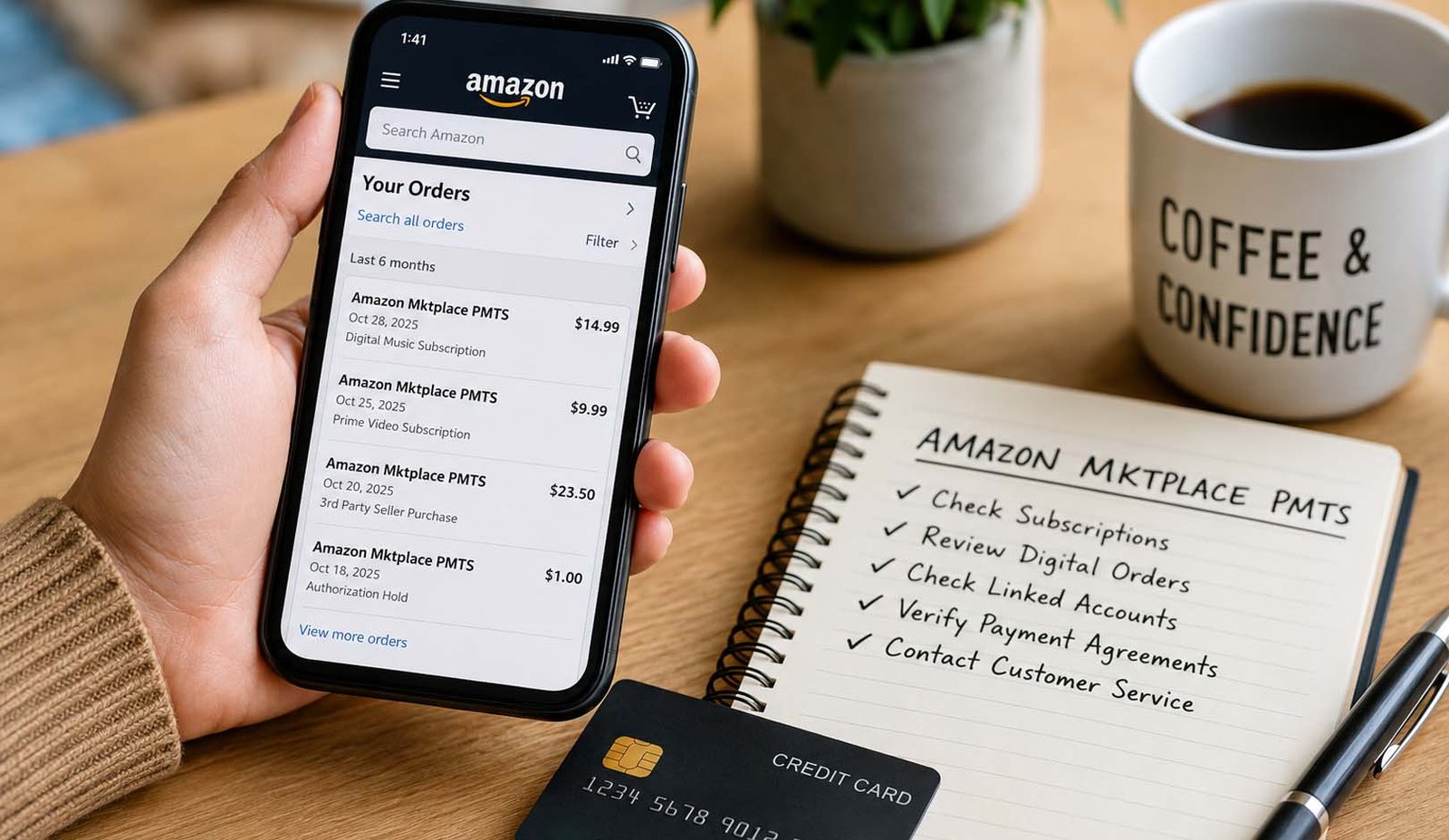
There are many reasons why you may see an amazon marketplace pmts charge. Most of the time, it is something simple that you forgot or did not notice at the time of purchase.
Here are some common examples:
-
Buying a product from a third-party seller
-
Paying for a subscription like Prime or Music
-
Buying digital items like movies, books, or apps
-
Paying shipping fees from some sellers
Sometimes, these charges are small. For example, you may see a charge ending in .99. These are often digital items or small add-ons that are easy to forget.
In other cases, the charge may come from a service you signed up for earlier. For example, you may have started a free trial. After the trial ends, Amazon starts charging you automatically.
Amazon Marketplace PMTS on a Bank Statement
When this charge shows on your bank statement, it may look different each time. That is because Amazon uses different billing codes for its system.
You may see names like:
These extra words may look confusing, but they are not dangerous. For example, “WA” usually means Washington, where Amazon is based. “US” shows that the payment was processed inside the United States.
These codes help Amazon track payments in its system. They do not mean your location. They simply show where the payment was processed from inside Amazon’s network.
So if you see these names, do not panic. They are normal technical labels used by Amazon’s billing system.
POS Debit and Credit Card Charges
You may also notice that the charge looks different depending on how you paid. For example, some users see pos debit amazon marketplace pmts on their bank account.
POS means Point of Sale. This means the money was taken directly from your bank account. This type of charge happens quickly, so it may feel sudden or surprising.
If you use a credit card, the charge works differently. The money is not taken right away. Instead, it is added to your credit balance, and you pay it later.
Sometimes, you may also see a small charge like $1 or $5. This is called an authorization hold. Amazon uses it to check if your card is working. It usually disappears after a few days.
Why You May Not Recognize the Charge
One of the biggest reasons people worry about amazon marketplace pmts is because they do not remember making the purchase. But in many cases, the reason is simple.
You may have signed up for a service and forgotten about it. For example, a free trial can turn into a paid plan without you noticing. This happens with services like Prime or music subscriptions.
Another common reason is family use. If you share your Amazon account, someone else may have made the purchase. It could be a child, partner, or even a shared device like Fire TV
Small purchases can also be easy to miss. Buying a movie, app, or eBook takes just one click. Later, when you see the charge, you may not remember it at all.
How to Find Where the Charge Came From
If you see an unknown amazon marketplace pmts charge, the best step is to check your Amazon account carefully. Do not rush to panic. Most of the time, the answer is already there.
Start by checking your order history. Look at the date and amount. Try to match it with the charge on your bank statement. This simple step solves many cases.
Next, check your digital orders. Many people forget this section exists. It includes movies, books, apps, and other online items that do not appear in normal orders.
You should also check your subscriptions. Go to the “Memberships and Subscriptions” page. Look for active services that renew every month or year.
Finally, check if your account is linked to other people or services. This includes family accounts, shared devices, or even AWS if you use it for work. Sometimes, the charge comes from there.
What to Do if the Charge Looks Wrong
If you see an amazon marketplace pmts charge that does not feel right, the first step is to stay calm. Many times, the charge is real but just hard to remember. So take a moment and check your account slowly.
Start by checking your Amazon account again. Look at your orders, digital items, and subscriptions. Match the date and amount with your bank statement. Even a small detail can help you find the source of the charge.
If you still cannot find it, check if someone else used your account. Maybe a family member bought something or used a shared device. This happens more often than people think, especially with kids using smart TVs or apps.
After checking everything, if the charge still looks wrong, you should contact Amazon support. Tell them the exact amount and date. They can quickly check their system and tell you what the charge is for.
How to Stop Future Charges
Once you find the source of the amazon marketplace pmts charge, the next step is to stop it if you do not need it. This is very important for subscriptions and auto-renew services.
Go to your Amazon account and open the “Memberships and Subscriptions” page. Here, you will see all active services. You can cancel anything you no longer want with just a few clicks.
Some charges come from payment agreements. These are found in Amazon Pay. Even if you change your card, these payments may continue. So you need to cancel them from the agreement section.
It is also a good idea to remove old cards and check your settings. Turn off auto-renew if you do not need it. This helps you avoid surprise charges in the future.
How Refunds and Charge Disputes Work
If you were charged by mistake, you may be able to get your money back. Amazon usually helps users, especially if the service was not used after the charge.
For example, if a subscription renewed but you did not use it, you can ask for a refund. Amazon often approves these requests quickly. This makes things easier for users.
It is best to contact Amazon first before calling your bank. If you go to your bank right away and file a dispute, Amazon may block your account for some time while they check the issue.
So always try Amazon support first. If they cannot solve the problem, then you can contact your bank. This step-by-step way is safer and helps avoid account trouble.
How to Keep Your Amazon Account Safe
Keeping your account safe is very important. It helps you avoid unknown amazon marketplace pmts charges and keeps your money secure.
First, turn on two-factor login. This adds one more step when you sign in. Even if someone knows your password, they cannot enter your account easily.
Next, use a strong password. Do not use simple words or the same password for all sites. Also, check your saved cards and remove any you do not use anymore.
You should also check your devices. Remove any unknown device from your account. This helps you stay in control and keeps your account safe at all times.
Signs That a Charge Could Be Fraud
Most amazon marketplace pmts charges are real. But sometimes, fraud can happen. So it is important to know the warning signs.
If you see many small charges that you do not know, it can be a red flag. Also, if charges appear right after using your card on an unsafe website, you should be careful.
Another sign is when you cannot find the charge in your Amazon account at all. If it does not match any order, subscription, or service, then it may not be real.
In such cases, call your bank right away. Block your card and report the issue. After that, also inform Amazon so they can check your account for any problem.
Simple Tips to Avoid Surprise Charges
Avoiding surprise charges is not hard. You just need to follow a few simple steps and stay aware of your account activity.
Check your subscriptions every month. Many users forget about free trials. These trials turn into paid plans if not canceled on time.
Also, keep an eye on your bank statement. Even small charges matter. If you check often, you can catch any issue early before it becomes a big problem.
Set reminders for trials and renewals. This simple habit can save you money. It also helps you stay in control of your spending
Final Thoughts
Seeing an amazon marketplace pmts charge can feel confusing at first. But now you know that it is usually a normal part of how Amazon handles payments.
Most of the time, the charge comes from something simple. It can be a small purchase, a subscription, or a shared account activity. That is why it is important to check everything carefully.
The best way to stay safe is to stay aware. Check your account often, manage your subscriptions, and keep your account secure. These small steps can save you from stress later.
If something still feels wrong, do not ignore it. Take action quickly and get help. With the right steps, you can stay in full control of your account and your money.
(FAQs)
What is amazon marketplace pmts on my bank statement?
It means Amazon processed a payment from your account. It is usually linked to a product, subscription, or service connected to Amazon.
Is amazon marketplace pmts a scam?
In most cases, no. It is a real charge. But you should still check your account to be sure everything is correct.
Why don’t I remember this charge?
You may have forgotten a purchase, subscription, or small digital item. It can also be from a family member using your account.
Can I get a refund for amazon marketplace pmts?
Yes, in many cases. If the service was not used, Amazon may return your money after you request a refund.
How do I stop amazon marketplace pmts charges?
Go to your subscriptions or Amazon Pay agreements and cancel the service. This stops future charges.
Can someone else use my account?
Yes, if your account is shared or not secure. Always check devices and turn on extra security to stay safe.
Don’t miss these:
What Is Make1M.com Luxury? A Simple Guide to Luxury Living and Smart Wealth
AI Real Estate Tools vs. Traditional Market Research Methods





 Biography8 months ago
 News7 months ago
 Blog4 months ago
 Biography8 months ago