
Tech
Skywork AI in 2026: Everything You Need to Know Before You Try It

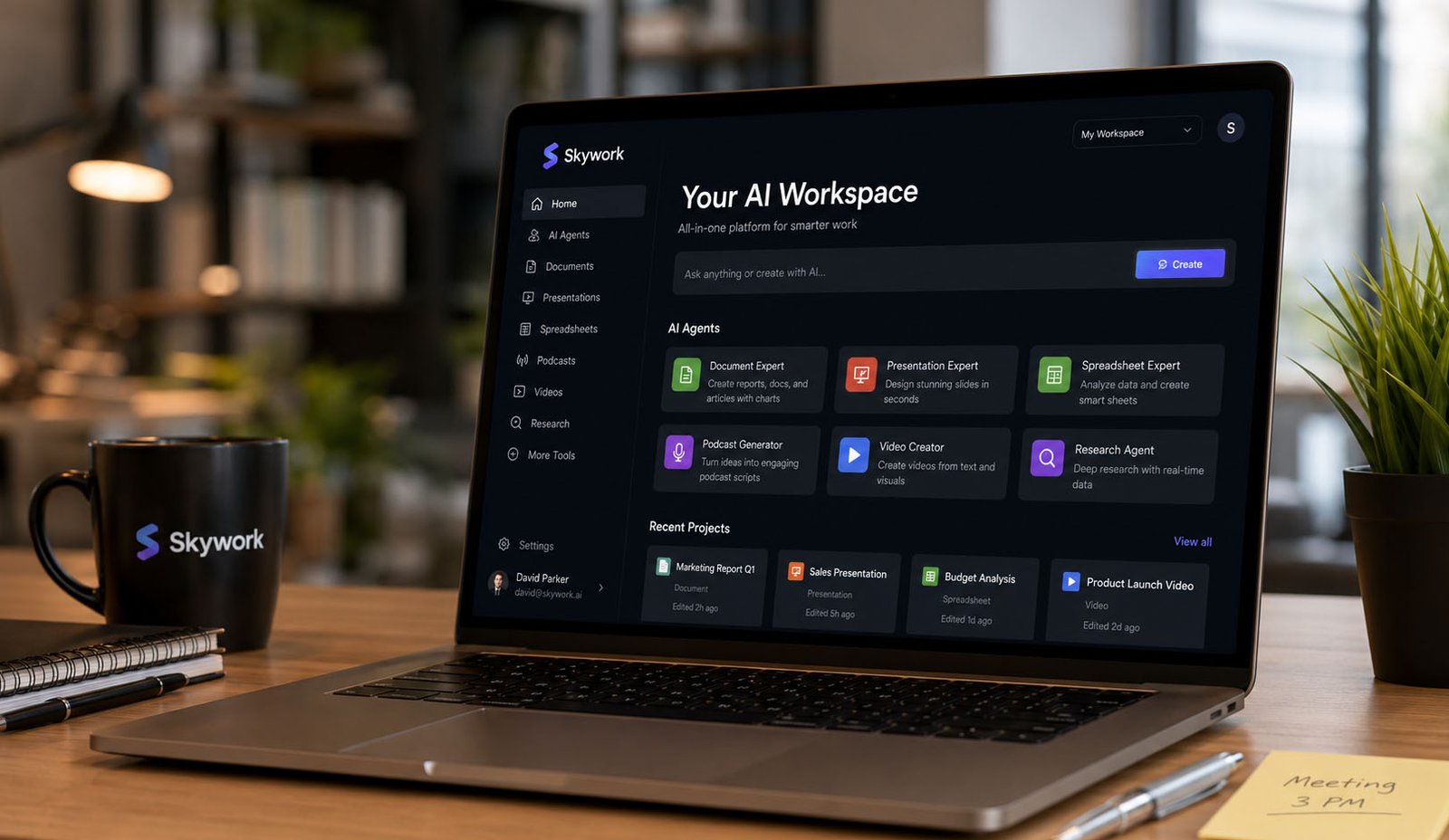
AI tools are changing how we work every day. Many people now use AI to write, research, and create content. But there is one big problem. Most people use many different tools for different tasks, and this can feel confusing and slow.
This is where Skywork AI comes in. It promises to do everything in one place. Imagine using one tool to write reports, make slides, create videos, and even build spreadsheets. Sounds simple, right? That is why many people are now talking about Skywork AI.
In 2026, tools like Skywork AI are becoming more popular. People want faster work, better results, and less stress. Instead of switching between apps again and again, they want one smart system that does it all in a smooth way.
In this article, we will explore Skywork AI. We will explain what it is, how it works, and what it can do. You will also learn about its features, tools, and real uses in daily work.
So if you are thinking about trying Skywork AI, this guide will help you understand everything clearly. Let’s start step by step and see what makes this tool special.
What Is Skywork AI?
Skywork AI is an all-in-one AI tool. This means it is not just a simple chatbot like many other tools. Instead, it works like a full workspace where you can do many types of work in one place without switching tools again and again.
Think of it like a smart helper that can do many jobs. It can write reports, create presentations, build spreadsheets, and even make videos or podcasts. You just give it a simple prompt, and it starts working for you step by step.
Many AI tools only give text answers. But Skywork AI goes further. It turns your idea into full results. For example, instead of just explaining something, it can create a full report with charts and visuals ready to use.
This is why Skywork AI is called a productivity tool. It helps people save time and do more work faster. It is useful for business users, marketers, students, and content creators who want quick and clean results.
In simple words, Skywork AI tries to replace many tools with just one platform. That is what makes it different and interesting in 2026.
How Skywork AI Works
Skywork AI works in a very simple way. You start by giving a prompt. This can be a question, an idea, or a task you want to complete. The system then understands your request and starts working on it.
But what makes Skywork AI special is how it processes your request. It does not just give a quick answer. Instead, it uses different AI agents that work like small experts. Each expert handles a different part of your task.
For example, if you ask for a business report, one agent may do research, another may write content, and another may create charts. All of this happens automatically without you needing to manage anything.
There is also something called a Clarification Card. This feature helps the system understand your needs better. If your request is not clear, it may ask simple questions to improve the result before starting the work.
Because of this smart process, the output is usually more accurate and complete. This also means you do not need to edit the result too much. It saves time and makes work easier for users.
Main Skywork AI Features
Skywork AI offers many features in one place. This is one of its biggest strengths. Instead of using many apps, you can do everything inside one platform, which makes work simple and smooth.
The main features include document creation, slide creation, spreadsheet tools, research tools, and creative tools like video and podcast generation. All these tools work together in a connected way.
Another important feature is multimodal support. This means Skywork AI can handle different types of content like text, images, audio, and video. So one prompt can create many types of results at the same time.
It also supports plugins. These plugins help expand what the platform can do. For example, you can connect web search, generate images, create audio, or even get real-time data like stock updates.
Because all these features are connected, the platform feels like a complete system. It is designed to help users go from idea to final result without leaving the tool.
Skywork AI Document Tool
The document tool in Skywork AI is very powerful. It helps users create full documents from a simple idea. You do not need to write everything yourself. The tool can do most of the work for you.
It can create research reports, business reports, and marketing content. For example, if you want a report on a topic, you just type your request, and the tool will build a full document with proper structure.
One of the best parts is that it can also add charts and visuals. This makes the document look more professional and easy to understand. You do not need to create graphs manually anymore.
It also takes care of formatting. This means your document will look clean and ready to use. You do not need to spend extra time fixing headings, spacing, or layout.
This feature is very useful for people who write reports often. It saves time and helps create high-quality content without much effort.
Skywork AI Slide Tool
Creating presentations can take a lot of time. But Skywork AI makes this process much easier. Its slide tool can turn your idea into a full presentation in just a few steps.
You simply give a topic or prompt. Then the system creates slides with proper structure. It adds headings, points, and even design styles automatically to make the slides look good.
The tool also uses smart design themes. This means your slides will not look plain or boring. They will have a clean and modern look without you needing to design them yourself.
Another useful feature is export options. You can download your presentation in different formats like PPTX, PDF, or HTML. This makes it easy to share with others or use in meetings.
This tool is perfect for students, teachers, and business users. It helps save time and creates presentations that look professional and clear.
Skywork AI Spreadsheet Tool
Working with data can feel hard for many people. But Skywork AI makes it simple. Its spreadsheet tool helps you understand and organize data easily.
You can give it a dataset or ask a question. The system will then create tables and charts based on your request. This happens very fast and with very little effort from your side.
It can also analyze data. This means it can find patterns, show trends, and present useful insights. This is helpful for business reports and decision-making.
You do not need advanced skills to use this tool. Everything is done in a simple and clear way. The results are easy to read and ready to use in reports or presentations.
Because of this, the spreadsheet tool is very helpful for business users, analysts, and anyone who works with data regularly.
Here is the second half of your article, written in the same easy, clean, and friendly style:
Skywork AI for Research
Skywork AI is very strong when it comes to research. Many people spend hours searching for data online. But this tool can do that work much faster. It collects useful information and turns it into clear results.
The system can search the web, read data, and bring the best points together. This means you do not have to open many tabs or read long pages. Everything comes in one simple place, ready to use.
One helpful feature is the Clarification Card. This tool helps the system understand your question better. If something is not clear, it asks simple questions before starting. This makes the final result more correct and useful.
Skywork AI also performs well in deep research tasks. It was even ranked highly on research tests like GAIA. This shows that it can handle serious work, not just simple questions.
Because of this, it is a great tool for students, writers, and business users. It helps you save time and gives better answers without confusion.
Skywork AI for Creative Work
Skywork AI is not only for work and data. It is also great for creative tasks. You can use it to create podcasts, videos, images, and even story ideas.
For example, you can ask it to write a podcast script. It will create a full script that you can edit easily. You can also change the tone to match your style or audience.
It can also help with video ideas. You can turn a simple idea into a full video plan. This is very useful for content creators and marketers who want to create engaging content quickly.
The tool can also work with audio and images. This means you can create full creative projects in one place. You do not need to use many tools for different tasks.
Because of this, Skywork AI is a strong choice for people who create content every day. It makes the process fast, simple, and smooth.
Skywork AI Plugins and Smart Tools
Skywork AI also comes with many smart tools and plugins. These plugins help expand what the platform can do. It makes the system more flexible and powerful.
For example, you can use plugins for web search. This helps the tool find fresh and updated information. You can also use image tools, audio tools, and even data tools.
Another useful feature is real-time data access. This means you can get live updates like stock prices or trends. This is helpful for business users who need fresh data.
All these tools work together in one system. You do not need to install many apps or switch between platforms. Everything stays in one place.
This makes Skywork AI feel like a complete workspace. It is built to handle many tasks in a simple and smart way.
Skywork AI for Business Teams
Skywork AI is very useful for teams. Many companies use different tools for reports, slides, and data. This can slow down work and create confusion.
With Skywork AI, teams can do everything in one place. They can create reports, build presentations, and analyze data without switching tools again and again.
It also helps teams work faster. Tasks that take hours can be done in minutes. This gives more time for planning and better decisions.
Another benefit is consistency. All outputs follow a clean and professional style. This helps teams keep their work organized and easy to understand.
Because of this, many business users find Skywork AI helpful. It improves workflow and makes teamwork smoother.
Skywork AI Privacy and Safety
When using AI tools, privacy is very important. Many people worry about how their data is used. Skywork AI focuses on keeping user data safe.
The platform uses secure systems to protect information. It follows clear rules for how data is stored and used. This makes it safer for business and personal use.
It is also designed for companies. This means it includes features for secure work and data protection. Many businesses need this level of safety when working online.
However, it is always good to check privacy settings yourself. Before sharing sensitive data, make sure you understand how it works.
Overall, Skywork AI tries to build trust with users. It focuses on safety while still giving strong features.
Pros and Cons of Skywork AI
Like every tool, Skywork AI has good points and some limits. It is important to understand both before using it.
One big advantage is that it combines many tools in one place. You can do research, writing, slides, and creative work without switching apps. This saves time and effort.
Another good point is automation. It handles complex tasks quickly and gives ready-to-use results. This is very helpful for busy users.
But there are also some things to think about. Some users may feel it has a learning curve at first. Also, pricing details may vary, and not all features may be free.
So it is always good to test the platform first. This helps you see if it matches your needs or not.
Who Should Use Skywork AI?
Skywork AI is useful for many types of users. It is designed for people who want to work faster and smarter.
For example, marketers can use it to create campaigns. Writers can use it for articles and reports. Students can use it for research and assignments.
Business users can use it for reports, data analysis, and presentations. It helps them save time and improve their work quality.
Content creators will also find it helpful. They can create videos, podcasts, and creative ideas in one place.
However, if you only need simple answers, a basic AI tool may be enough. Skywork AI is best for people who need full workflows, not just quick replies.
Final Thoughts
Skywork AI is a powerful tool in 2026. It brings many features together in one place. This makes work faster, easier, and more organized for many users.
Instead of using many apps, you can do everything in one system. From research to content creation, it covers almost every need in a simple way.
It is not perfect, but it offers strong value. For people who want to save time and improve their work, it can be a great choice.
If you are curious about Skywork AI, it is worth trying. It may change how you work and create content every day.
(FAQs)
What is Skywork AI used for?
Skywork AI is used for research, writing, presentations, spreadsheets, and creative content. It helps users complete many tasks in one place without switching tools.
Is Skywork AI free to use?
Some features may be free, but full access may require a paid plan. It is best to check the latest pricing before using it.
Can Skywork AI create videos and podcasts?
Yes, Skywork AI can create podcast scripts, video ideas, and even full content plans. It supports creative work in a simple way.
Is Skywork AI safe to use?
Skywork AI focuses on data safety and privacy. It uses secure systems, but users should still be careful when sharing sensitive information.
Who should use Skywork AI?
It is best for marketers, writers, students, business users, and content creators who need multiple tools in one platform.
Can Skywork AI replace other AI tools?
In many cases, yes. It combines many features in one system, but some users may still prefer specific tools for certain tasks.
Don’t miss these:
Kalon AI: A Complete Look at Its Features, Tools, and Benefits
Tikcotech Explained: The Smart App That Does Almost Everything

CFA Course Duration vs Career Advancement: Long-Term Perspective

When Your AC Breaks Down, Every Hour Counts

Why Power Washing Is the Best Thing You Can Do for Your Property This Season

When Your Furnace Fails, Fast Help Makes All the Difference

When Your Toilet Breaks, You Need More Than a Quick Fix

Beyond the Thermal Baths: A Surprising Reason to Visit Hungary

How to Create the Perfect Gift Box: Tips, Ideas & Inspiration

How the Best Chronic Care Management Software Supports Care Coordination?

How to Prepare Your Business for HubSpot Migration Services

Why Tankless Water Heaters Are the Upgrade Your Home Deserves

Best Video Doorbell Without Subscription Storage Guide

How to Build and Scale an SEO Agency Without Spending Thousands on Tools

How Dissertation Writer AI Assists Students From Topic Selection to Completed Dissertation

The Worst Truck Accidents in U.S. History and What They Changed About Road Safety

Why Renting a Private Home Near an Active Volcano Is Safer Than You Think

Why Posters Still Matter in a Fast-Scrolling Digital World

Men’s Western Shirts Ideas: 3 Styling Formulas for a Cool Summer

MacBook Air Computer Charger: Features, Performance, and Computer Charger MacBook Compatibility Guide

When Connectivity Counts, Telecommunications Contractors Deliver

Desktop Essentials: Why Custom Printed Notepads Never Go Out of Style
CFA Course Duration vs Career Advancement: Long-Term Perspective
When Your AC Breaks Down, Every Hour Counts
Why Power Washing Is the Best Thing You Can Do for Your Property This Season
When Your Furnace Fails, Fast Help Makes All the Difference
When Your Toilet Breaks, You Need More Than a Quick Fix
Beyond the Thermal Baths: A Surprising Reason to Visit Hungary
How to Create the Perfect Gift Box: Tips, Ideas & Inspiration
How the Best Chronic Care Management Software Supports Care Coordination?
How to Prepare Your Business for HubSpot Migration Services
Why Tankless Water Heaters Are the Upgrade Your Home Deserves
-

 Biography5 months ago
The Emotional Journey of Joanne Schieble Simpson, Steve Jobs’ Biological Mother
-

 News4 months ago
Jamal Adeen Thomas – Everything You Should Know About Clarence Thomas’ Son
-

 Biography5 months ago
Meet Theo Ressler: Everything You Know About Jami Gertz’s son
-

 Blog1 month ago
What Is Sotwe? Everything You Need to Know Before Using It