
Tech
BigMotion AI: The Easy Way to Create Faceless Videos for Social Media

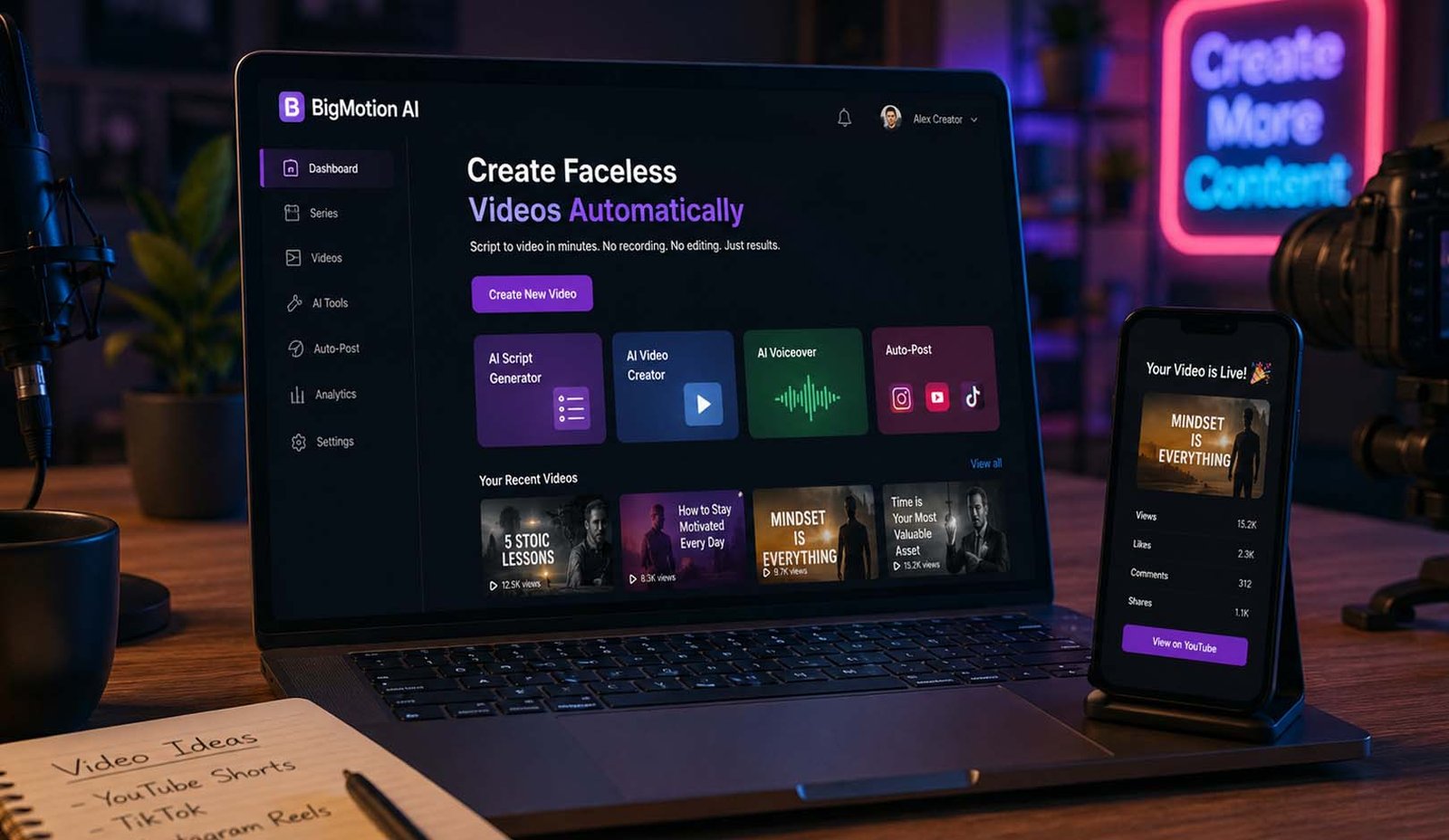
Have you ever wanted to make videos for TikTok, YouTube Shorts, or Instagram Reels but felt it was too hard or time-consuming? BigMotion AI is here to help. This smart tool lets you create videos without showing your face. It can turn your ideas into full videos quickly and easily.
BigMotion AI is designed for people who want to save time and make videos automatically. You do not need to learn video editing or spend hours making each video. The platform uses artificial intelligence to do almost everything for you.
In this article, we will explain how BigMotion AI works, what features it has, how much it costs, and who should use it. We will also talk about its strengths and weaknesses. By the end, you will know if this tool is right for you.
Many creators are already using BigMotion AI to grow their channels. It helps them make more videos, reach more viewers, and even earn money from their content. This article will guide you step by step to understand this tool fully.
What Is BigMotion AI?
BigMotion AI is a tool that helps you make videos automatically. It is powered by artificial intelligence. That means it can read your ideas or scripts and turn them into videos with voice, music, and visuals.
You can make videos without showing your face. The AI creates realistic avatars, captions, and background music. It can also post your videos to TikTok, YouTube Shorts, or Instagram Reels automatically.
The platform is designed for short videos. You can make clips from a few seconds to a few minutes long. It is especially useful for faceless content, like tips, tutorials, or marketing videos.
BigMotion AI is built to save time and reduce manual work. You do not need cameras, microphones, or editing software. You just enter your idea, and the AI does the rest.
Who Can Use BigMotion AI?
BigMotion AI is for anyone who wants to make videos easily. Content creators can use it to make YouTube Shorts or TikTok videos faster.
Social media managers can create multiple videos for clients without spending too much time. Entrepreneurs can make brand videos without hiring a team.
Even beginners with no video experience can use BigMotion AI. You do not need technical skills or editing knowledge. The platform is simple and beginner-friendly.
BigMotion AI is also good for people who want to make passive income. By creating videos automatically, you can build a channel or social account that may earn money over time.
How BigMotion AI Works
BigMotion AI works in a few simple steps. First, you pick a topic or idea for your video. You can write a script or let the AI help you create one.
Next, the AI chooses visuals, adds a voiceover, and selects background music. It can also add captions automatically. The result is a full video ready to watch.
After the video is ready, you can let BigMotion AI post it directly to TikTok, YouTube Shorts, or Instagram Reels. It can also schedule videos to post at the best time for your audience.
The platform works very fast. Videos that could take hours to make manually can be ready in just a few minutes. This allows creators to make many videos in a short time.
Key Features of BigMotion AI
BigMotion AI has many helpful features. One is AI avatars. These are realistic characters that speak your script. They look natural and lip-sync perfectly.
Another feature is image-to-video. You can upload pictures, and the AI will turn them into moving videos. You can even set start and end frames for animations.
BigMotion AI also adds music and voiceovers automatically. You can choose different voices or languages. The AI will match the mood and tone of your video perfectly.
Captions are added automatically, too. This makes videos easier to watch for people who prefer reading or have hearing difficulties. All features are designed to make video creation smooth and fast.
Creating Videos Step by Step
To make a video, first go to BigMotion AI and sign in. Then choose “New Series” or “New Video.” Pick your topic, style, language, and the platforms where you want it posted.
Next, write your script or let the AI generate one. You can add prompts like “Top 5 tips” or “How to cook pasta.” The AI will read your script and create a full video.
If you want, you can use images or start/end frames. BigMotion AI can animate them automatically. You can also adjust the aspect ratio for TikTok, YouTube, or Instagram.
Finally, click generate, and the AI will make your video. You can preview it, make small edits if needed, and let the platform post it automatically to your chosen channels.
How BigMotion AI Saves Your Time
Making videos the old way takes a lot of time. You have to write scripts, record clips, edit videos, add music, and then post them. This can take hours for just one video. BigMotion AI changes this whole process and makes it much faster.
With BigMotion AI, most of the work is done by the system. You only give a topic, and the tool creates the video for you. It writes the script, adds visuals, puts voice, and even adds captions. This saves a lot of time for creators.
Another great thing is batch work. You can create many videos at once. Instead of working on one video again and again, you can produce a full set of videos in one go. This is very helpful if you run multiple channels.
Because of this speed, creators can post more content. And when you post more videos, you have more chances to grow your account. So BigMotion AI not only saves time but also helps you grow faster.
Turn One Idea Into Many Videos
One strong feature of BigMotion AI is content reuse. This means you can take one idea and turn it into many videos. For example, one long video can become many short clips for social media.
You can take a YouTube video and turn it into TikTok clips or Instagram Reels. This helps you use the same content again in a smart way. You do not need to create new ideas every time.
BigMotion AI also helps turn scripts into different formats. A simple script can become a video, and the same idea can be used in many styles. This makes content creation easier and faster.
This feature is very useful for people who want to grow fast online. You can stay active on many platforms without doing extra work. It saves effort and increases your reach at the same time.
Pricing Plans and What You Get
BigMotion AI comes with simple monthly plans. Each plan gives you a set number of videos you can create every month. You can choose the plan based on your needs and goals.
The first plan is the Launch plan. It costs about $19 per month and lets you create around 12 videos. It is good for beginners who want to test the platform and start small.
The second plan is the Grow plan. It costs about $39 per month and allows up to 30 videos. This plan is better for people who want to post more often and grow faster.
The third plan is the Scale plan. It costs about $69 per month and gives you up to 60 videos. This is best for serious creators who want to build strong content channels and earn more from videos.
Good Things About BigMotion AI
BigMotion AI has many good points that make it popular. The biggest one is full automation. You do not need to do editing or recording. The tool does almost everything for you.
It is also very easy to use. Even if you have never made a video before, you can still use it without problems. The system is simple and beginner-friendly.
Another great benefit is faceless video creation. You do not need to show your face. This is perfect for people who want to stay private but still grow online.
The tool also supports many platforms. You can post on TikTok, YouTube Shorts, and Instagram Reels easily. This helps you reach more people without extra effort.
Things You Should Know Before Using It
Even though BigMotion AI is powerful, it has some limits. One issue is that it does not offer a free trial. You have to pay to use the platform. This can be a problem for some users.
Another point is limited control. Since the AI does most of the work, you may not be able to customize everything. Some users want more control over editing and design.
Also, some features are only available in higher plans. This means you may need to upgrade to get full access. The cost can increase if you want more videos.
Still, if your main goal is automation and speed, these limits may not matter much. It depends on what you need and how you plan to use the tool.
BigMotion AI vs Other Tools
BigMotion AI is not the only tool in the market. There are other platforms like Vidnoz AI that also help create videos using AI.
Both tools offer features like AI avatars, voiceovers, and templates. They help users create videos without recording themselves. This makes them good for faceless content.
However, BigMotion AI focuses more on full automation. It handles script, video, and posting in one flow. On the other hand, Vidnoz AI offers more free features and templates.
If you want a free option, Vidnoz AI may be better. But if you want full automation and less manual work, BigMotion AI can be the better choice.
Simple Tips to Get Better Results
If you want to get the best results, start with a clear topic. Choose something simple and useful, like tips, facts, or short guides. This makes your videos more engaging.
Try to stay consistent. Post videos regularly instead of posting once in a while. BigMotion AI makes it easy to create many videos, so use this feature wisely.
Also, test different styles. Try different voices, visuals, and formats. This helps you learn what your audience likes the most.
Finally, track your results. Check which videos get more views and likes. This will help you improve your future content and grow faster.
Final Thoughts
BigMotion AI is a smart and simple tool for video creation. It helps you create videos quickly without doing hard work. This makes it perfect for beginners and busy creators.
If you want to grow on TikTok, YouTube Shorts, or Instagram, this tool can help you stay active. It saves time and makes content creation easy.
However, it may not be perfect for everyone. If you want full control and deep editing, you may find it limited. Also, the cost can be a concern for some users.
Overall, BigMotion AI is a strong option if you want fast, simple, and automated video creation. It is a great tool for anyone who wants to build a faceless content channel in 2026.
(FAQs)
Is BigMotion AI free to use?
No, BigMotion AI is not free. It works on monthly plans. You need to pay to use its features and create videos.
Can beginners use BigMotion AI?
Yes, beginners can use it easily. You do not need editing skills. The AI handles most of the work for you.
Can I make money with BigMotion AI?
Yes, you can earn money by creating videos and growing your social media channels. Many users use it for passive income ideas.
Does BigMotion AI create videos automatically?
Yes, it creates videos automatically. It can write scripts, add visuals, voice, and captions without manual work.
Can I post videos directly to social media?
Yes, BigMotion AI can post videos to TikTok, YouTube Shorts, and Instagram Reels. It also allows scheduling.
Does BigMotion AI support different languages?
Yes, it supports multiple languages. You can create videos for a global audience with different voice options.
Is BigMotion AI good for faceless videos?
Yes, it is perfect for faceless videos. You can create content without showing your face or recording yourself.
Don’t miss these:
Kalon AI: A Complete Look at Its Features, Tools, and Benefits
Tikcotech Explained: The Smart App That Does Almost Everything

CFA Course Duration vs Career Advancement: Long-Term Perspective

When Your AC Breaks Down, Every Hour Counts

Why Power Washing Is the Best Thing You Can Do for Your Property This Season

When Your Furnace Fails, Fast Help Makes All the Difference

When Your Toilet Breaks, You Need More Than a Quick Fix

Beyond the Thermal Baths: A Surprising Reason to Visit Hungary

How to Create the Perfect Gift Box: Tips, Ideas & Inspiration

How the Best Chronic Care Management Software Supports Care Coordination?

How to Prepare Your Business for HubSpot Migration Services

Why Tankless Water Heaters Are the Upgrade Your Home Deserves

Best Video Doorbell Without Subscription Storage Guide

How to Build and Scale an SEO Agency Without Spending Thousands on Tools

How Dissertation Writer AI Assists Students From Topic Selection to Completed Dissertation

The Worst Truck Accidents in U.S. History and What They Changed About Road Safety

Why Renting a Private Home Near an Active Volcano Is Safer Than You Think

Why Posters Still Matter in a Fast-Scrolling Digital World

Men’s Western Shirts Ideas: 3 Styling Formulas for a Cool Summer

MacBook Air Computer Charger: Features, Performance, and Computer Charger MacBook Compatibility Guide

When Connectivity Counts, Telecommunications Contractors Deliver

Desktop Essentials: Why Custom Printed Notepads Never Go Out of Style
CFA Course Duration vs Career Advancement: Long-Term Perspective
When Your AC Breaks Down, Every Hour Counts
Why Power Washing Is the Best Thing You Can Do for Your Property This Season
When Your Furnace Fails, Fast Help Makes All the Difference
When Your Toilet Breaks, You Need More Than a Quick Fix
Beyond the Thermal Baths: A Surprising Reason to Visit Hungary
How to Create the Perfect Gift Box: Tips, Ideas & Inspiration
How the Best Chronic Care Management Software Supports Care Coordination?
How to Prepare Your Business for HubSpot Migration Services
Why Tankless Water Heaters Are the Upgrade Your Home Deserves
-

 Biography5 months ago
The Emotional Journey of Joanne Schieble Simpson, Steve Jobs’ Biological Mother
-

 News4 months ago
Jamal Adeen Thomas – Everything You Should Know About Clarence Thomas’ Son
-

 Biography5 months ago
Meet Theo Ressler: Everything You Know About Jami Gertz’s son
-

 Blog1 month ago
What Is Sotwe? Everything You Need to Know Before Using It