Making videos used to be hard for many people. You often needed special software, editing skills, and many hours of work. Because of this, many people gave up on their video ideas before they even started. Today, things are very different. AI tools are helping people create videos much faster and with much less effort.
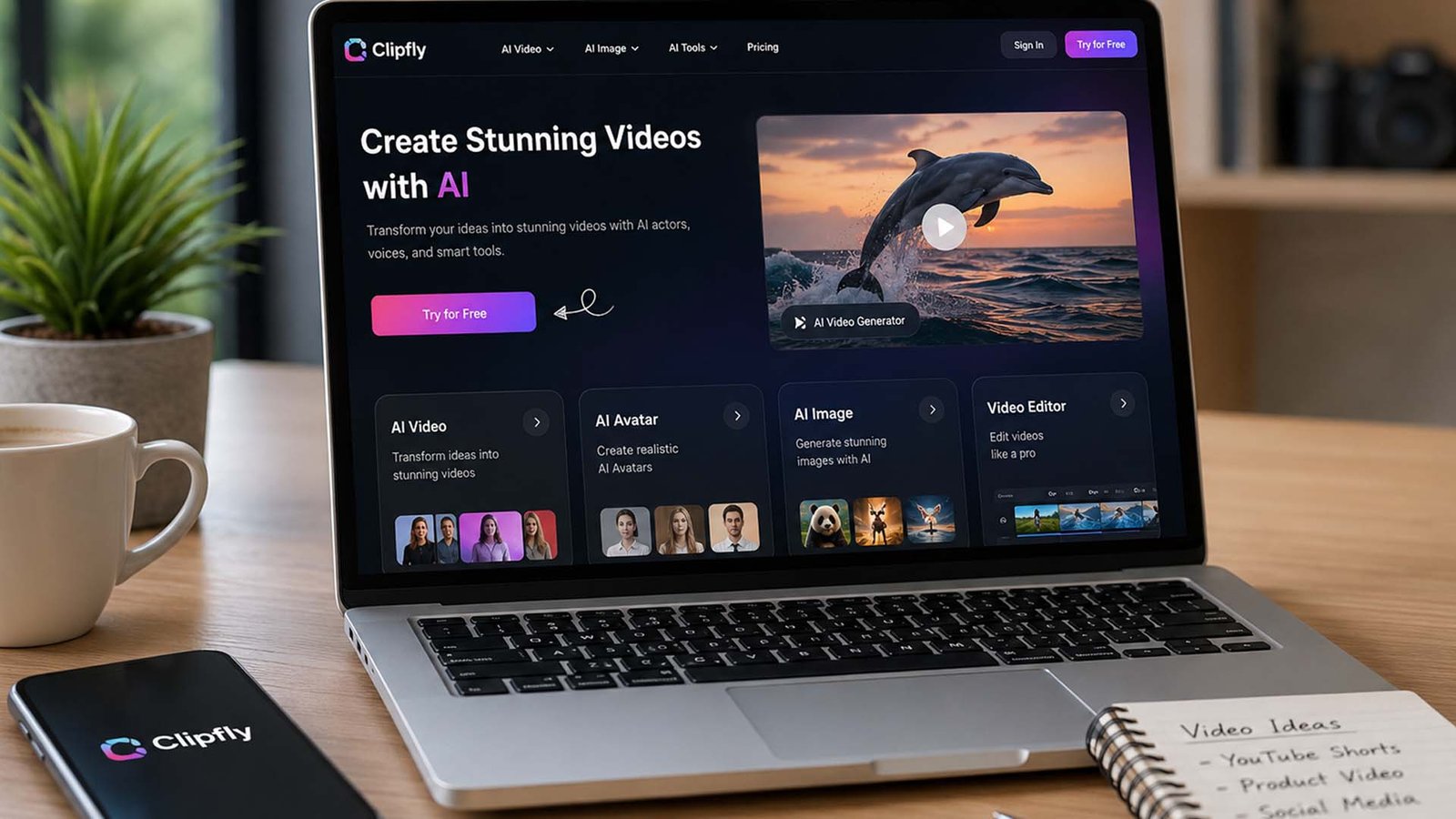
One tool that has been getting a lot of attention is Clipfly AI. This online platform uses artificial intelligence to help people create, edit, and improve videos in a simple way. Whether you run a business, create social media content, teach online, or simply enjoy making videos for fun, Clipfly AI offers tools that can make the process much easier.
Imagine turning a simple idea into a video in just a few minutes. Or taking an old photo and making it move like a real video. These are the kinds of things that Clipfly AI is designed to do. You do not need years of editing experience or expensive equipment to get started.
In this guide, we will explore everything you need to know about Clipfly AI. We will look at its features, tools, pricing, benefits, and real uses. By the end, you will have a clear idea of whether this AI video creator is the right choice for your needs.
What Is Clipfly AI?
Clipfly AI is an online video creation and editing platform powered by artificial intelligence. It helps users create videos from text prompts, images, and existing video clips. Instead of spending hours editing every small detail, users can let AI handle much of the work.
The platform is designed for beginners as well as people who already create content regularly. You do not need advanced editing knowledge to use it. The tools are organized in a simple way, making it easy to understand where everything is located.
One reason why Clipfly AI has become popular is its ability to handle many tasks inside one platform. Instead of using separate tools for editing, animation, voice generation, and video enhancement, users can access everything from one dashboard.
Another reason people like Clipfly AI is that it works directly through a web browser. There is no need to install large programs on your computer. You can sign in, start creating, and manage projects online from almost anywhere.
How Clipfly AI Works
Getting started with Clipfly AI is simple. Users can create an account using an email address. The signup process takes only a few minutes, making it easy for new users to begin quickly.
After logging in, users arrive at a clean dashboard. The layout is easy to understand, even for people who have never used video editing software before. Important tools are clearly labeled, helping users find what they need without confusion.
The dashboard includes sections for AI video generation, editing tools, templates, and other creative features. Everything is placed in an organized way, which helps users move smoothly from one step to the next.
Whether you want to create a video from text, animate a photo, improve video quality, or remove unwanted objects, the process follows simple steps. This easy setup is one of the biggest reasons many people choose Clipfly AI.
Clipfly AI Text to Video Tool
One of the most popular features inside Clipfly AI is the text-to-video tool. This feature allows users to type a prompt or short description and let the AI create a video based on those words.
For example, a user might type a prompt about a sunset over the ocean, a busy city street, or a travel adventure. The AI then creates video scenes that match the description. This helps users save a huge amount of time during content creation.
This feature is especially useful for content creators, marketers, and business owners. Instead of recording every scene manually, they can quickly create videos that support their ideas and messages.
Clipfly AI also offers different visual styles for generated videos. Users may find options such as digital art, anime-inspired looks, creative designs, and other styles that help match the theme of their project.
Another benefit is speed. Traditional video production can take days or even weeks. With AI video generation, users can create content much faster while still getting attractive results that are ready for editing and sharing.
Clipfly AI Image to Video Tool
Many people have photos they would love to bring to life. The image-to-video feature in Clipfly AI helps make that possible. Users can upload a picture and turn it into a moving video.
This feature adds motion and visual effects to still images. A photo that once looked simple can become much more exciting when movement is added. This can help make content more engaging for viewers.
Social media creators often use image-to-video tools to make posts stand out. Instead of sharing a normal picture, they can create a short video that catches attention while people scroll through their feeds.
Businesses can also use this feature for product photos, advertisements, and promotions. Even a simple image can become a more interesting piece of content when transformed into a short video.
The image-to-video tool is also helpful for personal projects. Family photos, travel memories, and special moments can feel more alive when movement and animation are added through AI technology.
Clipfly AI Photo Animator
Another exciting feature is the AI photo animator. This tool takes image animation one step further by adding facial expressions and movement to photos.
Imagine finding an old family picture and seeing it move naturally. The photo animator helps create that experience. Faces can appear more lively, making old memories feel fresh again.
Content creators often use this feature to create unique posts that grab attention. Animated photos usually attract more interest than standard pictures because they feel more interactive and fun.
Businesses can also use animated images in marketing campaigns. These moving visuals can help products and messages stand out from other content online.
The photo animator is a good example of how Clipfly AI goes beyond basic video editing. It gives users creative options that would normally require special software and advanced skills.
Clipfly AI Video Enhancer
Not every video looks perfect when it is first recorded. Sometimes videos are too dark, blurry, or lack clear colors. This is where the Clipfly AI video enhancer becomes useful.
The video enhancer is designed to improve video quality with just a few clicks. Users can upload a video and allow AI to make it look cleaner, brighter, and more detailed.
One of the most useful features is low-light improvement. Videos recorded in poor lighting often look difficult to watch. The AI can help brighten these clips and make important details easier to see.
The tool can also improve colors and contrast. This helps videos look more natural and more attractive. Colors become richer, while important parts of the video become easier to notice.
Another helpful feature is noise reduction. Some videos contain unwanted grain or visual distractions. The AI works to reduce these problems and create a smoother viewing experience.
Slow-motion videos can also benefit from enhancement. Clipfly AI helps improve frame quality so slow-motion scenes appear cleaner and more enjoyable to watch.
Clipfly AI Editing Tools
While AI features receive a lot of attention, Clipfly AI also includes many traditional editing tools. These tools help users make final changes and polish their projects before sharing them.
Users can trim videos to remove unwanted sections. This is useful when there are mistakes, extra footage, or parts that do not fit the final project. Small changes like these can make a video look much more professional.
The platform also allows users to split clips and combine multiple videos together. This helps create smooth stories and presentations. Instead of working with several separate files, users can organize everything into one final video.
Other editing tools include rotating videos, resizing content, adding text, and placing titles on the screen. These simple features help creators make videos that are easier to watch and understand.
Filters, transitions, and visual effects are also available. These tools help videos flow smoothly from one scene to another while giving projects a polished and attractive appearance.
Here is the second half of the article.
More AI Tools Inside Clipfly AI
Clipfly AI is not only for making videos from text or images. It also gives users many extra AI tools that can help make videos better, cleaner, and more fun. These tools are useful when you want to fix small problems or add something fresh to your video.
One helpful tool is the AI voice generator. This lets users add voiceovers without recording their own voice. It can save time for people who make explainers, ads, lessons, or short social media videos. A clear voice can make a video easier to follow.
Clipfly AI also has a background remover. This tool can remove a video background without using a green screen. This is helpful for product videos, talking videos, school videos, and business content. It makes the video look cleaner and more focused.
There is also an object remover. This can help remove things you do not want in a video. For example, if there is a small item in the background that looks messy, this tool can help clean it. This makes the final video look more polished.
Other tools include talking avatar, face dance, video clearer, watermark remover, and audio tools. Some of these tools may use credits. This means users should check how many credits they have before using them.
Templates and Media Library
Clipfly AI also offers templates and ready-made design items. This is helpful for people who do not want to start from a blank screen. A template gives you a simple starting point and helps your video look more professional.
Templates can save a lot of time. For example, if you need a short ad, a social media post, or a simple promo video, you can pick a template and then change the text, music, colors, and clips. This is much faster than building everything from zero.
The platform also includes a media library. This may include royalty-free music, images, clips, stickers, fonts, and other design items. These things help users create better videos without searching on many other websites.
This is useful for creators, teachers, businesses, and students. A good song, nice font, or clean sticker can make a simple video feel more complete. These small parts can make a big difference in how the video looks.
The free plan may have fewer media items, while the paid plan gives users more options. So, if someone makes videos often, the bigger media library can be a helpful reason to try the Pro plan.
Clipfly AI Pricing and Plans
Clipfly AI has a free plan, which is good for people who want to try the platform before paying. The free plan includes many basic editing tools and watermark-free exports. This is useful because many free video tools add a watermark to exported videos.
The free plan may include over 100 video editing functions, limited royalty-free audio, limited stock images, limited stock videos, limited stickers, limited fonts, and around 500MB of cloud storage. It may also allow exports up to 1080P.
Still, the free plan has limits. Some tools, such as text-to-speech, auto captions, audio extraction, MP3 export, extra credits, and higher-quality export options, may not be included. So, it is best for light use and simple projects.
Clipfly AI also has a Pro plan. The price may change over time, so users should always check the official website for the latest details. In the information we reviewed, the Pro plan was listed at yearly prices such as $49.99 or $69.99, depending on the source and offer.
The Pro plan may include higher export quality, such as 2K and 4K, more royalty-free audio, more stickers, more stock images, more stock videos, more fonts, more cloud storage, and monthly credits. This makes it better for people who create videos often.
Clipfly AI Credits System
Clipfly AI also uses a credit system for some AI tools. This means some tools may cost a set number of credits each time you use them. This helps users pay for or use advanced tools in a more flexible way.
For example, the video generator may use credits for each clip. Talking avatar, photo animator, background remover, object remover, face dance, video enhancer, video clearer, and watermark remover may also use credits.
This system can be useful because not every user needs every AI tool all the time. A person who only wants basic editing may not need many credits. But a creator who uses AI video tools daily may need more.
Before using any credit-based tool, users should check the current credit cost inside the platform. This helps avoid confusion and makes it easier to plan projects.
The credit system is also important for businesses and freelancers. If they create videos for clients, they should know how many credits each project may need. This helps them manage time, cost, and work better.
Who Should Use Clipfly AI?
Clipfly AI can be useful for many types of users. It is good for social media creators who need quick videos for TikTok, Instagram, YouTube Shorts, Facebook, or other platforms. Short videos are now very popular, so fast tools can help a lot.
Business owners can also use Clipfly AI for ads, product videos, brand posts, and simple promo content. They may not have a full video team, so an easy online video tool can save money and time.
Teachers and students may find it helpful for class projects, learning videos, and school presentations. A boring topic can feel more interesting when it is shown through a clear and simple video.
Freelancers can also use Clipfly AI to create client videos faster. They can use templates, AI tools, editing features, and stock media to finish simple projects in less time.
Personal users can use it too. They can make birthday videos, travel clips, family memory videos, and animated photos. Not every video needs to be for business. Sometimes, it is just about saving a sweet moment in a fun way.
Good Things and Bad Things
One of the best things about Clipfly AI is that it is easy to use. The dashboard is simple, and the tools are easy to find. This makes it friendly for beginners who feel nervous about video editing.
Another good thing is speed. Users can create videos from text, turn photos into moving clips, improve video quality, and edit videos without using many different apps. This saves time and keeps the work in one place.
Clipfly AI also gives users many tools in one platform. It has video generation, editing tools, photo animation, voiceovers, background removal, object removal, templates, media items, and export options. This makes it more useful than a basic editor.
But there are also some limits. The free plan has limited storage and fewer media items. Some advanced tools need credits. Also, new users may need some time to understand all the features.
Performance may also depend on the device and internet connection. Some AI tools can take more time, especially on older or weaker devices. Still, for many users, the ease and tools make Clipfly AI worth trying.
Clipfly AI vs Other Video Tools
Clipfly AI is part of a growing group of AI video tools. Some users may compare it with tools like Pictory and Synthesia. Each platform has its own strong points, so the best choice depends on what the user needs.
Pictory is often used to turn long content into short videos. It can be useful for blogs, scripts, and long text. If someone wants to repurpose written content into short videos, Pictory may be a good choice.
Synthesia is known for AI avatar videos. It is often used for training, business explainers, and videos where a virtual speaker talks on screen. If someone mainly needs avatar-based videos, Synthesia may be a better fit.
Clipfly AI feels more like an all-in-one creative video tool. It focuses on text-to-video, image-to-video, photo animation, video editing, video enhancement, and many extra AI tools in one place.
This makes Clipfly AI a good choice for people who want a simple tool that can handle many creative tasks. It may be especially helpful for beginners, small businesses, and creators who want quick results without learning hard software.
Final Thoughts
Clipfly AI is a helpful tool for people who want to create videos without making the process hard. It brings many video tools into one online platform, which makes it useful for beginners and regular creators.
The platform can help users create videos from text, turn images into videos, animate photos, improve video quality, remove backgrounds, remove objects, add voiceovers, and edit clips. These features make it more than just a simple video editor.
The free plan is a good way to test the platform. It gives users basic tools and watermark-free exports, which is a strong point. The Pro plan and credit system may be better for users who need more power and better export quality.
Of course, Clipfly AI is not perfect. The free storage is limited, some tools need credits, and advanced features may take time to learn. But for many users, these limits are normal for an AI video platform.
Overall, Clipfly AI is worth trying if you want a simple, fast, and creative way to make videos in 2026. It is especially useful for social media creators, small business owners, teachers, students, freelancers, and anyone who wants to turn ideas into videos without stress.
(FAQs)
What is Clipfly AI?
Clipfly AI is an online AI video tool. It helps users create, edit, and improve videos with simple tools. Users can make videos from text, images, and video clips.
Is Clipfly AI free to use?
Clipfly AI has a free plan. The free plan may include basic editing tools, limited media items, cloud storage, and watermark-free exports. Some advanced tools may need a paid plan or credits.
Can Clipfly AI make videos from text?
Yes, Clipfly AI can make videos from text prompts. You can type an idea, short script, or scene, and the AI can create video content from it.
Can Clipfly AI improve old or dark videos?
Yes, Clipfly AI has a video enhancer tool. It can help brighten dark videos, improve colors, reduce noise, and make videos look clearer.
Is Clipfly AI good for social media videos?
Yes, Clipfly AI can be helpful for social media videos. It can create short clips, animated photos, product videos, ads, and content for platforms like TikTok, Instagram, YouTube Shorts, and Facebook.
Does Clipfly AI remove video backgrounds?
Yes, Clipfly AI includes a background remover tool. It can help remove video backgrounds without a green screen, which is useful for clean and professional-looking videos.
Is Clipfly AI good for beginners?
Yes, Clipfly AI is beginner friendly. Its dashboard is simple, and most tools are easy to understand. New users may still need some time to learn the advanced features.
Don’t miss these:
What Is Chi-Square Test? Explanation for Everyone
Alhambra Palace Night Tours: Attendance, Revenue, and the Secret Behind Its Success





 Biography6 months ago
 News6 months ago
 Blog3 months ago
 Biography6 months ago