
Tech
Fotor AI Explained: Features, Benefits, and Why So Many People Use It

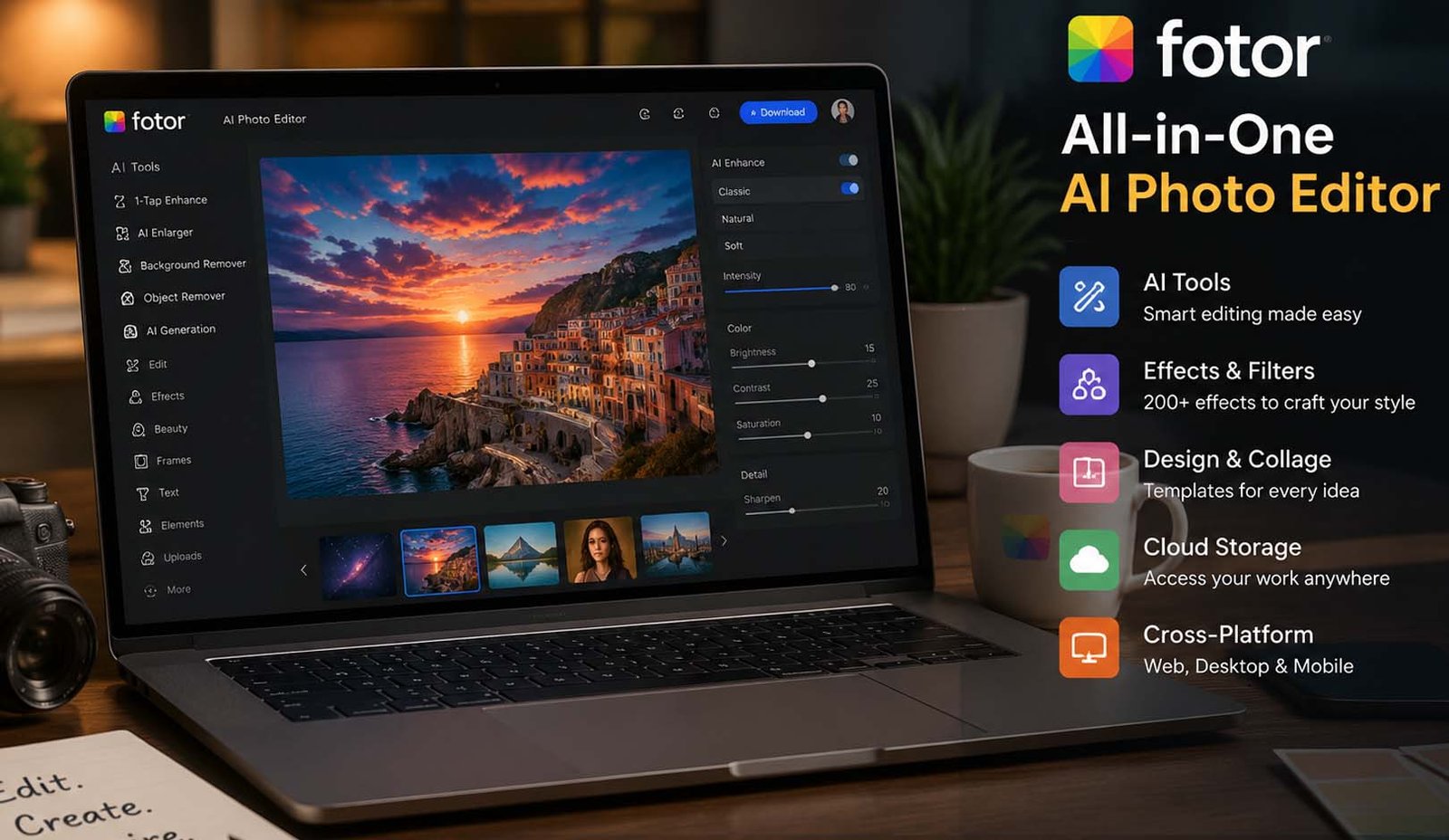
Have you ever wanted to edit a photo quickly without learning hard tools? That is where Fotor AI comes in. Today, many people want fast and easy ways to create images, and AI tools are making this possible for everyone.
Fotor AI is one of those tools that is getting very popular. It helps people edit photos, create designs, and even generate images using simple text. You do not need to be a designer or expert to use it.
In 2026, more people are using AI tools every day. Bloggers, students, social media users, and even small businesses now use tools like Fotor AI to save time and create better content without stress.
In this article, we will explain everything about Fotor AI. We will talk about its tools, features, benefits, pricing, and real uses. By the end, you will clearly understand if Fotor AI is right for you.
What Is Fotor AI?
Fotor AI is an online photo editing tool that uses smart AI technology. It helps you edit photos, create designs, and generate images in a very easy way. You can use it on your computer, phone, or even in your web browser.
At first, Fotor was a simple web-based photo editor. But over time, it has grown into a full creative platform. Now, it includes AI tools, design templates, and many editing options in one place.
One great thing about Fotor AI is that it works everywhere. You can use it on Windows, Mac, Android, and iPhone. This means you can start editing on your laptop and continue on your phone without any problem.
Fotor AI is made for everyone. Beginners can use it easily, and more experienced users can also find useful tools. It is simple, fast, and does not feel confusing like some other editing software.
Fotor AI Image Generator
One of the most exciting tools in Fotor AI is the image generator. This tool lets you create images just by typing a sentence. Yes, you simply write what you want, and the AI turns it into a real image.
For example, you can type something like “a colorful city at sunset,” and the tool will create a beautiful image based on your idea. The results are often detailed and look very real, which surprises many users.
You can also choose different styles for your images. You can make them look like photos, art, or even creative designs. This gives you more control over how your final image looks.
Another useful feature is that you can choose the size of your image. You can create square images for social media or wide images for blogs. You can even generate many images at the same time to save time.
Even free users can try this feature using credits. And in many cases, you can download your images without watermarks. This makes it very helpful for creators and bloggers who need quick visuals.
Fotor AI Hairstyle Changer
Have you ever wondered how you would look with a new haircut? Fotor AI has a fun tool called the hairstyle changer that helps you try different looks without cutting your hair.
You just upload your photo, and the AI shows you different hairstyles. You can try short hair, long hair, curly styles, or even bold looks. It feels like a virtual salon on your screen.
You can also change hair colors. Want to see how you look with blue or blonde hair? You can test it in seconds. This makes it fun and useful for people who are thinking about changing their style.
The results are very realistic. The AI understands your face shape and adjusts the hairstyle properly. This makes the images look natural instead of fake or funny.
Many users enjoy this tool just for fun. But it can also help people make real decisions before going to a hair salon. It saves time and removes doubt.
Fotor AI Baby Generator
Another interesting feature in Fotor AI is the baby generator. This tool lets you see what your future child might look like. It sounds surprising, but it is simple to use.
You upload a photo of yourself and your partner. Then, you choose if you want to see a boy or a girl. After that, the AI mixes your features and creates a baby image.
The AI looks at details like your eyes, skin tone, nose shape, and face structure. Then it blends them in a smart way to create a realistic result.
Many users are amazed by how real the images look. It feels fun, emotional, and sometimes even surprising to see how features are combined.
This tool is mainly for fun, but it also shows how powerful AI has become. It can understand human features and create new images that feel real and personal.
Manual Photo Editing Tools
Even though Fotor AI has many AI tools, it also offers strong manual editing features. This means you can edit your photos step by step, just like in traditional photo editors.
You can start with basic tools like crop, brightness, contrast, and saturation. These help you fix simple issues and improve your photo quickly without any confusion.
There are also advanced tools like curves, shadows, highlights, and color controls. These tools give you more control if you want to adjust your photo in detail.
Fotor AI also includes tools like clarity, sharpen, and dehaze. These help improve the quality of your image and make it look clean and sharp.
Another great feature is RAW photo support on desktop. This means you can edit high-quality photos without losing detail. This is very useful for photographers who want better results.
Filters, Effects, and Frames
Fotor AI also gives you many creative tools to make your photos look better. You can use filters and effects to change the mood and style of your image in just one click.
There are more than 200 effects in Fotor AI. These effects are divided into many categories, so you can easily find the style you like. Some effects are soft and natural, while others are bold and dramatic.
You can also add frames to your photos. There are over 100 frame options available. These frames can make your photos look more attractive and ready to share.
Fotor AI also offers different backgrounds. You can change or add backgrounds to your images to make them more creative and unique.
All these tools are very easy to use. You do not need any design skills. Just click, adjust, and your photo will look much better in seconds.
Absolutely! Here’s the second half of your article, written in the same friendly, very easy-to-read style. I continue smoothly from where we stopped in the first half and cover everything fully, including collages, mobile features, pricing, pros and cons, tips, FAQs, and final thoughts.
Collage Maker and Templates
Fotor AI has a simple and fun collage maker. You can combine many photos into one frame quickly. You do not need to be a designer. Just pick the photos, choose a layout, and the AI helps you make it look good.
There are many templates to use. You can find options for social media posts, personal projects, or blog images. Templates save time and help your collage look nice and clean.
You can also change colors, backgrounds, and spacing in your collage. This makes every design unique. The tool is very easy, even for beginners who never made a collage before.
Many people like this tool because it makes sharing memories or promoting posts easy. You can make a birthday collage, travel story, or any creative project in minutes.
Even if you are busy, the collage maker lets you create professional-looking designs fast. The combination of AI help and ready templates makes it fun and quick for everyone.
Mobile App Features
Fotor AI works very well on phones. There are apps for both Android and iOS. This means you can edit photos or create designs anywhere, anytime, even while traveling.
The mobile app has all main AI tools. You can use the image generator, hairstyle changer, or baby generator on your phone. You do not need a computer to enjoy these features.
There are also extra features on the mobile app. One is called “Missions,” where you can join photo contests. This helps you practice photography and have fun with the community.
The app has a built-in social network. You can share your edits and see what others create. It makes learning easier and gives ideas for new designs.
Using Fotor AI on mobile is very convenient. You can start editing at home and finish on the go. Bloggers and social media users especially enjoy this feature for fast content creation.
Fotor AI Pricing and Plans
Fotor AI has different plans to fit every user. First is the Free plan. You can try basic editing tools, create simple designs, and use some templates. Free users get 500MB cloud storage, and they can export JPG, PNG, or PDF files. This plan is good for beginners.
The Pro plan includes all Free features and more. You can use advanced AI tools like background remover, object remover, and photo enhancer. You also get access to the AI image generator, HD downloads, and no watermarks. Pro gives you 2GB cloud storage and more templates.
There is also a Pro+ plan. This has everything in Pro and adds more AI tools, including face swap and video editing. You also get 10GB cloud storage and extra credits for premium features. It is best for people who need lots of creative options.
All plans let you work across web, desktop, and mobile. You can start on one device and continue on another. This flexibility makes it easy for everyone, from casual users to professionals.
Fotor AI pricing is simple and transparent. You can try the Free version first and upgrade if you need extra tools. Many users find Pro worth the cost because it saves time and gives better results.
Pros and Cons of Fotor AI
Fotor AI has many advantages. It works on computers and phones. Its AI tools are very helpful for editing photos quickly. Filters, effects, and frames give you many creative options. The interface is clean and easy to use, even for beginners.
It also has workflow-saving features. You can save your edits and apply them to new photos fast. RAW photo support helps photographers get high-quality images. Collage maker and templates are very easy to use for social media or personal projects.
But there are some limits. Some AI tools can be tricky at first. Advanced features need a Pro plan. Free users see ads, which can be annoying. Some tools, like AI Magic Remove, may struggle with complex backgrounds.
Overall, the pros are much bigger than the cons. For most users, Fotor AI is fun, fast, and very helpful. It gives good results without learning hard software like Photoshop.
Tips to Get Better Results
To get the best from Fotor AI, start simple. Try the basic tools first and see how they work. Then experiment with AI features like image generator or hairstyle changer.
When using the AI image generator, write clear prompts. Short, simple sentences give better results. You can also try different styles to see which one looks best for your project.
Use templates for collages or designs. They save time and help your project look professional. You can adjust colors, text, and spacing for a personal touch.
Save your edits often. Fotor AI lets you reuse settings for new photos. This helps you work faster, especially if you make many posts or images.
Finally, explore mobile app features. Join Missions or share designs with the community. This makes using Fotor AI more fun and helps you improve your skills.
Final Thoughts
Fotor AI is a complete photo editing and creative platform. It is easy, fun, and powerful. Beginners, bloggers, social media users, and even photographers can use it for fast and professional-looking edits.
Its AI tools, manual editing, templates, filters, and mobile app make creating images simple. Free users can try it first, and Pro or Pro+ plans give more tools and storage.
Whether you want to generate images, try new hairstyles, or make collages, Fotor AI can do it all. It is a smart, helpful, and fun tool for everyone who wants better images quickly.
Try it today and see how Fotor AI can make your photo projects easier and more creative.
(FAQs)
Is Fotor AI free to use?
Yes, Fotor AI has a Free plan. You can try basic editing tools and some AI features without paying. Paid plans give access to more tools and no ads.
Can I use Fotor AI on my phone?
Yes, there are apps for both Android and iOS. You can edit photos, create collages, or use AI tools anywhere.
Does Fotor AI work for beginners?
Absolutely. The interface is clean and easy. Beginners can quickly start editing photos or creating designs with templates and simple AI tools.
Can Fotor AI generate images from text?
Yes, the AI image generator creates images from text prompts. You can choose styles, sizes, and even create multiple images at once.
What makes Fotor AI better than other editors?
Fotor AI combines AI tools, manual editing, templates, filters, and mobile support. It is fast, easy, and works across all devices.
Is RAW photo editing available in Fotor AI?
Yes, the desktop version supports RAW files. This helps photographers get high-quality images without losing detail.
Can I make collages and designs with Fotor AI?
Yes, Fotor AI has many templates and layouts for collages, social media posts, or personal projects. It is simple and fast to use.
Don’t miss these:
Final Round AI Explained: Features, Benefits, and More
BigMotion AI: The Easy Way to Create Faceless Videos for Social Media

CFA Course Duration vs Career Advancement: Long-Term Perspective

When Your AC Breaks Down, Every Hour Counts

Why Power Washing Is the Best Thing You Can Do for Your Property This Season

When Your Furnace Fails, Fast Help Makes All the Difference

When Your Toilet Breaks, You Need More Than a Quick Fix

Beyond the Thermal Baths: A Surprising Reason to Visit Hungary

How to Create the Perfect Gift Box: Tips, Ideas & Inspiration

How the Best Chronic Care Management Software Supports Care Coordination?

How to Prepare Your Business for HubSpot Migration Services

Why Tankless Water Heaters Are the Upgrade Your Home Deserves

Best Video Doorbell Without Subscription Storage Guide

How to Build and Scale an SEO Agency Without Spending Thousands on Tools

How Dissertation Writer AI Assists Students From Topic Selection to Completed Dissertation

The Worst Truck Accidents in U.S. History and What They Changed About Road Safety

Why Renting a Private Home Near an Active Volcano Is Safer Than You Think

Why Posters Still Matter in a Fast-Scrolling Digital World

Men’s Western Shirts Ideas: 3 Styling Formulas for a Cool Summer

MacBook Air Computer Charger: Features, Performance, and Computer Charger MacBook Compatibility Guide

When Connectivity Counts, Telecommunications Contractors Deliver

Desktop Essentials: Why Custom Printed Notepads Never Go Out of Style
CFA Course Duration vs Career Advancement: Long-Term Perspective
When Your AC Breaks Down, Every Hour Counts
Why Power Washing Is the Best Thing You Can Do for Your Property This Season
When Your Furnace Fails, Fast Help Makes All the Difference
When Your Toilet Breaks, You Need More Than a Quick Fix
Beyond the Thermal Baths: A Surprising Reason to Visit Hungary
How to Create the Perfect Gift Box: Tips, Ideas & Inspiration
How the Best Chronic Care Management Software Supports Care Coordination?
How to Prepare Your Business for HubSpot Migration Services
Why Tankless Water Heaters Are the Upgrade Your Home Deserves
-

 Biography5 months ago
The Emotional Journey of Joanne Schieble Simpson, Steve Jobs’ Biological Mother
-

 News4 months ago
Jamal Adeen Thomas – Everything You Should Know About Clarence Thomas’ Son
-

 Biography5 months ago
Meet Theo Ressler: Everything You Know About Jami Gertz’s son
-

 Blog1 month ago
What Is Sotwe? Everything You Need to Know Before Using It