Starting a business or working with a company can feel exciting. You may have a great idea, or someone may offer you a deal that sounds good. But here is a simple question. How do you know the business is real? This is where NC SOS Business Search becomes very helpful.
In 2026, many people do business online. You see websites, ads, and social pages every day. But not all of them are real or properly registered. That is why checking official records is so important before you trust any company.
The NC SOS Business Search is a simple tool that helps you check real business details. It is run by the North Carolina Secretary of State. It lets you search companies and see their official records in just a few minutes.
In this guide, we will walk step by step. You will learn how to search a company, what details you can find, and how to read everything in a simple way. By the end, you will feel more confident before making any business decision.
What Is NC SOS?
The term NC SOS stands for North Carolina Secretary of State. This is a government office that keeps official records for businesses in North Carolina. If a company is registered in that state, its details are stored here.
This office handles many types of business records. It includes LLCs, corporations, and partnerships. So, if someone says they own a company in North Carolina, you can check it using the NC SOS system.
The best part is that this system is open to the public. Anyone can use it. You do not need special access. You can simply search and see real details without paying anything in most cases.
Think of NC SOS like a trusted source. Instead of guessing or trusting what someone says, you can check the facts. This makes your decisions safer and smarter when dealing with businesses.
Why People Use NC SOS Business Search
People use NC SOS Business Search for many simple reasons. The biggest reason is to check if a business is real. In today’s world, this step can save you from scams and bad deals.
For example, imagine someone asks you to invest money in their company. Before you send any money, you can search their business name. If you do not find it, that can be a warning sign.
Business owners also use this tool before starting a company. They want to check if their business name is already taken. This helps them avoid problems later when building their brand.
Even customers use it. If you are buying something expensive, you may want to check if the company is properly registered. This small step builds trust and helps you feel more safe.
What You Can Find in a Business Record
When you use NC SOS Business Search, you can find many useful details in one place. These details help you understand a company better before making any decision.
Here are some main things you can see:
-
Business name
-
SOSID number (unique ID)
-
Business type (LLC, corporation, etc.)
-
Formation date
-
Business status
-
Registered agent
-
Office and mailing addresses
-
Filing history
Each of these details tells you something important. For example, the formation date shows how old the company is. The status tells you if it is active or closed. These small details can make a big difference.
Instead of guessing, you get clear and real information. This helps you feel more confident when dealing with any business in North Carolina.
How To Search a North Carolina Company
Using the NC SOS Business Search is very simple. You do not need any special skills. You just need a few minutes and the company name you want to check.
First, go to the official North Carolina Secretary of State website. Then find the business search option. This is where you can start your search easily.
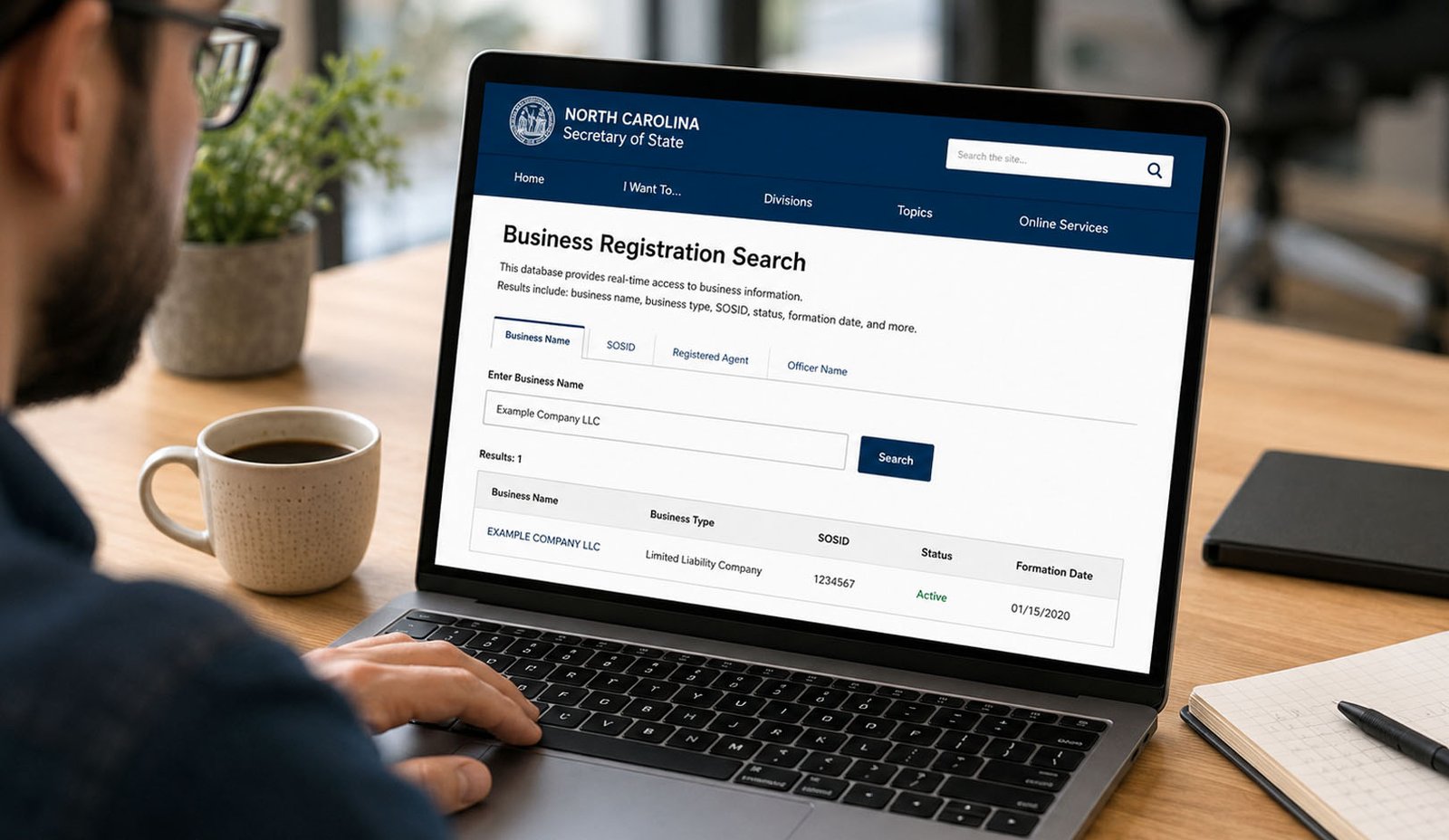
Next, type the business name or a keyword. Press the search button and wait for the results. You will see a list of companies that match your search.
Finally, click on the correct company. This will open the full record. You can then read all the details and understand the business clearly.
Ways To Search on NC SOS
There are different ways to search on NC SOS. This makes the tool flexible and helpful for many people. You can choose the method that works best for you.
The most common way is to search by business name. This is easy and works well for most users. You just type the name and see the results.
You can also search by SOSID number. This is useful if you already know the exact business ID. It helps you find the exact company quickly.
Other options include searching by registered agent or company officer. These methods are helpful when you have limited information but still want to find the right business.
How To Read Search Results
After you search, you will see a results table. At first, it may look a little confusing. But once you understand it, it becomes very easy to read.
The table usually shows the business name, SOSID number, and type. You may also see other small details that help you identify the company.
One important thing is to check the name carefully. Many companies have similar names. Do not click the first result without checking the full name.
When you open a record, you will see more details like status, date formed, and addresses. This is where the real information is. Take your time and read it properly.
What Business Status Means
The business status is one of the most important parts of the record. It tells you if the company is active or not. This can help you make better decisions.
If the status says active, it means the business is currently registered. This is usually a good sign. It shows the company is still running in the system.
If the status says dissolved, the business may have closed. If it says suspended, there may be some problems with filings or rules.
Always check this section first. Before you trust a company or send money, make sure the status looks safe. This small step can protect you from big problems.
How To Check LLCs and Corporations
You can easily check both LLCs and corporations using NC SOS Business Search. The process is almost the same, and it only takes a few minutes.
For an LLC, you can search the name and open the record. You will see details like business type, status, and formation date. This helps you confirm if the company is properly registered.
For corporations, you can also find similar details. In some cases, you may see more information like officers or company structure.
This makes the tool very useful for different types of businesses. Whether it is a small LLC or a big corporation, you can check everything in one place.
How To View Filing History
When you open a company record in NC SOS Business Search, you will see a section called filing history. This part shows all the important documents that the business has submitted over time. It helps you understand what has happened inside the company.
For example, the first filing is usually the creation document. This is when the business was first formed. It shows when the company started and how it was registered in the system.
You may also see amendment filings. These are changes made later. A company may change its name, address, or other details. These updates are recorded so you can see the full story.
Sometimes, you will see dissolution or suspension filings. These are very important. They show if a business has closed or had a problem. Always check this part before making any business decision.
Understanding Registered Agent Information
Every business in North Carolina must have a registered agent. This person or company receives legal papers for the business. It can include notices, letters, or court documents.
When you use NC SOS Business Search, you can see who the registered agent is. This helps you know who is officially linked to the business for legal contact.
For example, if you need to send an official notice, the registered agent is the right contact. This makes communication clear and safe.
If a company has unclear or missing agent details, it can be a warning sign. That is why checking this part is always a smart move before trusting a business.
NC SOS UCC Search Explained
The NC SOS system also allows you to check UCC records. UCC stands for Uniform Commercial Code. In simple words, it shows if a business has loans or claims on its assets.
For example, if a company takes a loan, the lender may file a claim. This claim is recorded in UCC filings. It shows that the lender has rights over some business property.
This is very useful for buyers and investors. Before you buy equipment or invest money, you can check if something is already tied to a loan.
Not everyone needs this step. But for big deals, it adds extra safety. It helps you avoid hidden financial problems.
Common Mistakes To Avoid
Many people make small mistakes when using NC SOS Business Search. These mistakes can lead to wrong results or confusion. But once you know them, they are easy to avoid.
One common mistake is spelling the business name wrong. Even a small error can show no results. It is better to try different spellings if needed.
Another mistake is clicking the first result too fast. Some companies have very similar names. Always check the full name, business type, and details carefully.
People also forget to check the full record. They only look at the name or status. But the filing history and agent details are also very important. Always review everything.
When You Should Use NC SOS Business Search
You should use NC SOS Business Search before starting a business. It helps you check if your business name is available. This saves time and avoids future problems.
You should also use it before signing any contract. If someone offers you a deal, take a few minutes to check their business record first.
Investors also use this tool before sending money. It helps them confirm that the company is real and active.
Even business owners should check their own records. This helps them keep their details updated and avoid issues with filings.
Extra Tips To Use NC SOS Smartly
When using NC SOS Business Search, take your time. Do not rush. A careful check can give you better results and more confidence.
Try searching with simple keywords if the full name does not work. This can help you find the right company faster.
Always compare details like address, agent, and formation date. These small things help you confirm you are looking at the correct business.
Also, check more than one detail. Do not depend only on status. A full review gives you a better and safer understanding of the company.
Final Thoughts
The NC SOS Business Search is a simple but powerful tool. It helps you check real business information in just a few minutes. This can protect you from mistakes and risky deals.
Instead of guessing, you can see official records. You can check status, filings, and other important details. This makes your decisions smarter and safer.
Before you trust any company, take a moment to search. A quick check today can save you from big problems later. That is why this tool is so useful in 2026.
(FAQs)
What is NC SOS Business Search?
NC SOS Business Search is a free online tool. It helps you find official records of businesses registered in North Carolina. You can check details like name, status, and filings.
Is NC SOS Business Search free to use?
Yes, most searches are free. You can check business records without paying. Some special documents may have a small fee, but basic search is free.
Can I check if a business is real using NC SOS?
Yes, you can. You can search the business name and see if it is registered. This helps you confirm if the company is real and active.
What does active status mean on NC SOS?
Active status means the business is currently registered and running. It shows the company is still valid in the system.
What is an SOSID number?
The SOSID is a unique number for each business. It helps identify the company in the state system. It is like an ID number for the business.
Can I search by owner or agent name?
Yes, you can search by registered agent or company officer. This helps when you do not know the full business name.
What is UCC in NC SOS?
UCC shows financial claims on a business. It tells if a company has loans or liens. This is useful for investors and buyers.
Don’t miss these:
The Truth About Myreadibgmsngs and How It Can Improve Your Learning
What Is Brasssmile? Everything You Need to Know About This Growing Website





 Biography6 months ago
 News6 months ago
 Blog3 months ago
 Biography6 months ago