
Tech
Wayin Video Explained: The Smart AI Tool That Helps You Skip Long Videos

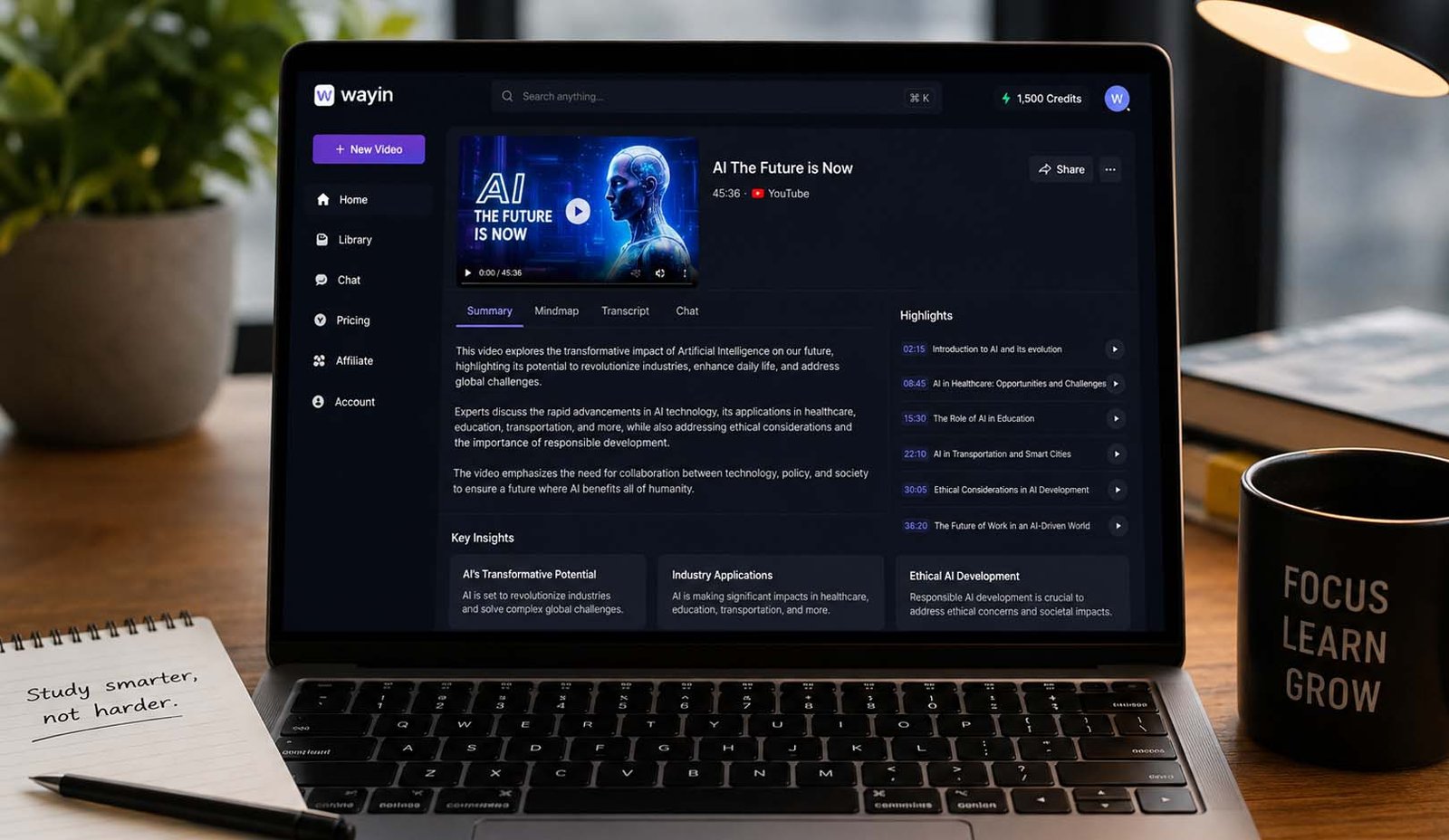
Have you ever opened a long video and thought, “This is too long, I don’t have time for this”? Many people feel this every day. We watch tutorials, lectures, and podcasts, but we only need a few important parts. The rest feels like wasted time.
This is where Wayin Video comes in. It is a smart AI tool that helps you understand long videos very fast. Instead of watching everything, you can read a summary, search inside the video, and jump to the parts you need. It feels simple and helpful.
Think about this. What if a 45-minute lecture could become a short, clear summary in less than a minute? What if you could find one idea in seconds instead of dragging the video bar again and again? That is exactly what Wayin Video tries to do.
In this article, we will explain everything about Wayin Video. We will talk about how it works, its features, and why people are using it in 2026. By the end, you will clearly know if this tool is right for you or not.
What Is Wayin Video?
Wayin Video is an AI tool that helps you understand videos quickly. It takes a long video and turns it into simple text, summaries, and useful notes. You do not have to sit and watch the whole video anymore.
It is not like a normal video player. It works more like a smart helper. It reads the video, listens to the audio, and even looks at the screen. Then it gives you the most important parts in a clean and easy way.
For example, if you open a long tutorial, Wayin Video will show you a short summary first. It will also break the video into small parts with titles. This makes it feel like reading an article instead of watching a long video.
So in simple words, Wayin Video turns videos into something you can read, search, and understand quickly. This is why many people now use it for learning, research, and daily work.
Why Wayin Video Is Useful
Today, most people learn from videos. We watch YouTube tutorials, online classes, interviews, and webinars. But the problem is simple. Videos take time. Sometimes a one-hour video only gives you five minutes of useful ideas.
This is where Wayin Video becomes helpful. It saves your time by showing only the important parts. You can quickly see what the video is about and decide if it is worth watching fully or not.
Let’s say you are a student. You have many lectures to watch. Instead of watching each one fully, you can use Wayin Video to get summaries and key points. This helps you study faster and smarter.
The same goes for professionals and creators. If you watch many videos for work, this tool helps you focus only on what matters. You spend less time watching and more time learning or creating something new.
How Wayin Video Works
Using Wayin Video is very simple. First, you paste a YouTube link or upload your video file. This could be a lecture, a podcast, a tutorial, or even a recorded meeting.
After that, the tool starts working. It looks at the video, listens to the audio, and reads any text shown on the screen. It uses AI to understand what is happening in the video.
Then, in a short time, it gives you results. You get a summary, a clear outline, highlights, and a full transcript. Everything is organized so you can easily understand it.
Once the results are ready, you can search inside the video, jump to any part, or even ask questions. It feels like you are talking to the video instead of just watching it.
Main Features of Wayin Video
Wayin Video comes with many useful features that make it stand out. These features are made to help you save time and learn faster from videos.
One of the biggest features is AI video summary. It gives you a short explanation of the whole video. You can quickly understand the main idea without watching everything.
Another strong feature is video search. You can type a word or question, and the tool will show you where it is in the video. This makes finding information very easy and fast.
You also get transcripts, highlights, and a chat option. The transcript helps with notes, highlights show key moments, and chat lets you ask questions. All these features work together to give a smooth experience.
Wayin Video Summaries
One of the best parts of Wayin Video is its summary feature. It takes a long video and turns it into a short and simple explanation. This helps you understand the topic quickly.
For example, if you open a 40-minute lecture, you do not need to watch it fully at first. You can read the summary and see what the lecture is about. This helps you decide what to do next.
The summary is not just random lines. It is clear and structured. It shows the main points and the flow of the video. This makes it easier to follow the topic.
This feature is very useful for students, researchers, and busy people. It saves time and helps you focus only on important ideas instead of wasting time on less useful parts.
Wayin Video Search Tool
The search tool in Wayin Video is one of its most powerful features. It lets you search inside a video just like you search on Google. This makes everything faster and easier.
Imagine you are watching a long lecture and you only need one topic. Instead of moving the video bar again and again, you just type the topic. The tool shows you the exact part.
This saves a lot of time and effort. You do not feel lost while watching long videos. You can directly jump to the part you need without guessing.
This feature makes videos feel like articles. You can search, click, and read important parts quickly. It changes the way people use video content completely.
Wayin Video Transcripts
Wayin Video also creates full transcripts of videos. This means you get everything in written form. You can read the whole video like a document.
The transcripts are clean and easy to read. They include timestamps and sometimes speaker names. This helps you understand who is speaking and when something important is said.
This feature is very helpful for note-taking. You can copy lines, save ideas, and use them in your work. It is perfect for students, writers, and researchers.
It also helps with podcasts and interviews. Instead of listening again and again, you can just read the important parts. This makes learning faster and more comfortable.
Who Should Use Wayin Video?
Wayin Video is very helpful for students. Many students watch long lectures every day. It can feel slow and tiring. With this tool, they can read a summary first and then watch only the important parts. This makes study time shorter and easier.
It is also great for researchers. Sometimes they need quotes from interviews or talks. Instead of listening again and again, they can use transcripts. They can search for words and quickly find the right part. This saves a lot of time and effort.
Content creators can also use Wayin Video. If you make videos or write content, you often watch many videos for ideas. This tool helps you find key points fast. You can also use transcripts to create posts, blogs, or scripts.
Working people can also benefit from it. Many people watch webinars and training videos. These videos can be very long. With Wayin Video, they can jump to the useful parts and finish their work faster.
Pros and Cons of Wayin Video
Let’s first talk about the good side. Wayin Video saves a lot of time. You do not need to watch full videos. You can read summaries and go to important parts quickly. This makes learning faster and more focused.
Another good point is the search feature. It works very well in most cases. You can find topics easily without guessing. The transcripts are also clean and helpful for notes and quotes. All features work together in a smooth way.
Now let’s look at the weak side. The free plan has limited credits. If you use it a lot, you may need a paid plan. This can be a small issue for heavy users.
Also, some complex videos still need full watching. The tool may miss small details sometimes. Search results are good, but not always perfect. So you still need to use your own thinking while using it.
Wayin Video Pricing
Wayin Video offers a free plan for beginners. This plan gives you limited credits. You can test the tool and see how it works. It is a good way to try before spending money.
The paid plans are for regular users. The Standard plan gives more credits and better quality. It also allows uploads and faster speed. This is useful for students and normal users.
The Pro and Pro+ plans are for heavy users. These plans give more credits and higher video quality. They also allow bigger uploads and faster processing. This is good for professionals and teams.
There is also a Business plan. This plan is made for companies. It includes custom features, API access, and support. This is useful for large teams that work with many videos daily.
Real-Life Use of Wayin Video
Let’s take a simple example. Imagine you have a 45-minute tutorial. Normally, you would watch the full video. But with Wayin Video, you can read a summary in one minute. Then you only watch the parts you need.
Now think about a podcast. It may be one hour long. You only want a few ideas from it. With the search feature, you type a word and jump to that part. You get the idea quickly without wasting time.
In lectures, this tool becomes even more helpful. You can search for key topics like definitions or steps. You can also save highlights and revisit them later. This makes revision easy and fast.
In all these cases, Wayin Video changes how you use videos. You do not just watch them. You read, search, and pick what you need. This makes learning smarter and more flexible.
Is Wayin Video Worth Using?
Wayin Video is very useful if you watch many videos daily. If your learning depends on lectures, tutorials, or webinars, this tool can save you hours every week. It makes your work simple and smooth.
If you are someone who likes reading more than watching, you may not need it much. But if videos are your main source of learning, then this tool becomes very helpful. It fits well into daily study or work.
It is also important to know that it is not perfect. Some videos still need full watching. But as a starting point, it gives a strong summary and helps you move faster.
Overall, Wayin Video is a smart tool for modern learning. It does not replace videos, but it makes them easier to use. That is why many people are using it in 2026.
Final Thoughts
Wayin Video is a simple but powerful tool. It turns long videos into summaries, transcripts, and searchable content. This helps people save time and focus on what really matters.
The best thing about Wayin Video is how easy it is to use. You just add a video, and it gives you everything you need. It feels like turning a long video into a simple document.
It is not perfect, but it is very helpful. It works best for people who learn from videos every day. It makes learning faster, easier, and more flexible.
If you are tired of long videos and want a smarter way to learn, Wayin Video is worth trying. It can change how you use videos and help you use your time better.
(FAQs)
What is Wayin Video used for?
Wayin Video is used to summarize long videos. It helps you read summaries, search inside videos, and find important parts quickly. It is mainly used for learning, research, and saving time.
Is Wayin Video free to use?
Yes, Wayin Video has a free plan. It gives limited credits for testing. If you need more usage, you can upgrade to a paid plan for more features and higher limits.
Can Wayin Video work with YouTube videos?
Yes, it works very well with YouTube videos. You just paste the link, and it will create summaries, transcripts, and highlights for that video.
Does Wayin Video support different languages?
Yes, Wayin Video supports more than 100 languages. This makes it useful for people from different countries and for different types of content.
Can Wayin Video replace watching videos?
No, it cannot fully replace watching videos. It helps you find key parts and understand the topic faster. But for deep learning, you may still need to watch some parts carefully.
Who should use Wayin Video the most?
Students, researchers, content creators, and professionals benefit the most. Anyone who watches long videos often will find this tool very useful.
Don’t miss these:
Where to Buy YELL51X-OUZ4 Model: Best Places to Find It in 2026

CFA Course Duration vs Career Advancement: Long-Term Perspective

When Your AC Breaks Down, Every Hour Counts

Why Power Washing Is the Best Thing You Can Do for Your Property This Season

When Your Furnace Fails, Fast Help Makes All the Difference

When Your Toilet Breaks, You Need More Than a Quick Fix

Beyond the Thermal Baths: A Surprising Reason to Visit Hungary

How to Create the Perfect Gift Box: Tips, Ideas & Inspiration

How the Best Chronic Care Management Software Supports Care Coordination?

How to Prepare Your Business for HubSpot Migration Services

Why Tankless Water Heaters Are the Upgrade Your Home Deserves

Best Video Doorbell Without Subscription Storage Guide

How to Build and Scale an SEO Agency Without Spending Thousands on Tools

How Dissertation Writer AI Assists Students From Topic Selection to Completed Dissertation

The Worst Truck Accidents in U.S. History and What They Changed About Road Safety

Why Renting a Private Home Near an Active Volcano Is Safer Than You Think

Why Posters Still Matter in a Fast-Scrolling Digital World

Men’s Western Shirts Ideas: 3 Styling Formulas for a Cool Summer

MacBook Air Computer Charger: Features, Performance, and Computer Charger MacBook Compatibility Guide

When Connectivity Counts, Telecommunications Contractors Deliver

Desktop Essentials: Why Custom Printed Notepads Never Go Out of Style
CFA Course Duration vs Career Advancement: Long-Term Perspective
When Your AC Breaks Down, Every Hour Counts
Why Power Washing Is the Best Thing You Can Do for Your Property This Season
When Your Furnace Fails, Fast Help Makes All the Difference
When Your Toilet Breaks, You Need More Than a Quick Fix
Beyond the Thermal Baths: A Surprising Reason to Visit Hungary
How to Create the Perfect Gift Box: Tips, Ideas & Inspiration
How the Best Chronic Care Management Software Supports Care Coordination?
How to Prepare Your Business for HubSpot Migration Services
Why Tankless Water Heaters Are the Upgrade Your Home Deserves
-

 Biography5 months ago
The Emotional Journey of Joanne Schieble Simpson, Steve Jobs’ Biological Mother
-

 News4 months ago
Jamal Adeen Thomas – Everything You Should Know About Clarence Thomas’ Son
-

 Biography5 months ago
Meet Theo Ressler: Everything You Know About Jami Gertz’s son
-

 Blog1 month ago
What Is Sotwe? Everything You Need to Know Before Using It