
Tech
What Happened to Leaf Browser? Everything You Need to Know

Introduction
Have you ever searched for Leaf Browser and wondered why people still talk about it in 2026? You are not alone. Many students and users still look for it because it was once a very helpful tool for managing tabs in a smart way.
Leaf Browser was not a full browser like Chrome or Firefox. It was a simple Chrome extension that made browsing easier. It helped people keep their tabs clean and organized, especially when they had many pages open at the same time.
This tool became very popular in schools and among Chromebook users. Many students used it to manage their study work, research, and daily tasks. It gave them control over their tabs in a way normal browsers could not.
But here is the big question — what happened to Leaf Browser? Why did it disappear, and why are people still searching for it today? In this article, we will explain everything in a very simple and clear way.
What Is Leaf Browser?
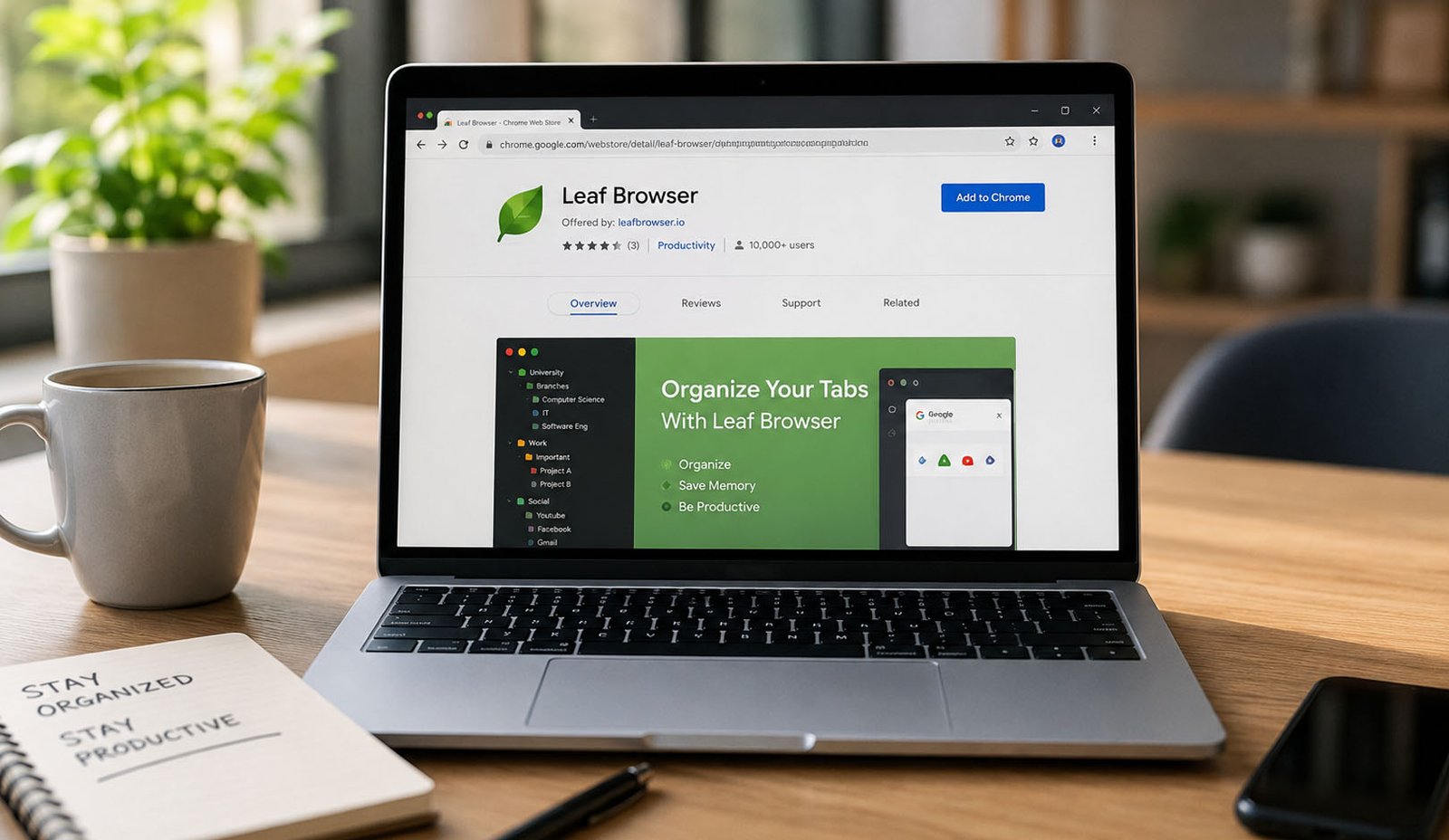
Leaf Browser was a Chrome extension that helped users manage tabs in a better way. It was not a full browser, but it worked inside Google Chrome to improve how tabs were handled. This made it very useful for people who open many tabs every day.
It was first released as Leaf Browser Alpha in 2016. It was created by a developer named Sam Lanning. At that time, many people needed a simple tool to organize their work, and Leaf Browser came as a smart solution.
The main goal of Leaf Browser was simple. It helped users organize their tabs into groups and levels. Instead of seeing many tabs at the top of the screen, users could keep everything neat and easy to find.
This made it very popular among students, researchers, and professionals. Anyone who worked with many websites at once found it very helpful. It saved time and made browsing feel less messy.
Leaf Browser mainly worked on Chrome and ChromeOS. This is why it became very popular on school Chromebooks. Many students used it daily for homework, projects, and research tasks.
How Leaf Browser Started
Leaf Browser started in May 2016 when it was released on the Chrome Web Store. It was called Leaf Browser Alpha at that time. Even though it was simple, it quickly caught people’s attention.
The idea behind it was easy to understand. Many people were tired of messy tabs. They wanted a better way to manage their browsing. Leaf Browser solved this problem with a clean and smart system.
As more people started using it, the tool became popular very fast. Students shared it with each other. Teachers also noticed how useful it was for school work and research tasks.
It became common in schools where students used Chromebooks. Since Chrome was already the main browser, adding Leaf Browser was very easy. This helped it grow even faster.
Over time, Leaf Browser became known as a must-have tool for heavy tab users. People who opened many pages daily found it very helpful and simple to use.
Why Leaf Browser Became Popular
One big reason why Leaf Browser became popular was its simple design. It was easy to use, even for beginners. You did not need any special skills to understand how it worked.
Another reason was how it helped with real problems. Many users open many tabs while studying or working. This can get confusing. Leaf Browser made everything neat and easy to manage.
Students loved it because it helped them stay organized. They could keep all their study pages in one place. This made research and homework much easier to handle.
It also became popular on school Chromebooks. Many students searched for tools that worked well on their devices, and Leaf Browser was one of the best options at that time.
Some users also believed it helped them open blocked websites. This made it even more popular in schools. However, its main purpose was tab management, not bypassing rules.
Leaf Browser Features Users Loved
Leaf Browser had many simple but powerful features. These features made it different from normal tab systems in Chrome. Users found these tools very helpful in daily use.
One of the best features was its tab hierarchy system. This means users could create main tabs and then add smaller tabs under them. It looked like a tree and made everything easy to understand.
Another useful feature was tab renaming. Users could change tab names to anything they wanted. This helped them remember what each tab was about without opening it again.
Leaf Browser also allowed color coding. Users could use colors to group their tabs. For example, they could use one color for school work and another for personal use. This made browsing more clear.
It also had a sidebar navigation system. This sidebar showed all tabs in one place. Users could quickly move between tabs without searching or scrolling too much.
How Leaf Browser Helped With Tab Management
Leaf Browser made tab management very simple. Instead of having many tabs in one long line, it allowed users to organize them into groups. This saved time and reduced confusion.
For example, a student working on a project could create one main tab for the project. Then they could add smaller tabs under it for research, notes, and videos. Everything stayed in one place.
This system was very helpful for people who work on multiple tasks. Professionals could manage work, emails, and research without mixing everything together. It kept their work clean.
Leaf Browser also allowed users to turn off inactive tabs. This helped reduce memory usage and made the browser faster. This feature was very useful on low-powered devices like Chromebooks.
Because of these features, Leaf Browser became a favorite tool for people who wanted a simple and smart way to manage their browsing experience.
Did Leaf Browser Work on School Chromebooks?
Yes, Leaf Browser worked very well on school Chromebooks. This is one of the main reasons why it became so popular among students. Most schools already used Chrome, so adding this extension was easy.
Students used Leaf Browser to manage homework, research, and class tasks. It helped them stay organized, especially when they had many tabs open for different subjects.
Many students also searched for Leaf Browser because they thought it could help them access blocked websites. This made it very popular in school environments.
However, it is important to understand that Leaf Browser was mainly made for tab management. It was not designed to break school rules or bypass network limits.
Even today, many people search for Leaf Browser because they remember how useful it was on Chromebooks. Its simple design and smart features made it stand out from other tools.
Why Leaf Browser Stopped Growing
After some time, people started noticing that Leaf Browser was not getting new updates. At first, this did not feel like a big problem. But slowly, users saw that other tools were getting better while Leaf Browser stayed the same.
The last known updates happened many years ago, around 2018. After that, there were no new features, no fixes, and no improvements. This made many users feel unsure about using it for daily work.
Browsers like Chrome keep changing and improving every year. Because Leaf Browser did not update, it started to feel old. Some features stopped working properly with new Chrome versions.
As time passed, users slowly moved to newer tools. These tools were safer, faster, and more modern. This is how Leaf Browser slowly lost its place in the market.
Today, in 2026, Leaf Browser is no longer growing. It is remembered as a useful tool from the past, but it is not active anymore.
Is Leaf Browser Still Available Today?
You may still find Leaf Browser on some old websites or archives. Some users try to download it from these places. But this is not always safe or useful.
Since the tool is not updated, it may not work well with the latest Chrome versions. Even if you install it, some features may break or not load properly.
There is also a safety risk. Old software can have security problems. Since Leaf Browser is not maintained, these problems are never fixed. This makes it risky to use today.
Many experts suggest avoiding old tools like this. Instead, they recommend using modern browsers or extensions that are still updated and supported.
So yes, Leaf Browser may still exist in old files, but it is not a good choice in 2026.
Problems With Using Leaf Browser Now
One big problem with Leaf Browser today is security. Since there are no updates, any bugs or issues stay forever. This can put your data and browsing at risk.
Another problem is compatibility. New Chrome versions may not support old extensions properly. This means Leaf Browser may crash or stop working suddenly.
There is also a lack of new features. Modern tools offer better design, better speed, and more options. Leaf Browser feels very basic compared to what we have today.
Users also miss support. If something goes wrong, there is no help or updates from the developer. This makes it harder to trust the tool for important work.
Because of these problems, most users have moved to better and safer options.
Best Leaf Browser Alternatives
Since Leaf Browser is no longer active, many new tools have taken its place. These tools offer similar features but with better updates and safety.
One of the most talked-about options is Horse Browser. It is designed to feel similar to Leaf Browser. It uses a system called “Trails” to organize pages in a structured way.
Other popular options include browsers like Vivaldi, Opera, and Brave. Each one has its own style and features. Some focus on privacy, while others focus on customization.
There are also simple Chrome extensions like Tree Tab Sidebar and Tab Outliner. These tools offer basic tab management features for users who want something simple.
These alternatives give users many choices based on their needs and style.
Which Leaf Browser Alternative Is Best?
The best alternative depends on what you need. Different users have different goals, so there is no one perfect option for everyone.
For students, Horse Browser is a good choice. It feels similar to Leaf Browser and helps manage study tabs in a clean way. It also has extra tools for better productivity.
For users who like full control, Vivaldi is a strong option. It allows deep customization and gives users many ways to manage tabs and layout.
For privacy lovers, Brave is a smart choice. It blocks ads and trackers and keeps your browsing safe. Opera is also a good option with built-in tools like VPN and sidebar apps.
If you want something simple, Chrome extensions like Tree Tab Sidebar can still help you organize tabs without changing your browser.
What We Can Learn From Leaf Browser
Even though Leaf Browser is no longer active, it still taught us something important. It showed that tab management is a real problem for many users.
Before Leaf Browser, most browsers had simple tab systems. But Leaf Browser showed that people needed better ways to organize their work and browsing.
Many modern browsers now include features like tab grouping and vertical tabs. These ideas became popular because tools like Leaf Browser showed their value.
It also showed how important updates are. A tool may be great, but without updates, it cannot survive in the long run.
Leaf Browser may be gone, but its ideas still live on in modern tools.
Final Thoughts
Leaf Browser was a simple but powerful tool that helped many users manage their tabs in a better way. It became very popular, especially among students and Chromebook users.
Over time, it stopped getting updates and slowly disappeared. New tools replaced it with better features, stronger security, and regular updates.
Even though Leaf Browser is no longer active, people still remember it because it solved a real problem. It made browsing simple, clean, and easy to manage.
If you are looking for something similar today, there are many great options available. You just need to choose the one that fits your needs and style.
(FAQs)
What is Leaf Browser?
Leaf Browser is a Chrome extension that helped users organize tabs in a smart and simple way. It used a tree-style system to keep tabs neat and easy to manage.
Is Leaf Browser still working in 2026?
Leaf Browser is no longer active. It may still be found online, but it is not updated and may not work properly with modern browsers.
Can I download Leaf Browser today?
Yes, you may find old versions online. But it is not safe or recommended because it has no updates or security fixes.
Why was Leaf Browser popular in schools?
Many students used Leaf Browser on Chromebooks. It helped them manage study tabs and keep their work organized in a simple way.
Did Leaf Browser bypass school restrictions?
Some users believed this, but its main purpose was tab management. It was not designed to bypass school network rules.
What is the best Leaf Browser alternative?
Horse Browser is often seen as the closest option. Other good choices include Vivaldi, Brave, Opera, and simple Chrome tab extensions.
Is Leaf Browser free to use?
Yes, Leaf Browser was free when it was active. Most of its alternatives today are also free to use.
Don’t miss these:
Exploring Social Media Girls Forum: Benefits, Topics, and User Experience
What Is Tech TheHomeTrottersCom? Exploring the Biggest Tech Trends Today

CFA Course Duration vs Career Advancement: Long-Term Perspective

When Your AC Breaks Down, Every Hour Counts

Why Power Washing Is the Best Thing You Can Do for Your Property This Season

When Your Furnace Fails, Fast Help Makes All the Difference

When Your Toilet Breaks, You Need More Than a Quick Fix

Beyond the Thermal Baths: A Surprising Reason to Visit Hungary

How to Create the Perfect Gift Box: Tips, Ideas & Inspiration

How the Best Chronic Care Management Software Supports Care Coordination?

How to Prepare Your Business for HubSpot Migration Services

Why Tankless Water Heaters Are the Upgrade Your Home Deserves

Best Video Doorbell Without Subscription Storage Guide

How to Build and Scale an SEO Agency Without Spending Thousands on Tools

How Dissertation Writer AI Assists Students From Topic Selection to Completed Dissertation

The Worst Truck Accidents in U.S. History and What They Changed About Road Safety

Why Renting a Private Home Near an Active Volcano Is Safer Than You Think

Why Posters Still Matter in a Fast-Scrolling Digital World

Men’s Western Shirts Ideas: 3 Styling Formulas for a Cool Summer

MacBook Air Computer Charger: Features, Performance, and Computer Charger MacBook Compatibility Guide

When Connectivity Counts, Telecommunications Contractors Deliver

Desktop Essentials: Why Custom Printed Notepads Never Go Out of Style
CFA Course Duration vs Career Advancement: Long-Term Perspective
When Your AC Breaks Down, Every Hour Counts
Why Power Washing Is the Best Thing You Can Do for Your Property This Season
When Your Furnace Fails, Fast Help Makes All the Difference
When Your Toilet Breaks, You Need More Than a Quick Fix
Beyond the Thermal Baths: A Surprising Reason to Visit Hungary
How to Create the Perfect Gift Box: Tips, Ideas & Inspiration
How the Best Chronic Care Management Software Supports Care Coordination?
How to Prepare Your Business for HubSpot Migration Services
Why Tankless Water Heaters Are the Upgrade Your Home Deserves
-

 Biography5 months ago
The Emotional Journey of Joanne Schieble Simpson, Steve Jobs’ Biological Mother
-

 News4 months ago
Jamal Adeen Thomas – Everything You Should Know About Clarence Thomas’ Son
-

 Biography5 months ago
Meet Theo Ressler: Everything You Know About Jami Gertz’s son
-

 Blog1 month ago
What Is Sotwe? Everything You Need to Know Before Using It