Have you ever felt your Dell laptop getting slow for no clear reason? Maybe it crashes, the Wi-Fi stops working, or apps take too long to open. These small problems can make your daily work very hard and stressful.
Many people face these issues, but they do not know the real cause. In most cases, the problem is simple. The system is not updated. Old drivers and software can make your computer slow and unstable over time.
This is where Dell Command Update comes in. It is a simple tool that helps fix these problems by updating your system. It works quietly in the background and keeps everything fresh and working well.
In this guide, we will learn what Dell Command Update is, why you need it, and how it works. We will also look at its features, steps, and real benefits. Let’s start in a simple and clear way.
What Is Dell Command Update?
Dell Command Update is a tool made by Dell for its laptops and computers. It helps you update your system without doing hard work. You do not need to search for drivers or updates one by one anymore.
This tool checks your system and finds what needs to be updated. It can update drivers, BIOS, firmware, and even some apps. All of this happens in one place, which makes things very easy for users.
One great thing about Dell Command Update is its simple design. When you open it, everything is clear and easy to understand. Even if you are new, you can use it without any problem or confusion.
It also works fast. You can check for updates and install them in just a few clicks. This makes it a helpful tool for both beginners and people who use computers every day.
Why You Need This Tool
Think about this for a moment. When was the last time you updated your laptop drivers? Many people forget this step, and that is where problems start to grow slowly over time.
Old drivers can cause many issues. Your system may become slow, apps may crash, or your internet may stop working properly. These small issues can turn into big problems if not fixed in time.
Dell Command Update helps you avoid all this stress. It keeps your system updated without extra effort. You do not have to search online or worry about missing updates anymore.
It also helps your system stay safe. Updates often fix bugs and improve security. So, using this tool means your computer stays fast, stable, and protected at the same time.
What Does Dell Command Update Do?
Dell Command Update works like a smart helper for your computer. It checks your system and finds all the missing or old updates in a few seconds. This saves a lot of time and effort.
It updates many important parts of your system. These include drivers, BIOS, firmware, and system apps. All updates are done in one place, so you do not need to open many websites or tools.
The best part is that it can do this automatically. You can let it scan your system and notify you when updates are ready. This means you will never miss an important update again.
It also helps fix common problems. If your system is acting strange, updating drivers can often solve the issue. So, this tool is not just for updates, but also for fixing problems.
How Dell Command Update Works
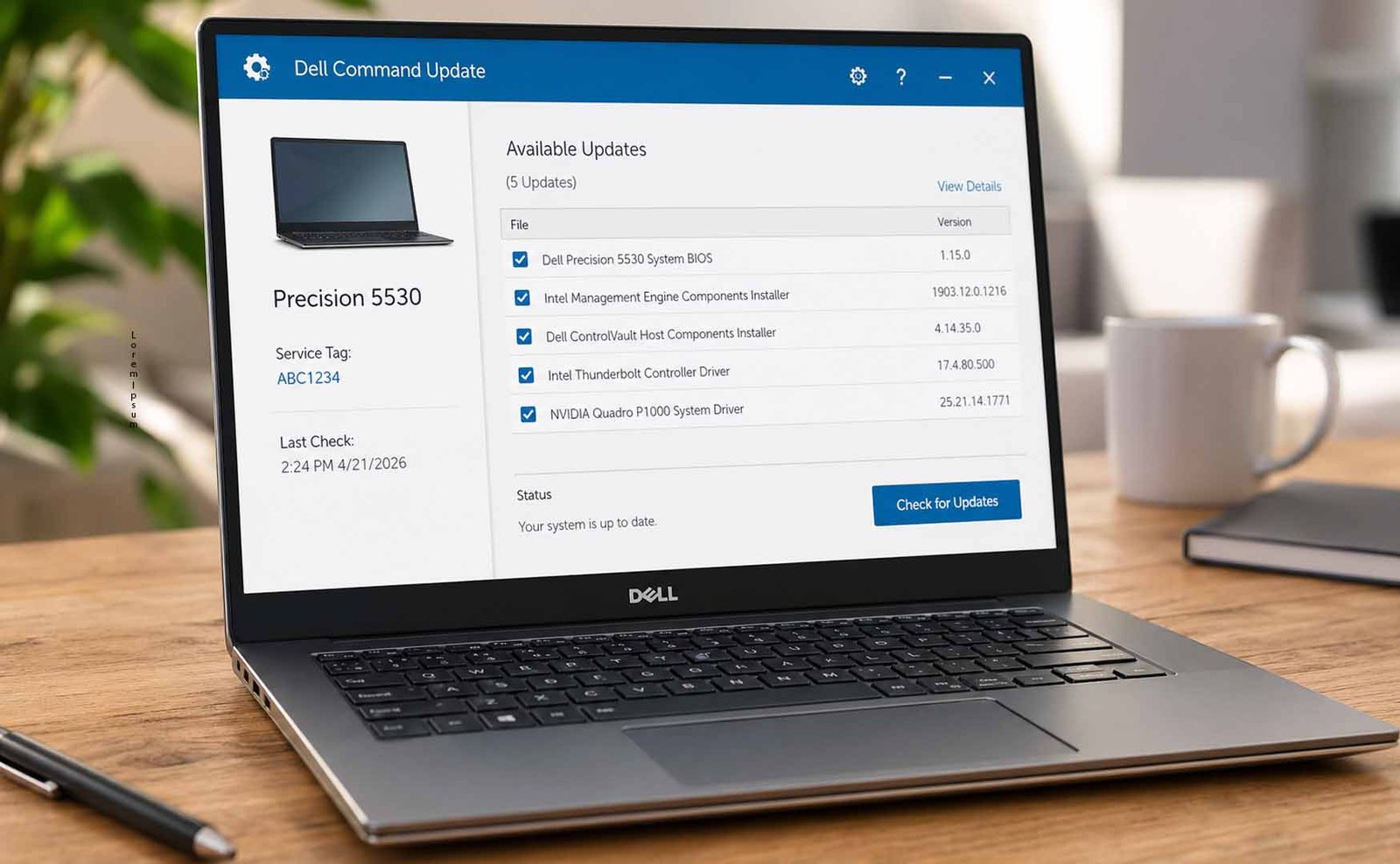
Using Dell Command Update is very simple. When you open the tool, you will see a button that says “Check for Updates.” This is where everything starts.
Once you click it, the tool scans your system. It looks at all parts of your computer and checks what needs to be updated. This process is quick and easy.
After the scan, you will see a list of updates. You can review them and choose what to install. Then, you just click “Install Updates,” and the tool does the rest for you.
Some updates may need a restart. The tool will ask you before restarting your system. After that, you can open it again and check if everything is updated properly.
How to Download Dell Command Update
Downloading Dell Command Update is also very easy. First, make sure your laptop is connected to the internet. This is needed to find and download the correct file.
Next, you need your Dell device details. This can be your service tag or model number. These details help the system find the right version for your device.
Then, go to the official Dell support website. Enter your device details and select your Windows version. After that, you will see the download option.
Once you download the file, open it and install it on your system. After installation, you can start using Dell Command Update to keep your computer updated and running well.
How to Use Dell Command Update (Easy Steps)
Using Dell Command Update is very simple and does not take much time. You just need to follow a few easy steps, and your system will stay updated without stress or confusion.
First, open the tool by typing its name in the Windows search bar. Click on it, and it will open quickly. The screen is clean, so you will not feel lost while using it.
Now click on “Check for Updates.” The tool will scan your system and show what needs to be updated. You can look at the list and understand what changes are coming.
After that, click “Install Updates.” The tool will start updating everything. If needed, it will ask for a restart. Once done, your system will feel smoother and better.
Best Features You Should Know
One of the best things about Dell Command Update is its clean and simple design. When you open it, you will see everything in one place. This makes it easy for new users to understand what to do next.
You do not need to learn anything special to use it. The buttons are clear, and the steps are simple. This is why many beginners feel comfortable using it from the first time without any confusion.
Another great feature is that it brings all updates together. You can update drivers, BIOS, firmware, and apps in one tool. This saves time and avoids the need to visit many websites again and again.
The tool also has auto scan and alerts. It checks your system and tells you when updates are ready. This means you do not have to keep checking again and again. It works like a smart helper for your system.
It also gives more control to users. You can set a time for updates so they do not disturb your work. You can even delay restart, which is very helpful when you are doing something important.
Advanced Features for Better Control
Dell Command Update is not just for simple users. It also has smart options for people who want more control. For example, it has a command line feature. This helps advanced users run updates in a faster and automatic way.
This feature is very useful for IT teams and offices. They can manage many systems at once without doing manual work again and again. This saves time and makes work smooth and easy.
Another useful feature is gradual updates. This means updates are not installed all at once. They are done step by step. This helps keep your system stable and avoids sudden problems.
It also helps after system reset. When you install Windows again, the tool finds the right drivers and installs them. This makes setup very easy and saves a lot of time.
It even allows reporting. You can see what drivers are installed and export that list. This helps in fixing problems and checking system details when needed.
Benefits of Using Dell Command Update
Using Dell Command Update can save a lot of your time. You do not need to search for drivers or updates on different websites. Everything is done in one place with just a few clicks.
It also makes your system faster. Many problems happen because of old drivers. When you update them, your laptop feels smooth and works better in daily tasks.
Another big benefit is safety. Updates often fix bugs and improve system protection. So, your data stays safe, and your system becomes more secure with regular updates.
It is also very easy to use. Even if you are not good with computers, you can still use it without stress. This makes it perfect for both new users and experienced users.
In simple words, this tool makes your system better, faster, and safer without much effort. That is why many Dell users trust it in 2026.
Are There Any Downsides?
Even though Dell Command Update is very helpful, it is not perfect. One thing to know is that it works only on Dell devices. If you use another brand, this tool will not work for you.
It also needs internet to work. Without internet, it cannot check or download updates. So, you must stay connected when using it for updates.
Sometimes, updates need a restart. This can be a little annoying if you are working on something important. But the tool gives a warning before restart, which helps you prepare.
Also, it is not fully required. You can update drivers manually too. But manual updates take more time and effort, which is why this tool is still a better choice.
Is Dell Command Update Safe to Use?
Yes, Dell Command Update is safe to use. It is an official tool made by Dell. This means it is trusted and built to work well with Dell systems.
When you download it from the official Dell website, there is no risk. It does not harm your system. Instead, it helps fix issues and improve performance.
It also improves system safety. Updates fix bugs and remove weak points in the system. This makes your laptop more secure while using the internet or apps.
Dell also keeps updating the tool itself. This means it stays modern and safe for users in 2026. So, you can use it without worry.
Can You Remove Dell Command Update?
Yes, you can remove Dell Command Update anytime. It is safe to uninstall it from your system. Your computer will still work normally after removing it.
But there is one thing to remember. If you remove it, you will need to update drivers manually. This means more work and more time spent searching for updates.
Some users remove it after updating everything once. This is okay if you do not want automatic updates again. But most users prefer to keep it for ease.
Keeping the tool is better for long use. It keeps your system fresh and updated without extra effort. So, uninstall only if you really do not need it.
Final Thoughts
Dell Command Update is a simple but powerful tool for Dell users. It helps keep your system updated without stress. You do not need to search or install updates one by one anymore.
It improves speed, fixes problems, and keeps your system safe. With its easy design, anyone can use it without confusion. This makes it a great choice for both new and experienced users.
If your Dell laptop feels slow or has small issues, this tool can help. Just a few clicks can make a big difference in how your system works every day.
In 2026, tools like Dell Command Update make life easier. They save time and keep things running smoothly. So, if you use a Dell device, it is a smart idea to try it and see the results yourself.
(FAQs)
What does Dell Command Update do?
It checks your system and updates drivers, BIOS, firmware, and apps. It keeps your system fresh and working well without manual work.
Is Dell Command Update necessary?
It is not required, but it is very helpful. It saves time and keeps your system safe and fast with easy updates.
Does Dell Command Update update itself?
Yes, Dell updates this tool from time to time. So, it stays safe and works well with new systems and software.
Can Dell Command Update fix problems?
Yes, many problems are caused by old drivers. Updating them can fix slow speed, crashes, and other small issues.
Is Dell Command Update safe for beginners?
Yes, it is very easy to use. Even new users can understand it and use it without any problem.
Do I need internet to use it?
Yes, you need internet to check and download updates. Without internet, it cannot work properly.
Don’t miss these:
SmiHub Explained: Watch Instagram Stories Secretly (Full Guide)
MangaOwl Explained: What It Is, How It Works, and If It’s Safe





 Biography6 months ago
 News6 months ago
 Blog3 months ago
 Biography6 months ago